What should you look for when buying?
Compact photo printer
A good fit if: you mainly want to print individual photos in postcard size.
Trade-off: the print size is smaller than A4, and the paper and ink ribbon must be compatible with the model.
Inkjet printer for home working and photos
A good fit if: you want to print documents as well as photos, or need a device with scanning and copying functions.
Trade-off: check the cost of ink and photo paper, as well as any maintenance the printer may need.
Smartphone instant photo printer
A good fit if: you want small prints for something like a travel journal.
Trade-off: prints are much smaller than a standard postcard-sized photo, and film or other media may need to be bought separately.
The approximate proportions group consumers by their main priority when printing holiday photos at home.
| Buying priority |
What to look for when buying |
Who it matters most to |
| Individual photo prints |
Check the print size you want and make sure the paper-and-ink-ribbon set is compatible. |
If you only want to print selected holiday photos and don’t need A4 size, a compact printer is an obvious choice. Around 33% of consumers say individual photo prints are their main priority. |
| Photos and office documents |
Check whether you need scanning and copying, and make sure the printer connects to your smartphone or computer. |
If you want one device for photos and documents when working from home, multifunction features are especially important. Around 25% of consumers say this combination is their main reason for buying. |
| Lots of photos and consumables |
Compare ink, photo paper and your planned print volume; check the manufacturer’s stated yield and the conditions it’s based on. |
If you regularly print larger batches of photos, remember to factor in consumables and any printhead maintenance. Around 25% of consumers say printing lots of photos is their main priority. |
| Larger photo sizes |
Check the maximum borderless print size supported by the specific model and which media it can use. |
If you want holiday photos larger than small prints, the supported print size is key. Around 17% of consumers make larger photos the main focus of their choice. |
Joybuy products for photos and home working
The products below include a wireless inkjet multifunction printer, as well as portable thermal and photo printers. If you’re buying for holiday prints, check the print size you want, the printing media and whether the printer’s output will meet your photo requirements.
 No image available
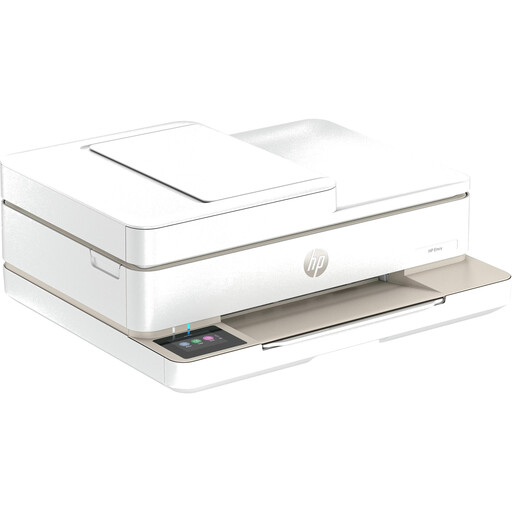
HP Envy 6520 All-in-One Wireless Inkjet Printer
An option if you’re looking for a wireless inkjet printer for photos and home working.
Before buying, check that you have the right photo paper and that the printer’s features meet your office needs.
Joybuy
 No image available
Portable Mini Thermal Printer for Smartphones
Worth considering for printing photos or notes from your smartphone.
Check in advance which paper and print size you’ll need for your holiday photos.
Joybuy
 No image available
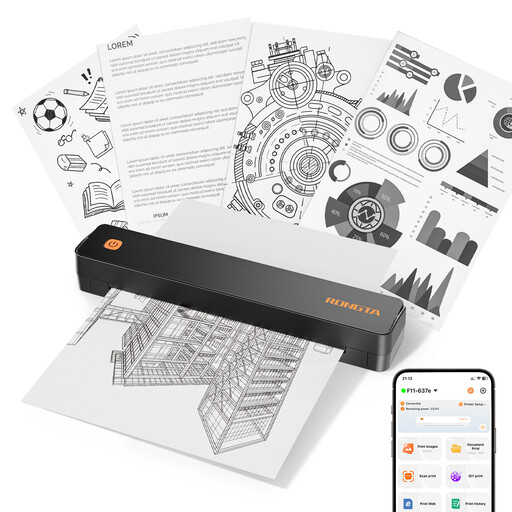
RONGTA F11B Portable A4 Thermal Printer
A possible choice if you’re looking for a portable printer for images or documents on a range of paper sizes.
The product name lists A4, A5 and B5, as well as Bluetooth and USB. Check that the printing method and media are right for your photo requirements.
Joybuy
 No image available
Portable Bluetooth Thermal Printer for Photos and Labels
An option if you want to print photos and other small items while you’re out and about.
You’ll need compatible thermal paper. Check that the available media is suitable for your holiday photos.
Joybuy
 No image available
Xiaomi Portable Photo Printer 1S
An option for small smartphone photo prints if the stated size of 2 × 3 inches suits your needs.
The prints are smaller than a standard postcard-sized photo. Also check that the compatible photo paper meets your requirements.
Joybuy
Frequently asked questions
How do I set up photo printing from my smartphone?
Check the connection options and app for the specific printer. Canon lists Wi-Fi and the SELPHY Photo Layout app for compatible iOS and Android devices for the SELPHY CP1500. The Fujifilm instax mini Link 3 uses Bluetooth and requires a compatible smartphone app.
What can I do if my Epson inkjet printer produces streaks or missing colours?
For affected EcoTank and Expression printers, Epson recommends checking the nozzles and cleaning the printhead if necessary. Before cleaning, make sure the ink level is above the lower limit, and don’t switch the printer off during the process.
Which consumables should I factor in?
Remember to budget for paper, ink ribbon, film or ink that’s compatible with your model and print size. Paper and ink ribbon are sold together as a set for the SELPHY CP1500, while film for the instax mini Link 3 is sold separately. Manufacturer yield figures are only meaningful under the stated conditions.
What are my rights if I bought a faulty printer as a consumer in Germany?
In Germany, goods are generally covered by a statutory warranty for at least two years from receipt, and the seller is responsible. If a product is faulty, the first remedies may include a free repair or replacement. A voluntary manufacturer’s guarantee is separate; special contractual circumstances, such as a private sale, should be checked individually.
Can I put an old photo printer in my household rubbish?
No. Under Section 10 of the Electrical and Electronic Equipment Act (ElektroG), old electrical equipment must be collected separately from unsorted municipal waste. The German Environment Agency lists municipal recycling centres and suitable collection points as disposal options. Removable batteries must be handed in separately in accordance with the applicable rules.


