Who is a mobile router suitable for?

Regular photo uploaders

If you often back up photos or videos while travelling, reception and actual upload performance at your holiday rental matter more than an advertised peak download speed. The Federal Network Agency points out that mobile coverage depends on factors including your location, contract, device and network congestion.

Travellers with a limited data allowance

If you want to back up your photos while travelling, remember to consider your data allowance, any roaming conditions and the storage available with your cloud service. Google Photos counts new backups towards your account storage, even when you select the ‘Storage saver’ option.

Groups travelling with several devices

If you want your phone and laptop to use the same connection, compare your smartphone’s hotspot with a separate SIM router. According to Apple Support, the number of devices that can connect to an iPhone at the same time depends, among other things, on the model and network provider.

What should you look for when choosing one?

Holiday rental Wi-Fi

A good fit if: You can use Wi-Fi at your accommodation and a test upload works with the files you usually share.

Consider: You can only assess upload performance at the actual setup location once you’re there.

Smartphone hotspot

A good fit if: You only upload occasionally or want to connect another device, and your phone has reception.

Consider: The hotspot shares your phone’s mobile data connection, so check your data allowance and device compatibility.

Mobile LTE router

A good fit if: You regularly want to connect independently of your phone or use several devices, and suitable LTE is available at your location.

Consider: You’ll need a suitable data plan and may also need to charge an extra device.

Mobile 5G router

A good fit if: Your location and plan support 5G, and you regularly upload large amounts of photos or videos.

Consider: Peak 5G and Wi-Fi speeds alone don’t tell you what upload performance will be like at your holiday rental.

Fixed mobile router

A good fit if: You’re staying at the holiday rental for longer and have a suitable place to position the router, with an appropriate power supply.

Consider: Check the power supply and location before choosing a model without a mobile battery.

Requirement What to check when buying Who is this important to?
Reception and photo uploads Check the network included in your plan at your location and try an upload at the property; don’t assume download speeds are the same as upload speeds. If I want to back up my holiday photos, upload performance at the actual location matters to me. Around 36% of consumers put reception and the ability to upload photos first.
Data allowance Compare the expected file sizes with your plan’s data allowance and, when travelling abroad, check the plan’s conditions. If I’m backing up lots of photos, I want to keep an eye on my data allowance. Around 29% of consumers prioritise the data included in their plan.
Several devices Count the devices you’ll use at the same time and compare a smartphone hotspot with a separate router. If I want my phone and laptop online together, I need a connection that suits my group. Around 21% of consumers prioritise connecting multiple devices.
Power supply and location Check whether there’s a suitable power supply where reception is best; treat battery-life figures as specific to the manufacturer’s model. If I want to use the router without a suitable socket, its power supply is important to me. Around 14% of consumers prioritise power supply and location.

Avoid common buying mistakes

  • Confusing peak download speed with photo upload speed

    Your photos are uploaded from the holiday rental, so a high download speed doesn’t show how quickly uploads will work at that specific location. The Federal Network Agency also points out that your location, contract, device and network congestion can all affect your mobile experience.

    Try uploading typical files at the property and compare the result with the plan you’re considering before choosing 5G based on a download speed figure.

  • Assuming a battery-powered hotspot and a fixed router are the same

    Routers designed for mobile use and devices intended for a fixed location may have different power and positioning requirements.

    Before choosing, decide whether you want to upload only at the holiday rental or also while you’re out and about without access to a suitable socket.

  • Confusing the router, data plan and cloud storage

    A router doesn’t provide unlimited data. Google Photos counts new backups towards your account storage even when you select ‘Storage saver’.

    Before you travel, check the amount you expect to upload, your plan’s data allowance and the terms of the cloud service you use.

  • Assuming EU roaming applies to every destination

    Roaming conditions depend on your destination and the details of your contract.

    When travelling abroad, check your destination, roaming access and data conditions separately from your choice of router.

Brands to consider

TP-Link

The M7650 and M8550 represent different generations of mobile technology: LTE and 5G respectively.

  • TP-Link quotes upload speeds of up to 50 Mbit/s for the M7650. This is a manufacturer’s figure, not a guarantee of reception or upload performance at your holiday rental.
  • Before buying, check that the features of the specific model variant suit your plan and location.

NETGEAR

The Nighthawk M3 and Nighthawk M7 Pro are battery-powered 5G hotspots.

  • NETGEAR Germany states that the M3 MH3150 can connect up to 32 devices at once, while the M7 Pro MR7450 can connect up to 64.
  • The maximum number of devices doesn’t tell you how quickly photos will upload with your particular setup.

FRITZ!

According to FRITZ!, the FRITZ!Box 6860 5G is designed for indoor use and sheltered outdoor areas.

  • This model offers a mobile router option that could be set up in a fixed location at your holiday rental.
  • Check that the location and power supply suit how you plan to use it.

GlocalMe

The G4 Pro is an LTE travel hotspot with a Cloud SIM service and the option to use a Nano SIM.

  • GlocalMe says it can connect up to ten devices.
  • Before uploading, compare the terms and validity period of your chosen data package with the length of your trip and the amount of data you’ll need.

GL.iNet

The Mudi V2 GL-E750V2 is an LTE pocket router with additional router and VPN features.

  • GL.iNet quotes battery life of up to eight hours.
  • VPN features don’t mean you’ll get better mobile reception or faster photo uploads; also check that you’re choosing the right variant.

Joybuy products for uploading photos

This selection includes mobile LTE hotspots as well as 4G and 5G mobile routers for use in a suitable location with an appropriate power supply.

AVM FRITZ!Box 6825 4G LTE with Wi-Fi 6 and Nano SIM

AVM FRITZ!Box 6825 4G LTE

An option if you want to set up a separate LTE connection at your holiday rental with a suitable power supply.

4G LTE modem router with Nano SIM; Wi-Fi 6; Gigabit LAN; USB-C power supply.

Joybuy

MERCUSYS MT110 4G LTE Mobile Wi-Fi with Nano SIM and battery

MERCUSYS MT110 4G LTE Mobile Wi-Fi

A mobile LTE hotspot for travellers who want to share a connection with several devices.

Nano SIM; connects up to 10 devices; 2200 mAh battery; stated usage time of up to 10 hours under the conditions specified.

Joybuy

ASUS 4G-AX56 LTE modem router with Wi-Fi 6

ASUS 4G-AX56

An option for a separate LTE connection at your holiday rental if you’re planning a fixed setup with a suitable power supply.

4G modem router with Nano SIM; dual-band Wi-Fi 6; Gigabit Ethernet ports.

Joybuy
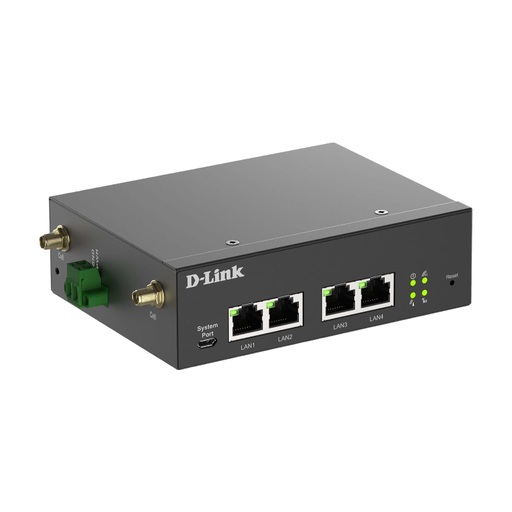
D-Link DWM-314-G 5G and LTE router with dual SIM

D-Link DWM-314-G

A gateway for a fixed setup if you need a mobile connection for wired devices.

5G and LTE router; dual SIM; four Gigabit Ethernet ports; 9–36 V DC input.

A suitable power supply is required for use.

Joybuy
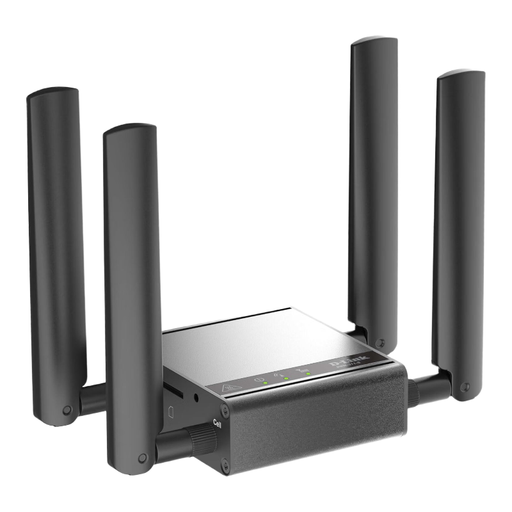
D-Link DWM-311-G 5G M2M router with 2.5GbE

D-Link DWM-311-G

An option for fixed use if you want to use a 5G mobile connection over Ethernet.

5G M2M modem with 2.5GbE; the product description specifies external mobile antennas.

Joybuy

Frequently asked questions

How can I check whether mobile data at my holiday rental will be good enough for uploads before I buy?

Check coverage from the provider you plan to use and try uploading a file at the exact location where you’ll set up the router. The Federal Network Agency’s map predicts outdoor coverage; walls, energy-efficient glazing and network congestion can all affect reception indoors.

How do I set up the router securely?

Set up the SIM and Wi-Fi following the instructions for your specific model. The Federal Office for Information Security recommends changing the router’s default admin password, keeping the firmware up to date and using a long Wi-Fi password.

Do I need to verify my identity before using a German prepaid SIM?

German mobile services paid for in advance are subject to a legal requirement to verify the account holder’s details against specific identity documents. Allow time to verify your identity and activate the SIM before your trip. This requirement applies to this type of plan, not to every router purchase.

Will my German data terms automatically apply at a holiday rental outside Germany?

No, that depends on your destination and contract. Roaming at domestic rates is only available if your contract includes roaming. Check for any exceptions and data conditions before uploading large amounts.

Could backing up photos use extra cloud storage?

Yes, that depends on the service you use. Google Photos says new backups count towards your account storage both in original quality and when you select ‘Storage saver’. Check the terms of your own cloud service.