
Lieferung heute & morgen

Qualitätsgarantie

Willkommens-Angebote freischalten: KOSTENLOSE Lieferung | Bis zu 80 % RABATT | Kostenlose 30-Tage-JoyPlus-Testphase
App herunterladen
Your own home cinema—the ultimate dream for many. But the path to the perfect image on your wall is often fraught with disappointment. The market for home cinema projectors is filled with tempting offers that, upon closer inspection, turn out to be costly mistakes. As your Joybuy Product Recommendation Officer, I'm here to help you identify the typical marketing traps and make an informed decision.
Three pitfalls in particular repeatedly lead to frustration and wasted money:
smart projector is advertised, but the operating system is outdated, slow, and receives no updates. Streaming apps like Netflix don't work, or only function clumsily via external devices, negating the "smart" advantage.portable projector, this quickly becomes a test of patience.To avoid these problems, you should be guided by objective technical data, not advertising slogans. Three parameters are non-negotiable for a successful home cinema experience.
Many budget-friendly models advertise "support for 4K" but output the image at a much lower resolution. What's crucial is the native resolution. A native 1080p projector displays the image with 1920 x 1080 pixels and is the foundation for a sharp Full HD projector experience. Anything less results in a visibly blurry and pixelated image, especially on larger projection surfaces.
The only reliable and standardised measurement for a projector's brightness is ANSI lumens. Unlike non-specific "lumens" or "lux," this value is measured according to a standardised procedure. For a clear image in darkened rooms, around 300-500 ANSI lumens are sufficient. If you also want to watch in dim daylight, you should look for a bright projector with at least 500 to 700 ANSI lumens.
A modern projector with Wi-Fi should support the WiFi 6 standard. This ensures a stable and fast connection for stutter-free, high-quality streaming. Automatic correction features are just as important: A projector with autofocus and automatic keystone correction adjusts the image independently in seconds—a huge relief in daily use. An up-to-date operating system also ensures that a projector with Netflix and other apps will continue to function smoothly in the long run.
Instead of presenting a confusing list, we have identified models that meet specific requirements and purposefully avoid the pitfalls mentioned.
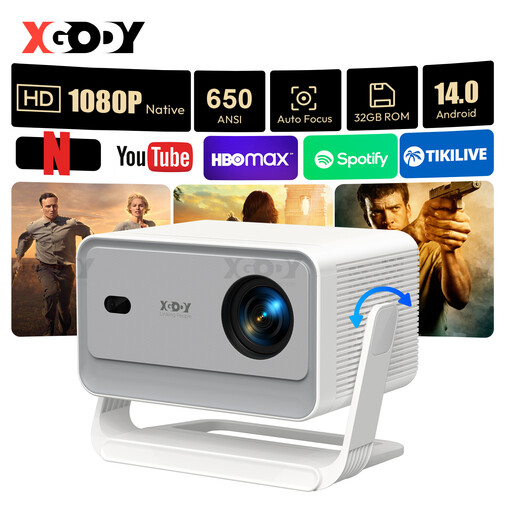
Why This Fits Their Persona: Ideal for tech-savvy users looking for a future-proof and versatile mini projector. Perfect for movie nights, gaming, or spontaneous presentations thanks to its state-of-the-art features.
It bypasses the "smart" disappointment with the latest Android 14.0 operating system. The specification of 650 ANSI lumens ensures transparency in brightness, and the AI auto-correction eliminates setup frustration.
Native 1080p resolution, support for WiFi 6, and Bluetooth 5.4 for maximum connectivity. The integrated stand allows for flexible positioning.
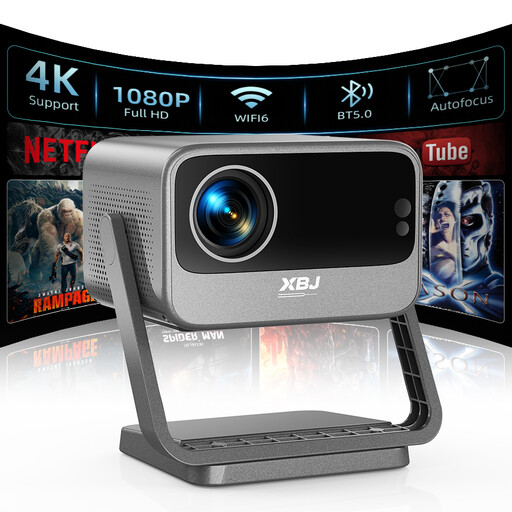
Why This Fits Their Persona: Perfect for users seeking a simple plug-and-play solution for streaming services. Ideal for movie nights in bed thanks to its clever ceiling projection feature.
Solves the app problem with an integrated OTT system (Linux) providing direct access to Netflix, YouTube, etc. The brightness is clearly declared at 700 ANSI lumens, and the fully automatic image correction makes setup effortless.
The 180° rotating stand enables easy `ceiling projection` without additional accessories. The device is ready for the most popular streaming services right out of the box.
We have compiled a complete, up-to-date list of products that fully meet these strict selection criteria and safety regulations.
No. "4K support" simply means the projector can process a 4K signal. However, it downscales the image to its lower native resolution, such as 1080p. A true native 4K projector has a much higher pixel density and is in a different price class. For most home cinema applications, a native 1080p projector already offers excellent image sharpness.
The easiest method is to use a model with an integrated, rotating stand, like the featured XBJ projector. This allows the lens to be aimed directly at the ceiling. For other models without this feature, you will need a separate ceiling mount or have to tilt the projector on a high shelf, which puts a heavy strain on the keystone correction.
Yes, especially if you plan to use the projector flexibly rather than in a fixed installation. These features save valuable time and frustration with every repositioning. They automatically ensure the image is sharp and perfectly rectangular, even when the projector is at an angle to the wall. For a modern smart projector, these convenience features are standard.