What should you look for when buying?
Compare the options against your workflow: text and window layout, laptop connectivity and desk space.
| What matters |
What to check when buying |
Who it matters most to |
| Readable code |
Check the screen size and resolution against your preferred operating system scaling and editor layout. |
When I spend a long time reading code and test results, the text needs to remain easy to read at my chosen scaling. Around 36% of consumers prioritise code and test results that are easy to read. |
| Multiple windows |
Decide in advance which windows you want open at the same time, then compare your layout with the available screen space. |
When I keep my editor, test results and documentation open side by side, I want to switch between them without making the text unnecessarily small. Around 29% of consumers prioritise having several work windows visible at once. |
| Laptop connectivity |
Check your laptop’s video output, the right cable and, if needed, charging power against the specific monitor. |
When I connect my laptop at my desk, I want to know whether the video signal and, if relevant, power supply are compatible. Around 21% of consumers prioritise suitable laptop connectivity. |
| Desk space and positioning |
Measure the available width and depth; check the stand or arm and the adjustment options you need. |
With a small desk, I want to position the screen appropriately without overcrowding my workspace. Around 14% of consumers prioritise a space-saving, adjustable setup. |
Joybuy monitors for code and test results
The following Joybuy options include 27-inch QHD monitors and a 40-inch ultrawide display. Before you buy, check that the space available, your preferred text size and the connections you need suit your workspace.
 No image available
Z-Edge AGEX 27-inch QHD monitor, white
A good fit if you’re looking for a 27-inch monitor listed as QHD, with an adjustable stand.
The listing title mentions 2K 1440P, 144 Hz, Fast IPS, FreeSync and HDR10, as well as DisplayPort and HDMI connections.
View at Joybuy
 No image available
INNOCN 40C1U 40-inch 5K ultrawide monitor, black
A good fit if you want to view several work windows across a large screen and have enough desk space.
The listing title specifies 5120 × 2160 pixels, IPS, 100 Hz, USB-C with 65 W PD, and PIP and PBP. Check that the stated charging power is suitable for your laptop.
View at Joybuy
 No image available
Philips 276B1 27-inch QHD monitor
A good fit if you’re looking for a 27-inch QHD monitor for code and multiple work windows.
The listing title specifies 75 Hz, IPS, 350 cd/m² and built-in speakers.
View at Joybuy
 No image available
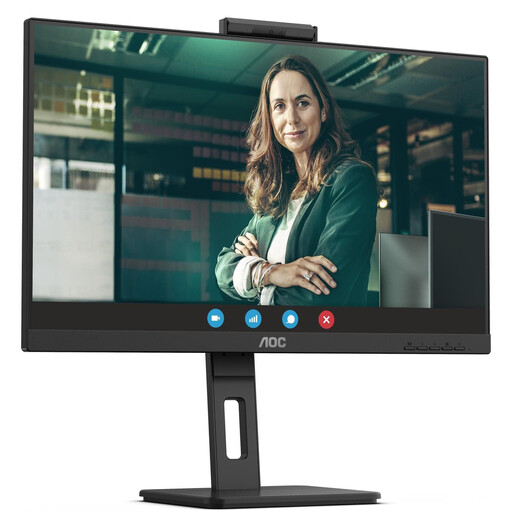
AOC Pro-Line Q27P3CW 27-inch QHD monitor
A good fit if you want to arrange code and test results on a 27-inch QHD screen.
The listing title specifies 75 Hz, IPS, 350 cd/m² and built-in speakers.
View at Joybuy
 No image available
Dell Pro 27 E2726DS 27-inch WQHD monitor
A good fit if you’re looking for a 27-inch WQHD monitor for your editor and test results.
The listing title specifies IPS, 8 ms, and HDMI and DisplayPort connections.
View at Joybuy
Frequently asked questions
Do I need a dedicated coding mode for unit testing?
No. A coding mode is an extra picture setting, not proof of better test results. First check whether the text size, window layout and screen position work for you. BenQ’s claims about concentration or productivity benefits from its modes come from the manufacturer and should not be taken as proven effects for unit testing.
Is one USB-C cable enough for my laptop’s picture and power?
Only if your laptop can output a video signal through that connection, the cable is suitable and the monitor’s charging power is right for your laptop. ASUS lists 96 W Power Delivery for the PA279CRV; EIZO specifies up to 70 W for the EV2490. This does not mean either monitor is compatible with every laptop.
How should I set up my monitor at home?
Check the available space, viewing position, reflections and the adjustment options on the specific model. The BAuA distinguishes a properly equipped teleworking workstation from other forms of location-independent working. ASR A6 should therefore not be treated as a monitor requirement that automatically applies to every home desk.
What are my rights when buying a monitor online as a private individual?
For a distance purchase made as a consumer from a trader in the EU, there is generally a 14-day withdrawal period from delivery. If the goods are faulty, you generally have at least a two-year statutory guarantee against the seller; this is separate from any additional manufacturer’s warranty. You may have to pay return postage when withdrawing from the purchase if the seller has informed you of this. This information comes from Your Europe, the European Union.
Are there labelling requirements for monitors on sale?
EU rules on ecodesign and energy labelling generally cover electronic displays such as monitors, although some product types are exempt or only partly covered. Check the energy information for the specific listing rather than trying to infer energy consumption from the model name. This summary is based on information from EUR-Lex, the European Union.


