Who can benefit most from a UPS in a home office?

Desktop users with important files open

If you want time to save your work and shut down your PC safely during a power cut, runtime at your actual load matters more than a high VA rating alone. Lenovo Germany describes runtime as the period for which devices can keep running during a power cut.

Users with an unattended desktop

If your PC keeps running while you’re away from your desk, supported USB communication and a configured automatic shutdown are important factors to consider. Eaton Germany describes HID-USB and automatic shutdown for the Ellipse PRO ELP650DIN.

Users with several essential devices

If you also want your monitor or router to keep running alongside your desktop, check which sockets are battery-backed and which only provide surge protection. BlueWalker/PowerWalker and CyberPower distinguish between these outputs on their respective models.

Which buying criteria matter when choosing a desktop UPS?

What matters What to check before buying Who is it important to?
Power and runtime Check the total load in watts, as well as the watt and VA ratings; compare runtime figures only at similar loads. If I need enough time to save my work and shut down, the runtime of my own setup matters; around 33% of consumers put sufficient power and runtime first.
Automatic shutdown Check for HID-USB or compatible software, operating system support and configurable shutdown. If my desktop might be left unattended, I want it to shut down safely when needed; around 27% of consumers prioritise automatic shutdown.
Waveform and voltage regulation Check the output waveform in battery mode and whether AVR is included on the specific model. If I need to account for my power supply’s requirements, I check the waveform and voltage regulation on the exact model; around 20% of consumers put this first.
Battery-backed sockets and battery Check how many sockets are battery-backed and distinguish them from outputs that only provide surge protection; check whether the battery can be replaced on the model. If several devices need to keep running during a power cut, I need enough suitable battery-backed sockets and want to factor in battery replacement; around 20% of consumers prioritise sockets and battery replacement.

Common misconceptions when buying a UPS

  • Assuming every Schuko socket provides battery backup

    On some models, certain sockets only provide surge protection and won’t power connected devices from the battery during a power cut.

    Connect your PC and any other devices you want to keep running during an outage only to outputs explicitly marked as battery-backed.

  • Estimating runtime from the VA rating or model name

    Backup time depends on the connected load. Manufacturer figures for half or full load can’t automatically be applied to a different setup.

    Compare the wattage of your load with the runtime figure at the same load before planning a shutdown time.

  • Assuming ‘line-interactive’ means ‘pure sine wave’

    Line-interactive models can have different output waveforms; the topology description alone doesn’t determine the waveform.

    Check the stated waveform for the full model name and the requirements of your PC’s power supply.

Brands and models to consider

APC by Schneider Electric

The BE850G2-GR and BX950MI-GR were considered desktop options by F.A.Z. Kaufkompass. This assessment applies to the models mentioned, not the entire range.

  • For the BE850G2-GR, F.A.Z. Kaufkompass described six battery-backed Schuko outputs and PC communication.
  • Information about this model doesn’t confirm current availability or a listing on Joybuy.

Eaton

The Ellipse PRO ELP650DIN is a tower UPS with Schuko sockets, line-interactive topology and AVR.

  • Eaton lists this model as 650 VA/400 W, with three battery-backed Schuko sockets, HID-USB and a replaceable battery.
  • According to Eaton, a fourth Schuko socket provides surge protection only. The older Ellipse ECO EL650USBDIN is a different model, which Eaton marks as no longer available.

PowerWalker

The VI 1000 CSW and VI 1000 MS show different designs and waveforms: a tower with a pure sine wave, and a power-strip format with a simulated sine wave.

  • BlueWalker/PowerWalker lists AVR and HID-USB for both models.
  • The manufacturer’s runtime and waveform information applies to each specific model and its stated load; it isn’t a general comparison for all PC setups.

CyberPower

The BR700ELCD is a line-interactive Schuko UPS in a desktop format, with AVR.

  • CyberPower lists this model as 700 VA/420 W, with eight Schuko sockets in total.
  • According to CyberPower, four of the eight sockets are battery-backed and four provide surge protection only; the stated waveform is simulated.

Joybuy products for desktop backup power

The following products are inverters with a stated UPS function. They require a 12 V DC power supply, so check that the necessary DC setup is suitable for your desktop backup plan.
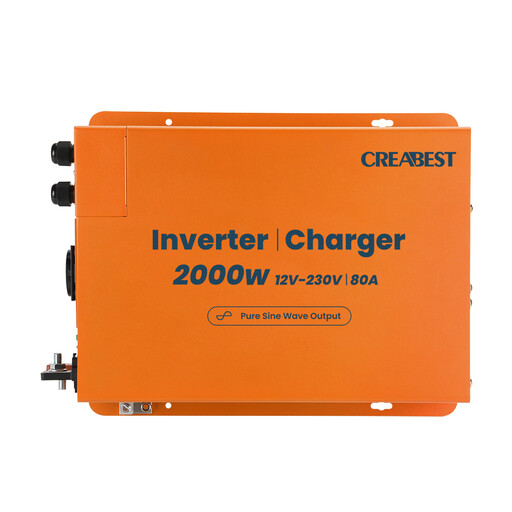
2000 W pure sine wave inverter with UPS function, 12 V to 240 V

2000 W pure sine wave inverter with UPS function, 12 V to 240 V

This model is suitable for desktop backup only if a compatible 12 V DC power supply is part of your setup.

Listed in the product title: 2000 W, pure sine wave, 12 V to 240 V, 80 A charger, RCD circuit breaker, mains priority mode, R10 and two 35 mm² DC cables.

View on Joybuy
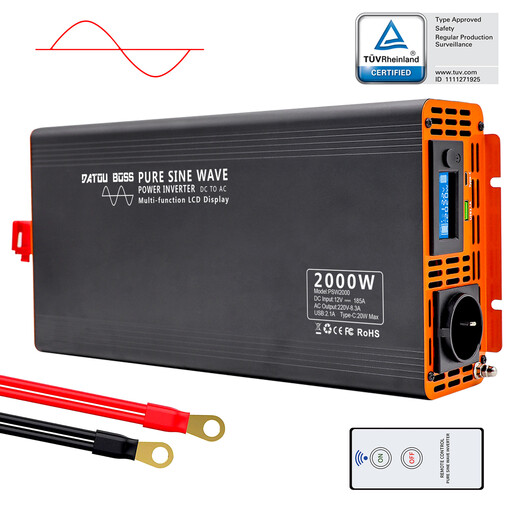
DATOUBOSS PSW2000W pure sine wave inverter, 12 V to 230 V

DATOUBOSS PSW2000W pure sine wave inverter, 12 V to 230 V

The product description mentions backup power during power cuts; a compatible 12 V DC power supply is required for operation.

Listed in the product title: 2000 W rated power, 4000 W peak power, pure sine wave, 12 V DC to 230 V AC and LCD display. The description states that it has a UPS function.

View on Joybuy
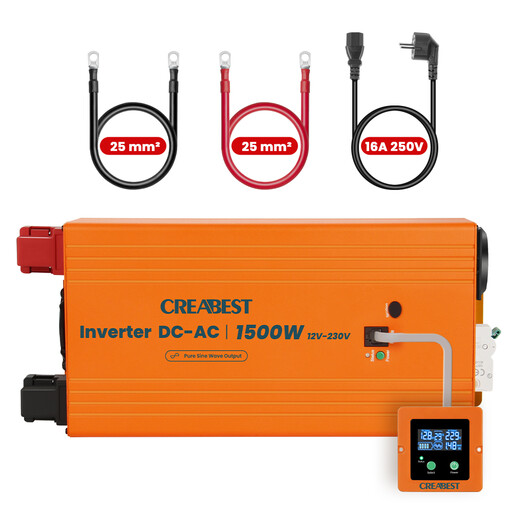
1500 W pure sine wave inverter with UPS function, 12 V to 240 V

1500 W pure sine wave inverter with UPS function, 12 V to 240 V

To use this with a desktop, you’ll need the required 12 V DC setup; the stated wattage doesn’t indicate runtime.

Listed in the product title: 1500 W, pure sine wave, 12 V to 240 V, RCD circuit breaker, mains priority mode, R10 and two 25 mm² DC cables.

View on Joybuy

Frequently asked questions about UPSs for home office desktops

How do I work out what size UPS I need?

Add up the wattage of all the devices you want to keep running from battery-backed sockets and compare the total with the UPS’s rated wattage. Check runtime against a manufacturer figure at as similar a load as possible. Lenovo Germany notes that the VA rating alone doesn’t tell you how long your specific desktop will run.

What do I need to set up for automatic shutdown?

Connect a compatible UPS to your desktop via USB, check support from your operating system or the manufacturer’s software, and configure the shutdown action. The presence of a USB port alone doesn’t confirm that shutdown will work with your PC. Eaton Germany lists HID-USB and automatic shutdown for the Ellipse PRO ELP650DIN.

What ongoing costs and disposal options should I consider?

Check whether the battery in the specific model can be replaced and whether a compatible replacement is available. The German Environment Agency recommends taking used batteries to collection points at retailers or local authority sites; end-of-life electrical appliances must be disposed of separately from household waste.

What should I check on the labelling and in the instructions?

The German Federal Network Agency lists correct CE marking, an identifiable product, accurate manufacturer details and German-language instructions with the necessary usage information and warnings among the checks it carries out as part of its market surveillance. These general checks don’t confirm that a specific product listing has been individually assessed.