What should you look for?
First, choose the required speed based on the devices involved. Then count every connection, including the one to your router. Finally, consider whether you’ll actually use any management features.
| Buying priority |
What to check |
Who is it most relevant to? |
| Speed between server and computer |
Check the LAN ports on both devices and the switch’s supported port speeds; also check the requirements for your existing cabling. |
If I often transfer large files between my media server and computer, the speed supported by both devices matters to me. Around 36% of consumers say file transfers are their top buying priority. |
| Enough ports for your server, computer and router |
Count all the planned wired connections, including the one to your router, and check that the ports you need support the right speeds. |
If I don’t have enough LAN sockets for my server, computer and router, I want to connect everything without unnecessarily complicated management. Around 29% of consumers put extra ports first. |
| Quiet operation and easy placement |
Check the specific model’s fan details, mounting options, power supply and stated power consumption. |
If the switch is near my desk, an easy set-up and the option to place it in my workspace matter to me. Around 21% of consumers prioritise straightforward use. |
| Network management instead of plug-and-play |
Check the features you need, the port speeds and, where applicable, the model’s hardware version. |
If I want to set up separate network segments or diagnostic features, I need the right management options on the switch. Network management is the top buying priority for around 14% of consumers. |
Joybuy products for Gigabit networks
The Joybuy models below cater for straightforward and managed Gigabit networks. If you want a 2.5-Gigabit connection, check that every port you need supports this speed.
 No image available
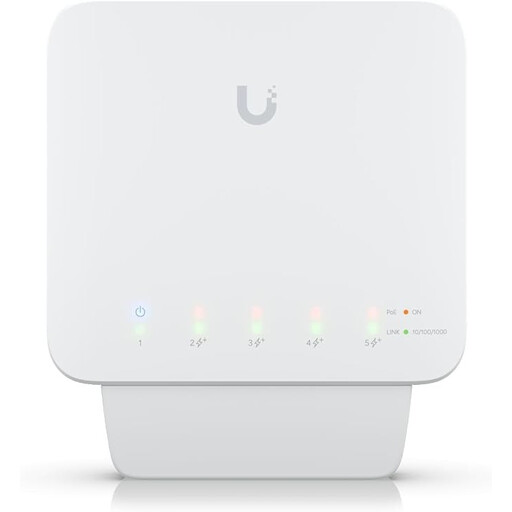
Ubiquiti UniFi Switch Flex USW-Flex, 5-port Gigabit, PoE+
For a managed Gigabit network if you want to use VLAN features.
Five Gigabit RJ45 ports, four of which are PoE+ outputs. Requires a compatible PoE++ source or a 60 W PoE adapter; an injector or power supply is not included.
Joybuy
 No image available
Ubiquiti UniFi Switch Flex Mini USW-FLEX-MINI-EU, 5-port Gigabit
A compact option for a managed Gigabit network with VLAN or port isolation features.
Five RJ45 ports with 10/100/1000 Mbit/s. Powered via USB-C or 802.3af/at PoE.
Joybuy
 No image available
D-Link DGS-1005P/E, 5-port Gigabit switch with 4 PoE+ ports
For a straightforward Gigabit upgrade if you want to power compatible devices over Ethernet.
Five 10/100/1000 Mbit/s ports, including four PoE+ ports offering up to 30 W per port and a total power budget of 60 W. Fanless metal casing and plug-and-play set-up are specified.
Joybuy
 No image available
D-Link DGS-1210-10/E, 10-port smart-managed Gigabit switch
For a managed network with several wired Gigabit devices and extra configuration options.
Eight Gigabit RJ45 ports and two SFP slots. Web management, VLAN, IGMP snooping and port mirroring are specified; the design is fanless.
Joybuy
 No image available
TP-Link TL-SG1008P, 8-port Gigabit switch with 4 PoE ports
For adding more wired Gigabit devices if you want to power some compatible devices over Ethernet.
Eight RJ45 ports with 10/100/1000 Mbit/s, including four PoE ports with a total power budget of 55 W. Plug-and-play set-up and a fanless design are specified.
Joybuy
Frequently asked questions
Do I automatically need a 2.5-Gigabit switch for a media server?
No. What matters is the ports on your media server and the computer receiving the files. If both devices have Gigabit ports, a faster switch alone won’t create an end-to-end 2.5-Gigabit connection.
How many ports should my switch have?
Count all your wired devices, then add the connection to your router. Choose a model with enough ports for all these connections, and check that their speeds are suitable for the devices you’re connecting.
Do I need to replace all my network cables for 2.5-Gigabit Ethernet?
Not necessarily: QNAP says you can use existing Cat-5e cables with the QSW-1105-5T. Check the requirements for the specific switch and the speed your connection actually negotiates.
How do I connect a basic switch?
Connect one port to your existing network or router, then connect the remaining ports to your wired devices. According to the manufacturers, the unmanaged models described by TP-Link Deutschland and NETGEAR Deutschland don’t need to be configured. Set up media server sharing separately.
When is a managed switch worth it?
A managed switch is useful if you genuinely want to use features such as VLAN, port mirroring or specific network configurations. Check the features and port speeds of the particular model separately: management won’t turn a Gigabit port into a multi-Gigabit port.


