Who might benefit from a home office switch?

Laptop plus other devices

If you want to connect your work laptop and other stationary devices to the router with cables, consider how many ports you need and how straightforward the setup will be. CHIP describes switches as a way to connect more devices to a network by cable.

Home working with plans to separate networks

If you want to set up separate network areas, take your router’s features and your organisation’s IT requirements into account. A configurable switch is only one part of the solution. The Federal Office for Information Security recommends using a secure communication channel, such as a VPN, to access an organisation’s internal resources.

Home working with specialist devices

If you also use a compatible PoE device or equipment with 2.5 GbE ports, you can factor these requirements into your choice of model. The ports and compatibility must match the devices you actually use.

What should you look for when buying a home office switch?

What you need What to check before buying Who is this important to?
Simple LAN expansion Check for spare router ports, an Ethernet port on your laptop or an approved adapter, and the number of Gigabit ports you need. If I only want to connect my laptop or a few extra devices by cable, an easy connection matters most to me. Around 38% of consumers prioritise a simple way to add wired connections.
Extra ports for devices Add up the router uplink and the Ethernet devices you plan to connect; remember to allow one port for the connection to the router. If I want to connect a printer, a dock with a network port or a NAS at my desk, I need enough ports for my specific needs. Around 31% of consumers prioritise extra ports for multiple devices.
Planned network separation Check the VLAN features of the specific model and make sure they work with your router configuration and your organisation’s IT requirements. If I want to separate my work and personal networks, I need a configuration that fits the rest of the network and complies with IT rules. Around 15% of consumers prioritise well-planned network segmentation.
PoE for an additional device Compare the PoE standard and the device’s power requirements with the switch’s total power budget. If I want to power a compatible access point or IP phone over Ethernet, for example, the power output needs to match the device. Around 8% of consumers prioritise PoE for an additional device.
Faster local transfers Check the Ethernet capabilities of all the devices involved and the local data route you plan to use. If I want to transfer large files between devices that already support it, the speed of the entire local connection matters most to me. Around 8% of consumers prioritise 2.5 GbE for local transfers.

Common mistakes when buying a network switch

  • Buying a switch when there’s already a suitable spare port on your router

    A switch won’t fundamentally change how a single wired laptop accesses the internet.

    First check whether your router has a suitable spare LAN port and whether your laptop supports Ethernet or needs an adapter approved by your organisation’s IT team.

  • Counting every listed port as a spare device connection

    When you connect the switch to the router, the uplink uses one port. That leaves four ports for devices on a five-port model.

    Add up the router uplink and the Ethernet devices you plan to connect before choosing between a five-port and an eight-port model.

  • Assuming VLAN, QoS and PoE are interchangeable features

    VLANs relate to configurable network segments, while PoE supplies power to compatible devices. Neither feature replaces your organisation’s security rules.

    Choose only the features you actually need, and agree any VLAN setup with your organisation’s IT team and router configuration.

  • Assuming 2.5 GbE means faster internet

    A faster local switch port won’t overcome a slower device at the other end or a limit on your internet connection.

    Before buying, check the Ethernet capabilities of the devices involved and the local data route you plan to use.

Key brands and model ranges at a glance

TP-Link

The models listed cover basic Gigabit connections, Easy Smart features and PoE.

  • TP-Link describes the TL-SG105 as a straightforward, fanless switch; the TL-SG105E offers VLAN features.
  • The TL-SG1005LP has four PoE+ ports and a total power budget of 40 W.
  • These features apply to the models listed, not to the entire brand.

NETGEAR

The GS305v3 and GS305E are different options for a small wired workspace.

  • NETGEAR describes the GS305v3 as a plug-and-play unmanaged model with no PoE budget.
  • The manufacturer lists VLAN features for the GS305E.
  • The similar model names don’t mean they have the same features.

D-Link

The DGS-105 is described as a basic switch for a small wired workspace.

  • D-Link lists five Gigabit Ethernet ports and fanless operation for revision E1.
  • Check the revision and warranty terms for the specific listing. The “Layer 2” label alone doesn’t mean it offers configurable VLAN separation.

QNAP

The QSW-1105-5T is an option for an existing or planned local 2.5 GbE network.

  • QNAP lists five 2.5 GbE ports and fanless operation for this model.
  • To benefit from the faster local port speed, you’ll need compatible devices at the other end. The switch won’t automatically speed up your internet connection.

Joybuy products for a wired workspace

This Joybuy selection includes switches for adding Gigabit ports, planned VLAN configurations and compatible PoE devices.

Ubiquiti UniFi Switch Flex Mini USW-FLEX-MINI-EU, 5-port Gigabit switch

Ubiquiti UniFi Switch Flex Mini USW-FLEX-MINI-EU, 5-port Gigabit switch

For a small workspace with several wired devices and planned VLAN use.

Five 10/100/1000 Mbit/s RJ45 ports; VLAN support and management through UniFi Network. Powered via USB-C or an 802.3af/at PoE input; the PoE port is an input and does not supply PoE power to connected devices.

View at Joybuy

D-Link DGS-1005P/E, 5-port Gigabit switch with 4 PoE+ ports

D-Link DGS-1005P/E, 5-port Gigabit switch with 4 PoE+ ports

For a workspace where you want to connect a compatible PoE device as well as your laptop.

Five Gigabit RJ45 ports, including four PoE+ ports; 60 W total PoE budget. The router uplink uses one of the five ports. Make sure the PoE standard and power requirements of your devices are within the total budget.

View at Joybuy

D-Link DGS-1210-10/E, smart managed Gigabit switch with 8 RJ45 ports and 2 SFP slots

D-Link DGS-1210-10/E, 8-port Gigabit switch with 2 SFP slots

For several wired devices when you also need VLAN configuration or other management features.

Eight Gigabit RJ45 ports and two SFP slots; VLAN and management features. You’ll need compatible transceivers for the SFP slots.

View at Joybuy

TP-Link TL-SG1008P, 8-port Gigabit switch with 4 PoE ports

TP-Link TL-SG1008P, 8-port Gigabit switch with 4 PoE ports

For several Ethernet devices and up to four compatible PoE devices in your workspace.

Eight 10/100/1000 Mbit/s RJ45 ports, including four PoE ports compliant with IEEE 802.3af; 55 W total PoE budget. The router uplink uses one port. Check that the devices’ power requirements are within the total budget.

View at Joybuy
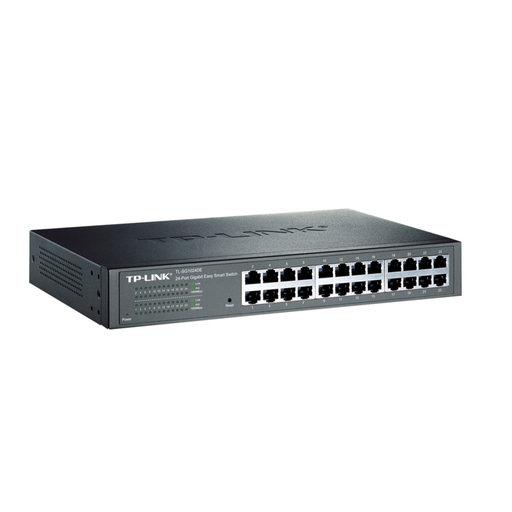
TP-Link TL-SG1024DE, 24-port Gigabit switch with VLAN management

TP-Link TL-SG1024DE, 24-port Gigabit switch

For a workspace or network with many wired devices and planned VLAN use.

24 Gigabit RJ45 ports and Easy Smart management with VLAN features; web interface for configuration and monitoring. Designed for desktop or rack mounting.

View at Joybuy

Frequently asked questions about home office network switches

Do I need a switch if I only want to connect my work laptop to the network by cable?

Not necessarily. If your router has a spare, suitable LAN port, you can connect your laptop directly. A switch adds more wired connections, but it doesn’t replace your router. Check whether your laptop has Ethernet or needs an approved adapter or dock, and confirm this with your organisation’s IT team.

How do I connect a basic switch at my desk?

Connect a LAN port on the switch to a LAN port on your router using an Ethernet cable, then plug your laptop and other devices into spare switch ports. Power the switch according to the manufacturer’s instructions. On a five-port model, the router uplink leaves space for four devices. Avoid unnecessary second cable connections between the same network devices.

Does a VLAN switch automatically make my work laptop secure?

No. VLAN features need to be configured to work with the rest of your network, and they don’t replace your organisation’s security requirements. The Federal Office for Information Security recommends using a secure communication channel, such as a VPN, to access an organisation’s internal resources.

What ongoing costs or service details should I consider?

An additional switch needs a power supply. Check that the power supply and cables suit your planned setup, and read the warranty terms for the specific model. You can’t assume that every switch comes with the same electricity-cost allowance or warranty.

What labelling should I look for when buying an electrical switch in Germany?

The German Federal Network Agency lists several obligations for businesses supplying electrical and electronic equipment. These include correct CE marking, identification of the device and manufacturer, and German-language instructions for non-professional users. CE marking is not proof of independent quality testing or that the switch is suitable for your company network.