
Lieferung heute & morgen

Qualitätsgarantie

Willkommens-Angebote freischalten: KOSTENLOSE Lieferung | Bis zu 80 % RABATT | Kostenlose 30-Tage-JoyPlus-Testphase
App herunterladen
A disorganized home office workspace can significantly impair productivity. Piles of paper, tangled cables, and a lack of storage space not only lead to chaos but also to unnecessary stress. However, the search for home office organization solutions often leads to products that overpromise and underdeliver. Before you invest, it's crucial to recognize common pitfalls that lead to disappointment and wasted money.
Many buyers focus on aesthetics while overlooking critical functional flaws. Here are three typical problems that often only become apparent after the purchase:
To organize your home workspace effectively, you should focus on verifiable criteria rather than marketing promises. Pay attention to the following three core parameters to make an informed decision.
The longevity of a product is directly linked to the materials used. To design modern office furniture that is also functional, various materials are used, and you should be familiar with their properties.
Always check the manufacturer's specified maximum load capacity, especially for shelves and monitor stands.
Before buying an office storage solution, measure your desk and the available space precisely. To organize your workspace without overcrowding it, vertical storage is often the better choice. Multi-tiered filing systems or a desk with shelves utilize the room's height and keep the work surface clear. Modular systems that can be adapted to changing needs offer the greatest long-term flexibility.
Modern organizational aids offer more than just storage space. Smart details make all the difference in daily use. These include:
Instead of making a one-size-fits-all recommendation, we have selected products tailored to specific user profiles and their requirements.
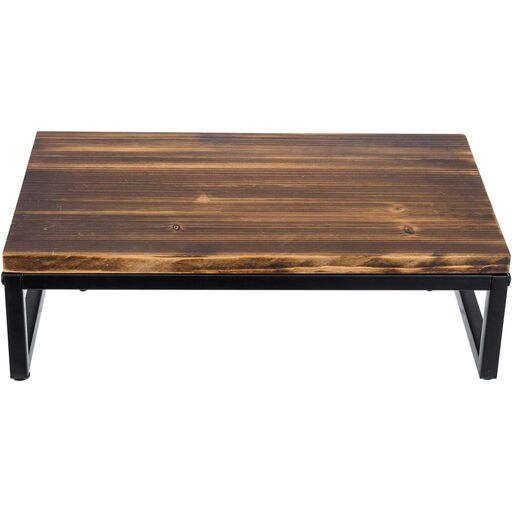
Why it's a great fit: It combines a clear ergonomic benefit with an appealing design. Ideal for users who prioritize a healthy posture while appreciating a warm, industrial aesthetic in their home office.
The construction of solid wood and powder-coated steel ensures high stability and prevents wobbling. The raised height directly addresses the ergonomics pitfall by bringing the monitor to a healthier viewing level.
Improves posture while creating valuable storage space under the monitor for a keyboard or notebooks. The load capacity of up to 45 kg is sufficient for most setups.
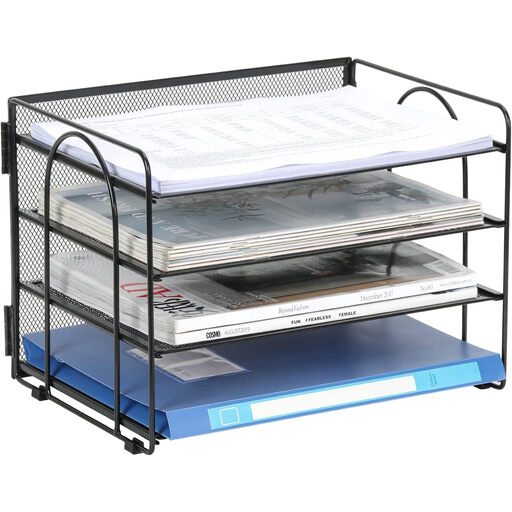
Why it's a great fit: This document tray solves a core problem—paper chaos—in a simple and efficient way. It is ideal for anyone looking for a functional, space-saving, and no-frills solution.
The sturdy metal construction with L-shaped supports prevents the trays from bending and ensures stability. Its vertical orientation avoids the pitfall of impractical dimensions by keeping valuable desk space free.
Provides four tiers of space for A4 documents, optimizing desk space. The non-slip rubber feet protect the surface and ensure a secure footing.
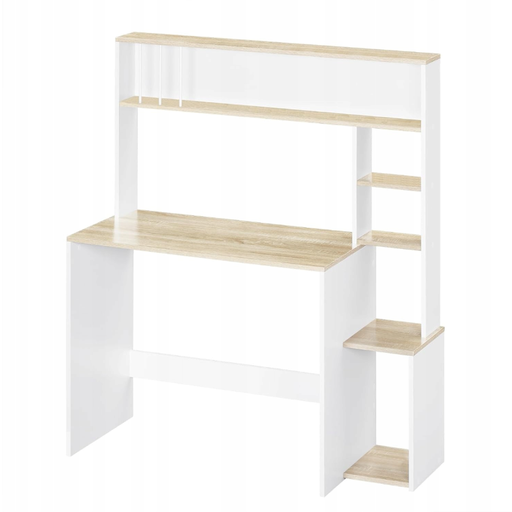
Why it's a great fit: This is a complete solution for anyone setting up a new workspace or completely revamping an existing one. The desk with an integrated shelf offers a large work surface and ample storage in a single piece of furniture.
As an integrated unit, this desk offers a stable overall construction. The use of E1-grade particleboard with a reinforced base ensures reliability. The generous dimensions and six open shelves solve the problem of insufficient storage space.
Combines a workspace and extensive storage in one cohesive, modern design. The open-shelf structure allows for quick access to books, binders, and other materials.
We have compiled a complete, up-to-date list of products that fully meet these strict selection criteria and applicable safety regulations.
For an ergonomic posture, the top edge of your screen should be at or just below your eye level. This prevents you from having to tilt your head unnaturally. The ideal height is individual and depends on your height, chair height, and monitor size. It can be helpful to simulate the optimal height with a stack of books before buying.
For maximum durability, metal, especially powder-coated steel, is an excellent choice. It is dimensionally stable, won't bend even under the weight of many documents, and is very resilient. Solid wood is also a very durable, but often heavier, option. While plastic is lightweight, it can crack or warp under heavy loads or over time.
An effective method is to use cable trays mounted under the desktop to bundle and conceal cables. Many modern desk organizers and monitor stands have integrated cutouts or guides for cable management. Smaller aids like reusable cable ties or self-adhesive clips can also help create order.