For a home-office photo gallery, a compact laptop is often enough if you mainly want to view, organise and select images. The key things to consider are suitable storage, the ports you need for your existing drives and a sensible backup plan. If you regularly edit large files or judge colours on the built-in display, check the exact RAM, processor and display configuration. A more powerful creative laptop isn’t automatically necessary just for sorting photos. If your online gallery is publicly accessible, you’ll also need to check the rights to publish the images, whatever laptop you choose.
Which workflow is right for you?
Photo collectors with a growing archive
If you want to import images, find them again and select photos for a gallery, you’ll need well-organised files, enough storage and a clear backup plan. Adobe describes the Lightroom Classic catalogue as a database that manages information such as photo locations and details.
Image editors working at their own desk
If you edit images regularly, assess the display and performance in light of your files and the software you actually use. Adobe identifies memory and processor performance as possible factors affecting Lightroom Classic.
Gallery creators with a flexible workspace
If you move between your desk and other workspaces, the laptop’s size and ports need to suit both. An existing monitor and external storage drives may affect what you really need from your laptop when you’re out and about.
What should you look for when buying?
First decide whether your priority is managing and backing up photos, assessing images on your laptop or editing them regularly. You can then compare the display, storage, performance and ports to find the right fit for your workspace.
| Priority |
What to check before buying |
Who is this important for? |
| Managing and backing up photos |
Check the available storage on the specific model, the ports for your existing drives, and that your catalogue and original photos are backed up separately. |
If I want to keep a growing photo archive organised and reliably manage my originals and backups, the storage setup is crucial. Around 40 % of consumers put management and backups first. |
| Assessing images on the display |
Compare the display size, stated colour gamut coverage and screen finish of the specific configuration. Also consider the lighting at your desk. |
If I want to select and assess images directly on my laptop, the built-in display has a greater impact on my workspace. Around 30 % of consumers prioritise assessing images on screen. |
| Editing images regularly |
Check the software requirements and the RAM, processor and—if relevant to the features you use—the graphics chip in your chosen model. |
For large files, extensive catalogues or editing several images at once, I need enough performance to suit my software. Around 20 % of consumers prioritise editing performance. |
| Workspace and ports |
Make a list of your existing monitors, card readers and drives, then check that the exact laptop model has the ports they need. |
If I move between a permanent desk and other workspaces, I want my laptop and existing devices to work together without unnecessary hassle. Around 10 % of consumers put their workspace and ports first. |
Avoiding buying and planning mistakes
-
Confusing a catalogue backup with a backup of all your photos
Adobe describes the Lightroom Classic catalogue as a database containing information about your photos; the image files themselves remain separate files. Backing up the catalogue alone is therefore not the same as backing up your original images.
Before you buy, decide where you’ll keep your originals and backups, and check that you can connect the drives you need to your laptop.
-
Assuming every model in a product range has the same specifications
The display, memory and SSD can vary between configurations. Compare the full model name and check the specifications for the exact device you’re considering.
Check the specific configuration rather than relying on the product range name alone.
-
Automatically choosing a workstation for simple sorting
The performance you need depends on factors such as file size, catalogue size and the type of editing you do. You don’t automatically need a higher-spec machine for demanding workflows if your main tasks are organising and selecting photos.
Start by setting out your workflow, then compare your software requirements with the specifications of the exact model.
Notable brands to consider
Apple
The MacBook Air may suit a compact workflow, while the MacBook Pro could be worth considering if you need a larger built-in display.
- For the MacBook Air M5 base configuration listed, Apple Germany specifies 16 GB of unified memory, a 512-GB SSD and a 13.6-inch display with P3 colour gamut.
- These specifications apply to the stated configuration. Weigh the smaller screen against the workspace you need.
ASUS
The ProArt P16 is aimed at buyers who want to combine image editing and image assessment on a larger Windows laptop.
- For the ProArt P16 configuration described, ASUS specifies a 16-inch OLED touchscreen and 32 GB of soldered memory.
- The colour-accuracy claims come from the manufacturer; don’t assume that the specifications and features apply to other P16 models.
Lenovo
The ThinkPad T1g is a performance-focused 16-inch range for a more desk-based Windows workflow.
- Lenovo describes the T1g Gen 8 as featuring Core Ultra processors and GeForce RTX graphics.
- The specifications of the exact configuration are what matter; features of one model don’t automatically apply to the entire range.
Dell
The Dell Pro Max 16 Plus is a configurable workstation alternative for Windows users with more demanding editing needs.
- Dell lists different processor and operating system options for the model.
- Check the display and performance features of the configuration you’re actually choosing. The available options don’t prove a general advantage for simply organising a gallery.
HP
The OmniBook Ultra is a mobility-focused alternative if you want to combine image work with general home-office tasks.
- HP lists OLED options up to 3K for the range.
- “Up to” doesn’t describe every model or prove the colour accuracy of a specific configuration, nor its suitability for particular image-editing software.
Joybuy laptops for your photo gallery
The Joybuy laptops below include compact models as well as 15- and 16-inch options for managing images locally and working on the built-in display.
 No image available
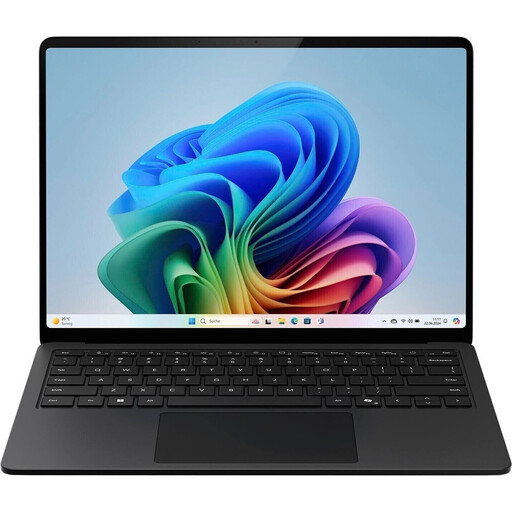
Microsoft Surface Laptop 8, Core Ultra 5, 24 GB RAM, 512 GB SSD
Its compact size makes this a good option if you want to manage photos in different workspaces.
- 13-inch touchscreen with 1,920 × 1,280 pixels and 500 cd/m²
- Intel Core Ultra 5 and Windows 11 Pro
- 24 GB RAM and 512-GB SSD
- Stated weight: 1.24 kg
View at Joybuy
 No image available
Microsoft Surface Laptop for Business, 7th Edition, Core Ultra 7 266V
The 15-inch display and listed microSDXC card reader are useful features if you want to view photos on your laptop and read memory cards.
- 15-inch touchscreen with 2,496 × 1,664 pixels
- Intel Core Ultra 7 266V and Intel Arc Graphics 140V
- 16 GB RAM and 512-GB SSD
- microSDXC and Thunderbolt 4
View at Joybuy
 No image available
16-inch laptop, Intel Core i5-8210Y
The matte 16-inch display is a useful feature if you want to view images directly on your laptop.
- 16-inch FHD display with anti-glare finish
- Intel Core i5-8210Y, 2 cores and 4 threads, up to 3.6 GHz
- 16 GB RAM and 512-GB SSD
- Windows 11 Pro and RJ45
View at Joybuy
 No image available
Ninkear A15 Pro, 16 GB DDR4, 1 TB SSD
The stated 1-TB SSD may be useful if you want to store photos locally. How well it suits you depends on the size of your photo collection and your backup plan.
- 16-inch FHD IPS display
- 16 GB DDR4 and 1-TB SSD
- Windows 11
View at Joybuy
 No image available
HONOR MagicBook X16 AMD 2025, Ryzen 5 6600H
The 16-inch format gives you a larger built-in display for viewing images on your laptop. Check that the rest of the specifications suit your software and files.
- AMD Ryzen 5 6600H
- 16 GB RAM and 512-GB SSD
- 16-inch display
- German keyboard
View at Joybuy
Frequently asked questions
Do I need a laptop with a dedicated graphics card for a photo gallery?
Not just to create a gallery. Check which editing features you actually use and what your software requires for them. Adobe identifies factors including file size, catalogue size, memory and processor as affecting Lightroom Classic performance.
How do I back up a gallery managed with Lightroom Classic?
Plan separate backups for your catalogue and original images. Adobe describes the catalogue as a database containing image locations and photo information; the image files themselves are separate.
What additional equipment should I check before buying a laptop?
Check whether your workflow requires extra storage drives, a card reader, an adapter or an external monitor. Make sure the exact laptop model has the ports you need, and consider whether you already own compatible devices.
What should I bear in mind if my online gallery includes people?
This is a matter of publication, not laptop hardware. Under section 22 of the German Art Copyright Act (KunstUrhG), images of people may generally only be distributed or displayed publicly with their consent. Whether exceptions or other data protection rules apply depends on the circumstances and how the images are published.
What rights do I have when buying a laptop online in Germany?
For a distance contract with a consumer, there is generally a statutory right of withdrawal, with a period of 14 days. Under section 438 of the German Civil Code (BGB), the limitation period for certain claims relating to defects in ordinary goods is generally two years from delivery. Statutory rights relating to defects are distinct from a voluntary manufacturer’s guarantee; exceptions and the circumstances of the specific contract also matter.


