Which buying criteria matter?
When choosing a UPS to save your work in a home office, the right choice depends on what matters most to you. Find the row that makes the biggest difference to your workstation.
| Priority |
What to check before buying |
Who is this important to? |
| Time to save your work |
Check the combined load in watts and the runtime at a suitable load level. |
If I need to save a file manually, I want to know how long my computer and essential monitor can run together. Around 31 % of consumers prioritise time to save their work. |
| Automatic shutdown |
Check the data connection, operating system support and shutdown software for the exact model. |
If I leave my PC unattended, I want the UPS to shut it down safely after a power cut. Around 25 % of consumers prioritise automatic shutdown. |
| Power supply compatibility |
Check your specific power supply’s requirements, as well as the waveform and behaviour during switching. |
If my PC has a demanding power supply, I want to know whether it can handle the UPS waveform when running on battery power. Around 19 % of consumers prioritise power supply compatibility. |
| Powering several devices |
Check which sockets have battery backup and the total load of all connected devices. |
If I need to keep my monitor running as well as my PC, I need enough battery-backed sockets and power. Around 13 % of consumers mainly want to power several devices. |
| Battery replacement and ongoing costs |
Check which replacement battery fits the exact model, its availability and the manufacturer’s replacement instructions. |
If I plan to use the UPS for a long time, I want to budget for battery replacement and maintenance. Around 12 % of consumers prioritise battery replacement and ongoing costs. |
Joybuy products with UPS functionality
The following products are 12 V to 240 V inverters whose product names mention a UPS function. They require a suitable 12 V DC power source and aren’t automatically equivalent to a mains-powered UPS for a desktop workstation. Before buying, also check the exact EU model, CE marking and relevant manufacturer information.
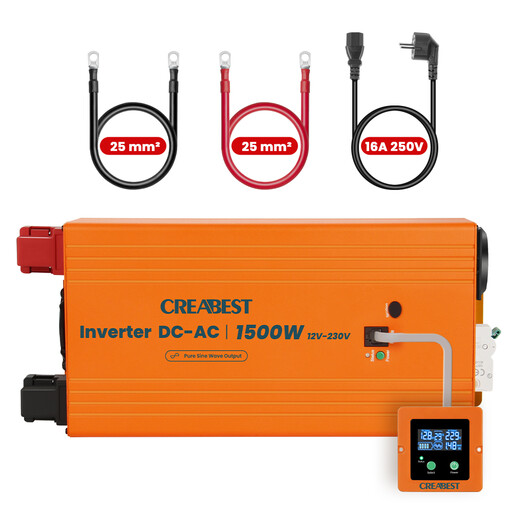 Image unavailable
1500 W Pure Sine Wave Power Inverter with UPS function, 12 V to 240 V
As an inverter with a UPS function, this model is relevant only for a setup with a suitable 12 V DC power source; check whether that suits your workstation.
The product name lists 1500 W, Pure Sine Wave, 12 V to 240 V, Mains Priority Mode and an RCD Breaker. It also lists two 25 mm² DC cables as included.
View at Joybuy
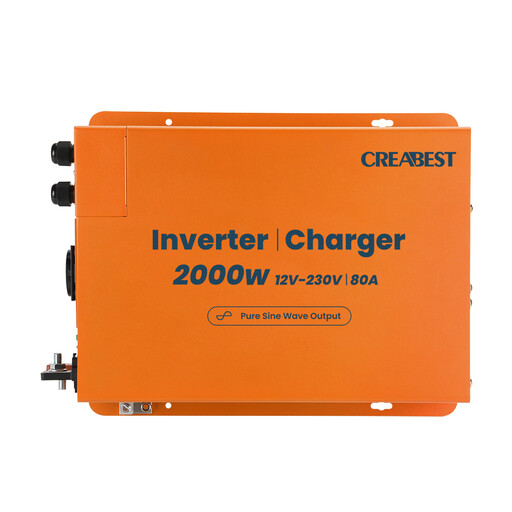 Image unavailable
2000 W Pure Sine Wave Power Inverter with UPS function, 12 V to 240 V
This product is described as a 12 V to 240 V inverter with a UPS function and requires a suitable 12 V DC power source. Check whether this setup is right for your home office.
The product name lists 2000 W, Pure Sine Wave, Mains Priority Mode and an 80 A charger. It also lists two 35 mm² DC cables as included.
View at Joybuy
Frequently asked questions about home office UPSs
How do I set up a UPS so I can save my files?
Connect your computer and, if needed, your essential monitor to battery-backed sockets, not just to sockets with surge protection. For automatic shutdown, set up the data connection and software that work with your model and operating system, then test the settings in a controlled way.
Will my cloud document stay available if my router is also connected to the UPS?
Not necessarily: a router with battery backup may stay switched on locally, but the Federal Office of Civil Protection and Disaster Assistance warns that internet and mobile networks may be disrupted during power cuts. Save a local working copy if you need to carry on without an internet connection.
What should I check about the battery and servicing before I buy?
For the exact model, check whether a replacement battery is available and how the manufacturer says it should be replaced. Schneider Electric describes the BE850G2-GR battery as user-replaceable; the German Environment Agency recommends checking whether replacement batteries are available.
What compliance and disposal rules apply in Germany?
A mains-powered 230 V UPS falls within the voltage range of the EU Low Voltage Directive. Check the CE marking and manufacturer information for the specific product; a CE mark alone is not an independent quality seal. Dispose of old batteries properly and follow the manufacturer’s instructions and local collection arrangements.


