Solo speakers recording from a fixed position
If you’re only recording the interview introduction to begin with and can position your recording device within cable reach, a wired lavalier microphone could be worth considering.


For recording an introduction on your own from a fixed position, a wired lavalier microphone can be a good choice, provided its connector wiring matches the input on your recording device. If you also want to record questions and answers with two voices, or need to move around freely, consider a compatible wireless set. Make sure the receiver and batteries suit your setup, and check the applicable radio regulations for the specific system. A test recording with the clothes you plan to wear, in the room you’ll be using and with your recording app, will help you check everything before the interview.
If you’re only recording the interview introduction to begin with and can position your recording device within cable reach, a wired lavalier microphone could be worth considering.
If you want to keep using your smartphone, computer or recorder, check that its actual microphone input and recording app are compatible with the microphone’s signal path.
If you want to record questions and answers as well as the introduction, or need to move around freely, check how many microphones or transmitters are included and which receiver option is compatible.
A good fit if: you’re recording one voice from a fixed position and have a compatible microphone input.
Bear in mind: cable length and routing can limit your setup. TRS and TRRS connectors aren’t interchangeable just because they have the same plug diameter.
A good fit if: your specific device supports USB-C audio input and your recording app recognises the microphone.
Bear in mind: USB-C alone doesn’t guarantee compatibility. The Sennheiser XS Lav USB-C has a specified 2-m cable, which limits how far away you can position your device.
A good fit if: a cable would get in the way of recording, or you want to capture two voices.
Bear in mind: the receiver option, batteries and connection must suit your recording setup. You’ll also need to check the applicable radio regulations for the specific system.
| What you need | What to check | Who is it important to? |
|---|---|---|
| Clear speech without clothing noise | Test the clip and microphone position with the clothes you plan to wear, then listen back to a test recording. | If you want a clear, easy-to-understand introduction, make sure the microphone sits securely without rubbing against your clothes. Around 29% of consumers prioritise speech clarity. |
| The right connection | Check the connector wiring, device input, any adapter needed and whether the recording app recognises the microphone. | If you want to keep using your existing smartphone, computer or recorder, the entire signal path needs to be compatible. Around 29% of consumers prioritise device compatibility. |
| One or two voices | Decide whether you’ll record just the introduction or both sides of the conversation, then check the number of microphones, channels and what’s included in the set. | If you want to include questions and answers in the recording, you’ll need a setup designed for the job. Around 21% of consumers prioritise recording two voices. |
| Freedom of movement and recording workflow | Choose wireless only if you genuinely need to move around; check the receiver, battery charge and connection at your recording location. | If a cable would restrict your movement while recording, remember to plan for the wireless connection and charged batteries. Around 21% of consumers prioritise freedom of movement. |
RØDE specifies a TRS connection for the Lavalier GO and a TRRS connection for the smartLav+. So a matching plug diameter alone doesn’t mean the microphone and device will work together.
Before buying, check your device, connector wiring and any adapter you might need as part of the complete signal path.
A solo introduction doesn’t necessarily need the same setup as a full conversation with questions and answers.
Decide which voices you want in the finished recording, then check the number of microphones, transmitters and the exact set variant you need.
DJI quotes conditions for the Mic Mini, such as a setup free from interference or an open environment. These may not match your own home studio.
Test the connection, recording and battery level at your intended recording location before the interview.
Wired lavalier microphones with a choice of analogue connections.
The MVL is designed for a compatible mobile signal path, while the MoveMic Two Receiver Kit offers a wireless option for two voices.
The XS Lav USB-C is a wired lavalier microphone for compatible mobile devices or computers.
The Mic Mini is a compact wireless model. Make sure the receiver option suits your recording setup.
The LARK M2 is available in clearly differentiated mobile, camera and Combo versions.
The Joybuy range includes lavalier microphones and wireless sets for a variety of recording setups. Check that the connection and set contents suit your device and the number of voices you want to record.
 No image available
For recording two voices if you’re looking for a wireless set with two transmitters and one receiver.
The product description lists internal 32-bit float recording and a charging case.
 No image available
For recording a single introduction if your recording device has a compatible 3.5-mm signal path.
The product description lists a 3.5-mm connection, an adapter kit, a clip and an omnidirectional pickup pattern.
 No image available
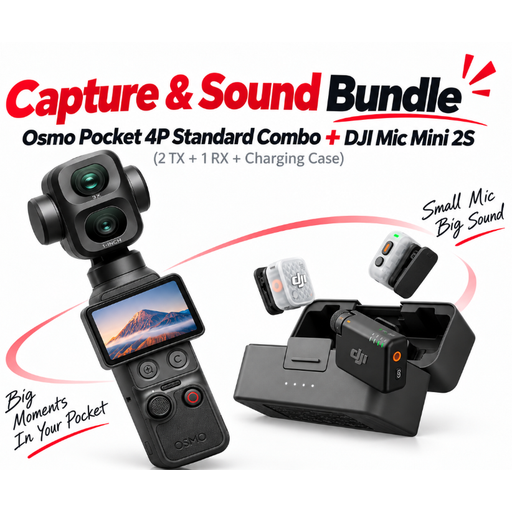
For a combined camera and audio setup if you’re looking for the bundle on offer rather than a standalone microphone.
The product description lists two transmitters and one receiver for the wireless microphone system.
 No image available
For recording one voice if this microphone variant suits your recording setup.
The product title lists a 6 m cable and a 3.5-mm connection; the description includes a clip and an omnidirectional pickup pattern. Check the signal path on your specific device.
 No image available
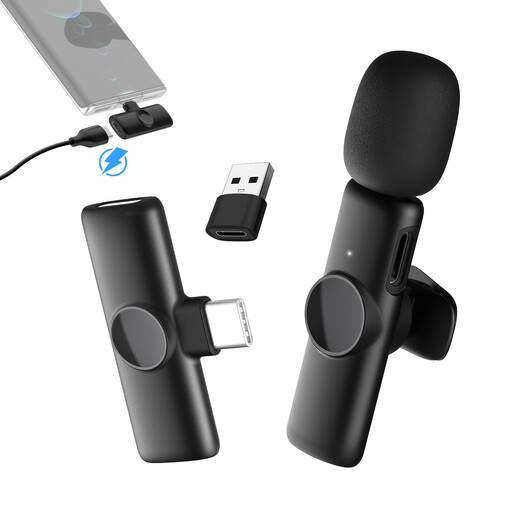
For recording one voice with freedom of movement if your USB-C phone supports the receiver connection described.
The product details list 2.4 GHz wireless connectivity, one transmitter and one receiver. Check the USB-C audio input on your specific phone.
No, the plug diameter alone isn’t enough to guarantee compatibility. RØDE specifies a TRS connection for the Lavalier GO and a TRRS connection for the smartLav+; for the MVL, Shure specifies a compatible 3.5-mm input or a CTIA-compliant adapter. Also check whether your recording app recognises the external input.
Check whether the exact set variant includes two microphones or transmitters and a compatible recording connection. Shure describes the MoveMic Two Receiver Kit as having two channels, with connections via MOTIV apps or a receiver. Record a test with both voices beforehand.
Attach the microphone so it doesn’t rub against the clothes you plan to wear, then listen back to a test recording with a normal speaking voice and a louder one. With a wireless set, also check the connection and battery level. Follow the instructions for your specific model when cleaning and storing it.
Depending on the combination, you may need a compatible adapter or receiver. RØDE specifies a TRRS-to-TRS adapter for using the smartLav+ with a Wireless GO TRS input. With wireless sets, also check that the receiver works with your recording device and the app you’re using.