If you record most of your walkthrough script from a fixed position, a wired lavalier is a suitable starting point – as long as you’ve confirmed that its connection and power requirements work with your recording device. If you need to move around, consider a compatible wireless set or a body-worn recorder. Check what’s included in the set, how it records and, where relevant, the radio-frequency regulations in Germany. Whatever microphone you choose, check the room acoustics and make sure it can be attached without rustling by recording a quick test.
Who these recording options suit
Speakers recording from a fixed position
If you’re recording your walkthrough script from one spot, the microphone connection needs to work with your computer or mobile device. Sennheiser lists USB-C as the connection for mobile devices and computers on the XS Lav USB-C.
Speakers who move around
If you move while recording, you’ll need both freedom of movement and a suitable way to capture the audio. DJI describes different set configurations for the Mic Mini, while Tascam’s DR-10L Pro is a body-worn recorder that offers an alternative to wireless transmission.
Speakers in a reverberant room
If your home studio has little sound absorption, check the room and capsule position before switching microphones. Shure notes that room acoustics affect the recording.
What to consider when choosing
For recording a walkthrough script at home, your choice mainly depends on whether you tend to stay in one spot, move around while speaking and which device you’ll use to record.
Wired lavalier
A good fit if: you mainly speak from a fixed position and your device has the right microphone input.
Consider: The cable limits your distance from the recording device. USB-C, TRS and TRRS connections aren’t automatically interchangeable.
Wireless set with transmitter
A good fit if: you want to move around while recording or find a cable between you and your recording device gets in the way.
Consider: The receiver or direct connection, power supply and recording device all need to work with the specific set. In Germany, you’ll also need to check the frequency and technical requirements.
Body-worn recorder
A good fit if: you’d rather record directly to a device worn on your body than maintain a live wireless connection to your recording device.
Consider: You’ll need to factor in power and storage, and transfer the files afterwards.
| What matters |
What to check before buying |
Who it matters most to |
| Clear speech |
Position the capsule close to your voice; make a test recording from the spot where you plan to speak. |
If I want to record the script clearly, I’ll listen to a test recording for room sound and background noise. Around 36% of consumers put speech clarity first. |
| The right connection |
Check the recording device’s input and power requirements; use an adapter specifically designed for the job if needed. |
If I want to keep using my existing phone, computer or recorder, the signal path needs to work with the device. Around 29% of consumers prioritise device compatibility. |
| Secure, rustle-free attachment |
Check the clip and cable routing on the clothes you’ll actually wear; test with the movements you usually make. |
If I gesture while reading aloud, I want to be able to move my clothes and the cable without them rubbing against the capsule. Around 21% of consumers pay particular attention to quiet attachment. |
| Freedom of movement |
Check the cable reach or wireless recording setup, what’s included in the set and how to transfer a locally saved file. |
If I move to a different spot while recording, I still want the audio to be captured using the intended method. Around 14% of consumers put freedom of movement first. |
Common selection mistakes
-
Assuming the same plug size means the same compatibility
TRS, TRRS, USB-C and the required power supply are all different connection options. A 3.5 mm plug alone doesn’t prove that a microphone will work with every phone or computer; Sennheiser specifies that the ME 2 is designed for certain pocket transmitters.
First, find out what input and power supply your recording device needs, then check these against the full microphone variant. Also check whether you need a suitable adapter.
-
Blaming the microphone alone for echo or clothing noise
Room acoustics and how the microphone is attached can affect a recording, regardless of any quality claims on the packaging.
Listen to a test recording from your intended recording spot before buying. Then try the microphone with the clothes and movements you’ll actually use when recording.
-
Assuming the set contents from the name of a wireless range
DJI describes different Mic Mini configurations with one or two transmitters. The range name alone doesn’t tell you which components are included in a particular set.
Check the full set name against the number of people speaking and your recording device’s connection. Before buying, check whether your recording setup requires a transmitter, receiver or suitable adapter.
Key brands to consider
Sennheiser
The documented lavalier variants differ in their connections and intended recording setups.
- Sennheiser lists a USB-C connection and a 2 m cable for the XS Lav USB-C.
- The manufacturer states that the ME 2 is designed for certain Sennheiser pocket transmitters; the plug size alone doesn’t prove it will work with any given device.
RØDE
The Lavalier GO and smartLav+ models offer different wired connection options.
- RØDE specifies a TRS connection with plug-in power for the Lavalier GO, and a TRRS connection for compatible smartphones for the smartLav+.
- For the smartLav+ used with a Wireless GO II, RØDE specifies a suitable TRRS-to-TRS adapter. The connection needs to match your specific recording device.
Shure
Shure says the MVL is designed for mobile voice recording with a compatible 3.5 mm input or the right adapter.
- Shure lists a windscreen and explains the MVL’s connection requirements.
- Check that your mobile device’s socket or the adapter you’re using supports the required CTIA pinout.
DJI
According to DJI, the Mic Mini range includes configurations with one or two transmitters used at the same time.
- DJI describes different set contents and connections to recording devices.
- Check the full set name and recording setup. The model range name alone doesn’t tell you which components are included or whether they’ll work with your device.
Tascam
The DR-10L Pro is an example of a body-worn recorder with a lavalier and local recording.
- Tascam documents a workflow using a memory card and a separately recorded audio file.
- Tascam lists the DR-10L Pro under discontinued products in its downloads section, so its documentation doesn’t confirm that new stock is currently available.
Joybuy products for voice recording
The Joybuy models below include wired lavalier microphones and wireless sets for compatible mobile devices or recording setups.
 No image available
SYNCO S8 Lavalier Microphone for Smartphone, PC, Laptop and Camera
A wired option for recording from a fixed position, provided you check that the connection works with your device.
The product name lists smartphones, PCs, laptops and cameras. Check that the stated 3.5 mm connection and any included adapter set are suitable for your recording device.
Joybuy
 No image available
Moman M1CT Wireless Lavalier Microphone, USB-C, 1TX+1RX
A wireless option for recording while moving around, provided the receiver and recording device are compatible.
The product name lists USB-C and a 1TX+1RX configuration. If using it wirelessly in Germany, check the frequency band and technical requirements for the specific system.
Joybuy
 No image available
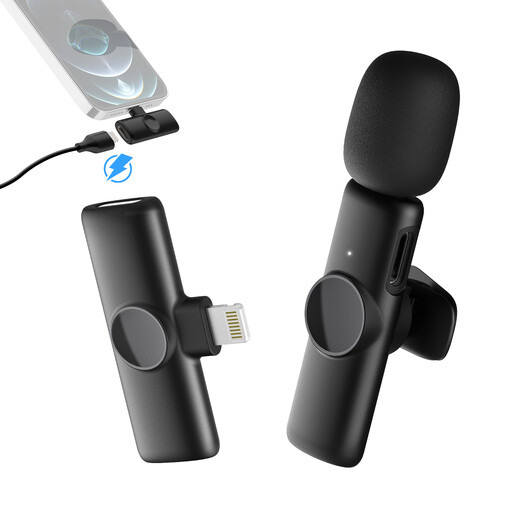
Moman MS1(A)【Lightning】 Wireless Lavalier Microphone, 1TX+1RX
For wireless voice recording with a compatible iPhone or iPad featuring a Lightning connector.
The product name lists Lightning and a 1TX+1RX configuration. If using it wirelessly in Germany, check the frequency band and technical requirements for the specific system.
Joybuy
 No image available
Moman MS1X(C) Wireless Lavalier Microphone for USB-C Android Phones, 2TX+1RX
A wireless option for compatible USB-C Android phones if you want to move around while recording.
The product name lists 2.4 GHz and a 2TX+1RX configuration. If using it wirelessly in Germany, check the frequency band and technical requirements for the specific system.
Joybuy
 No image available
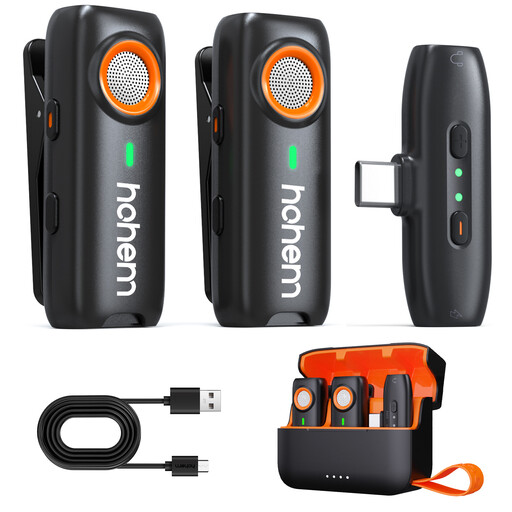
hohem Wireless Lavalier Microphone
Could suit wireless recording if you want to wear the microphone and have a local backup.
The product description mentions clip or magnetic attachment and TF card backup recording; the TF card isn’t included. If using it wirelessly in Germany, check the frequency band and technical requirements for the specific system.
Joybuy
Frequently asked questions
Will a lavalier microphone get rid of echo in my home studio?
No. Positioning the microphone close to your body can work well for voice recording, but room acoustics will still affect the result. Listen to a test recording from your planned recording spot and adjust the recording environment if needed.
Can I connect any 3.5 mm lavalier to my phone, regardless of the plug type?
No. RØDE specifies a TRS connection and plug-in power at the appropriate input for the Lavalier GO, while the smartLav+ uses TRRS for compatible smartphones. Check the socket, pinout and whether you need a suitable adapter for your specific device.
How can I prevent rustling when I gesture while recording?
Attach the capsule and cable to the clothes you’ll actually be wearing, then make a test recording using your usual movements. RØDE describes an additional cable loop as a way to reduce strain and minimise noise from movement.
What extra steps are involved with a body-worn recorder?
Allow for power, storage and transferring the files afterwards. Tascam’s DR-10L Pro manual describes recording audio separately, with files then transferred or edited. Tascam lists the model under discontinued products in its downloads section.
Can I use any wireless lavalier microphone in Germany without checking the frequency?
You can’t assume that every device is permitted. In Vfg. 37/2026, the Bundesnetzagentur lists frequency bands subject to technical and operational requirements. For short-range devices, it also refers to Vfg. 91/2025. Whether a particular set falls under these rules depends on its frequencies and technical specifications. Vfg. 37/2026 expressly repeals the earlier Vfg. 109/2025.


