Which switch is right for you?

A workspace with several LAN devices

If you want to connect your workstation, printer and other devices to the network by cable, count the available ports after connecting the switch to your router. NETGEAR’s GS305v3 has five Gigabit ports; the TP-Link TL-SG108E has eight.

Studio work with a local NAS

If you transfer large project files between your workstation and network storage, check the Ethernet ports on both devices. TP-Link and D-Link list five 2.5-Gigabit ports each for the TL-SG105-M2 and DMS-105. However, the number of ports alone doesn’t tell you how quickly files will transfer.

A noise-sensitive workspace

If your switch will be in your workspace or recording room, a model specifically described as fanless can help avoid adding fan noise. D-Link lists the DMS-105 as fanless; NETGEAR also describes the GS305E as fanless.

What should you look for when buying?

What matters when buying What to check Who should consider it?
Number of ports Count the router uplink and all the devices you need to connect at the same time, then compare the number of RJ45 ports. If I want to connect my router, workstation and peripherals at the same time, I need enough spare ports. Around 33% of consumers put having enough LAN ports first.
Speed between your workstation and NAS Check the Ethernet ports on both devices and the entire connection path; don’t confuse local file transfer speeds with internet speed. When working with large project files, I want my workstation and NAS to support the faster connection together. Around 27% of consumers prioritise fast local transfers.
Noise in your workspace Check that the specific model is explicitly described as fanless, and keep its ventilation areas clear. If the switch is in my workspace or recording room, I don’t want a fan adding to the noise. Around 20% of consumers prioritise a fanless workspace.
Network separation and management Check that the switch supports VLANs and that your router and other network equipment can be configured to work with them. If I want to manage my studio devices separately from the rest of my home network, I’m happy to take on the extra setup. Around 13% of consumers prioritise configurable network separation.
Power over Ethernet Match the PoE standard and power requirements of each device against the per-port limit and the total power budget. I want to power compatible devices through the network cable. Around 7% of consumers put PoE for compatible network devices first.

Avoid common buying mistakes

  • Planning to use all five ports for devices

    If the switch is connected to a LAN port on your router, one port on a five-port model will be taken up by that connection.

    Count the router uplink as one of the connections you need, then plan for your workstation and other devices.

  • Assuming 2.5 Gigabit guarantees faster file transfers

    The switch’s port speed alone doesn’t guarantee that project files will transfer at the same speed across your own network.

    Check your workstation, NAS and the whole connection path. Choose multi-gigabit for a local connection only when the devices involved also have suitable ports.

  • Assuming PoE can power any device

    A PoE switch only powers suitable, compatible devices. There are also limits for each port and for the shared power budget.

    Compare the PoE standard and power requirements of each device with the specifications for the switch you’re considering.

Notable brands and product ranges

TP-Link

The product ranges mentioned here include simple multi-gigabit connections, configurable Gigabit and PoE+.

  • TP-Link lists five 2.5-Gigabit ports and a fanless design for the TL-SG105-M2. The TL-SG108E has eight Gigabit ports and management features.
  • For the TL-SG1005P V5, TP-Link lists four PoE+ ports with a shared power budget of 65 W.
  • These features apply to the specific models and versions mentioned, not to every switch from the brand.

D-Link

The DMS-105 is an option if you need five multi-gigabit ports without configuration.

  • D-Link lists five 2.5-Gigabit ports and a fanless plug-and-play design for Revision A.
  • The port specification doesn’t guarantee a particular speed for real-world file transfers.

NETGEAR

The GS305v3 and GS305E are designed for basic and configurable Gigabit networks respectively.

  • NETGEAR describes the GS305E as fanless and lists VLAN support and other management features.
  • According to NETGEAR, the GS305v3 has no PoE budget; both models mentioned are Gigabit switches.

Ubiquiti

The UniFi Flex Mini 2.5G combines multi-gigabit ports with UniFi management.

  • Ubiquiti’s datasheet lists five 2.5-Gigabit ports and VLAN features.
  • Ubiquiti specifies UniFi Network version 8.6.9 or later for management. PoE can power this switch; the model isn’t listed as providing PoE output for five connected devices.

Joybuy products for your studio workspace

This selection includes Gigabit switches for adding LAN ports, as well as options for specific VLAN management or PoE requirements. The Gigabit ports listed here aren’t specified as 2.5-Gigabit connections for local multi-gigabit transfers.
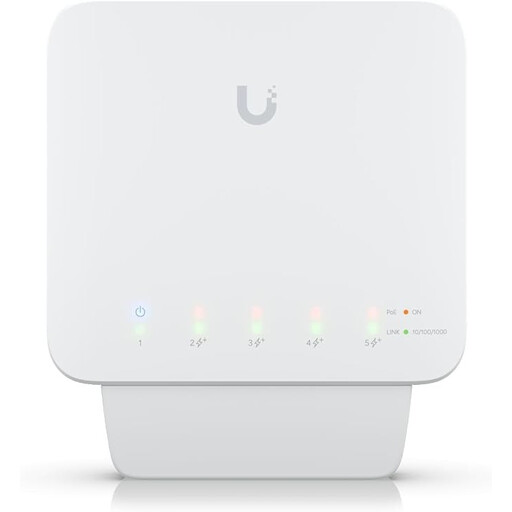
Ubiquiti UniFi Switch Flex USW-Flex, 5-port Gigabit PoE+, 46 W

Ubiquiti UniFi Switch Flex (USW-Flex), 5-port Gigabit PoE+, 46 W

A good fit if you want to connect several Gigabit devices and power compatible devices over PoE+.

Five Gigabit RJ45 ports, including four PoE+ outputs; up to 25 W per PoE+ port and a total power budget of up to 46 W with a suitable PoE++ or 60 W power supply.

You’ll need a compatible PoE++ source or a 60 W PoE adapter to use it; according to the product information, the adapter isn’t included.

View at Joybuy

Ubiquiti UniFi Switch Flex Mini USW-FLEX-MINI-EU, 5-port Gigabit

Ubiquiti UniFi Switch Flex Mini USW-FLEX-MINI-EU, 5-port Gigabit

A compact option for connecting several wired devices if you want to use VLAN features and configure the network yourself.

Five Gigabit RJ45 ports and VLAN features; powered via USB-C or 802.3af/at PoE.

The PoE port powers the switch; this model doesn’t provide PoE to connected devices.

View at Joybuy

D-Link DGS-1005P/E, 5-port Gigabit with 4 PoE+ ports, 60 W

D-Link DGS-1005P/E, 5-port Gigabit with 4 PoE+ ports, 60 W

A good choice if you need five Gigabit connections and want to power up to four compatible network devices over PoE+.

Four PoE+ ports, a shared PoE budget of 60 W, a fanless metal case and plug-and-play operation.

Check the power requirements of connected devices against both the total budget and the limits of each port.

View at Joybuy

D-Link DGS-1210-10/E, 10-port Gigabit Smart Managed Switch

D-Link DGS-1210-10/E, 10-port Gigabit Smart Managed Switch

An option for a workspace with lots of wired devices and a need to manage network features.

Ten connections in total: eight Gigabit RJ45 ports and two SFP slots; VLAN support and a fanless design.

The two SFP slots aren’t RJ45 ports. The RJ45 connections are Gigabit ports.

View at Joybuy

TP-Link TL-SG1008P, 8-port Gigabit with 4 PoE ports, 55 W

TP-Link TL-SG1008P, 8-port Gigabit with 4 PoE ports, 55 W

A good fit if you need more Gigabit connections than a five-port model offers and want to power compatible devices over PoE.

Eight Gigabit RJ45 ports, including four PoE ports; shared PoE budget of 55 W.

Compare the power requirements of your PoE devices with the shared budget and the limits of each port.

View at Joybuy

Frequently asked questions

How do I connect a switch in my studio workspace?

Connect a port on the switch to a LAN port on your router, then connect the other devices to the remaining ports you need. With a five-port model, one port is taken up by the router connection. According to manufacturers, basic unmanaged models don’t need to be configured.

Will a 2.5-Gigabit switch make my internet connection faster?

No. This rating describes the speed supported by the switch port; it won’t automatically increase the internet speed you pay for. For faster local transfers, the devices involved and the entire connection path must also support them.

What should I consider when setting up and maintaining my switch?

If noise is a concern, choose a model explicitly described as fanless and keep its ventilation areas clear. Check the power supply and connection cables for the specific model; a fanless switch doesn’t mean that other components won’t make noise.

Who should I contact if there’s a fault, and is a guarantee the same as your statutory rights?

For a consumer purchase, your statutory rights are generally a claim against the seller; a guarantee is separate and voluntary. The Verbraucherzentrale states that new goods are generally covered for two years from delivery and explains your right to have a faulty item put right. Check the terms of any additional manufacturer’s guarantee for the specific offer.

What labelling and disposal rules apply in Germany?

For electrical equipment covered by the relevant EU regulations, the manufacturer uses the CE mark to declare conformity; CE isn’t an independent quality mark. Don’t put an old switch in your household rubbish. The Umweltbundesamt recommends disposing of it separately, for example at a recycling centre or an appropriate take-back point.