
Lieferung heute & morgen

Qualitätsgarantie

Willkommens-Angebote freischalten: KOSTENLOSE Lieferung | Bis zu 80 % RABATT | Kostenlose 30-Tage-JoyPlus-Testphase
App herunterladen
The appeal of a mechanical keyboard that can be perfectly tailored to your preferences is undeniable. The ability to swap out switches without soldering—known as hot-swap—is at the heart of this trend. However, the market is flooded with models where not every feature advertised as "customisable" lives up to expectations. Before you make a decision, you should be aware of three common pitfalls that often lead to regrettable purchases.
To avoid these pitfalls and make an informed choice, you should focus on three core technical parameters. These define the durability, functionality, and customisation potential of your future keyboard.
The type of hot-swap socket is a fundamental quality indicator.
For a true custom keyboard experience, 5-pin compatibility is preferable as it ensures a wider selection of specialised switches and greater stability.
For users in English-speaking regions, a QWERTY Mechanical Keyboard is essential to maintain the standard key layout. Pay attention to the ANSI (US) or ISO (UK) layout depending on your preference. Furthermore, the form factor is crucial for ergonomics and desk space:
The mounting style significantly influences the typing feel and acoustics. The Gasket Mount structure is considered an advanced method in this regard. It involves isolating the PCB from the case using silicone gaskets. This results in a softer, more flexible keystroke and a more muted sound as vibrations are absorbed. Simpler tray-mount designs, where the PCB is screwed directly to the case, feel harder and sound louder in comparison.
Other features like a customisable RGB keyboard or a keyboard with a rotary knob for quick volume control can further enhance the user experience.
Based on the criteria mentioned, we have identified several models suitable for different user groups.

Why This Fits Their Persona: Offers premium features like a gasket mount and a rotary knob in a cost-effective, wired package. Ideal for users seeking a high-quality typing feel and a specific regional layout without paying extra for wireless options.
Features hot-swap sockets for 3-pin switches and a gasket-mount structure that provides a noticeably softer typing feel. The wired connection eliminates latency issues from the start.
Combines a German QWERTZ layout, gasket mount, and hot-swap capability in an accessible price range.
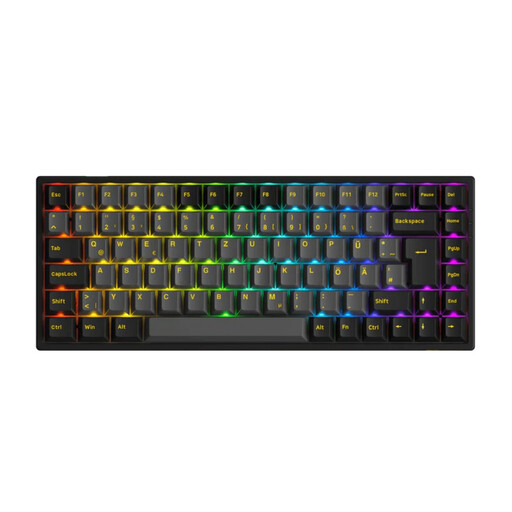
Why This Fits Their Persona: The 75% format with an ISO-DE layout is an ideal compromise between space-saving and functionality. Its tri-mode connectivity makes it a flexible choice for users who want to switch seamlessly between a work laptop and a gaming PC.
Delivers reliable wireless performance (2.4 GHz and Bluetooth) and supports 5-pin switches, making it future-proof for further customisation. The clear ISO-DE layout prevents frustration in daily use.
Compact 75% form factor with a full German QWERTZ layout (ISO-DE) and tri-mode connectivity.
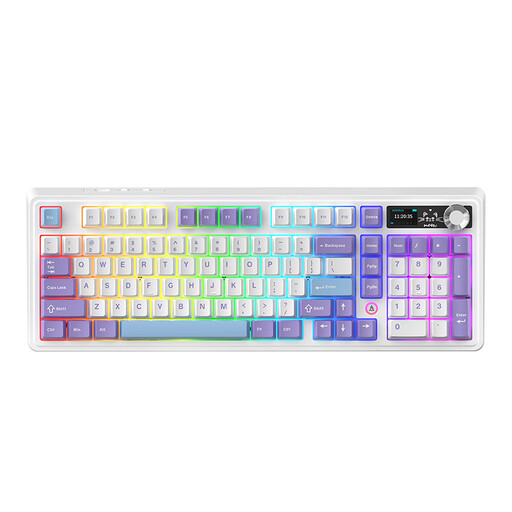
Why This Fits Their Persona: Perfect for users who demand maximum functionality and customisability. The tri-mode connectivity, large 10,000 mAh battery, and TFT screen cater to the desire for a high-end device for various use cases.
Provides a stable 2.4 GHz connection for low-latency gaming and supports both 3-pin and 5-pin switches for maximum flexibility. The five-layer sound-dampening structure ensures a defined acoustic profile.
Integrated TFT color screen for status display (e.g., battery, connection mode) and a multi-function rotary knob for advanced control.
We have compiled a complete, up-to-date list of products that fully meet these strict selection criteria and applicable regulations.
Hot-swap sockets are designed for a high number of change cycles, often several hundred times per socket. With proper handling—inserting and removing switches straight and carefully—the lifespan of the sockets is more than sufficient for most users in practice. Damage usually occurs from bent pins or applying too much force.
To swap them, you need two simple tools: a keycap puller to remove the keycap, and a switch puller to lift the underlying switch out of its socket. Many hot-swap keyboards include these tools in the box.
No, the hot-swap feature itself has no direct impact on the keyboard's latency or performance. The response speed is determined by the keyboard's polling rate and the type of connection. For competitive gaming, a wired connection or a 2.4 GHz wireless connection is always preferable to Bluetooth due to lower latency.