
Lieferung heute & morgen

Qualitätsgarantie

Willkommens-Angebote freischalten: KOSTENLOSE Lieferung | Bis zu 80 % RABATT | Kostenlose 30-Tage-JoyPlus-Testphase
App herunterladen
Finding the right mechanical keyboard can quickly become overwhelming. The market is saturated with technical jargon, exaggerated marketing claims, and features of questionable practical value. Many buyers invest in a premium model, only to discover a few months later that it doesn't meet their needs or has hidden flaws. As your Joybuy Product Recommendation Officer, I'm here to help you identify these pitfalls and make an informed decision based on objective criteria.
Before we dive into the key features, let's look at the three most common marketing traps that lead to buyer's remorse.
To find a keyboard that will satisfy you in the long run, you should carefully examine three technical aspects. These define the typing feel, functionality, and durability.
The mechanical switch under each key is the primary determinant of the typing and gaming feel. There are three main types:
For users in many regions, a local keyboard layout is essential for efficient work. For example, German users require a QWERTZ keyboard layout (ISO-DE) to easily access umlauts (?, ?, ?) and special characters. When selecting a product, explicitly check for your required layout (e.g., QWERTY, QWERTZ, AZERTY), as many models are offered in the standard American QWERTY layout by default.
Connectivity is another crucial factor. Modern keyboards often feature tri-mode connectivity:
The construction and materials used affect both the feel and the lifespan of a keyboard.
Here are some models that are well-suited for specific user groups based on objective features.

Why it's a great fit: Engineered for productive work environments. The quiet, low-profile tactile switches allow for precise typing without the noise of a typical gaming keyboard. Its multi-device connectivity via Bluetooth and the Logi Bolt receiver is perfect for working across multiple devices (PC, laptop, tablet).
This model forgoes aggressive "gaming" aesthetics, focusing instead on practical features. The battery life is transparently stated for use both with and without backlighting, setting realistic expectations.
Focus on quiet, tactile typing and seamless integration into multi-device workflows. The availability of local layouts like the German QWERTZ layout and its smart backlighting are optimised for professional use.
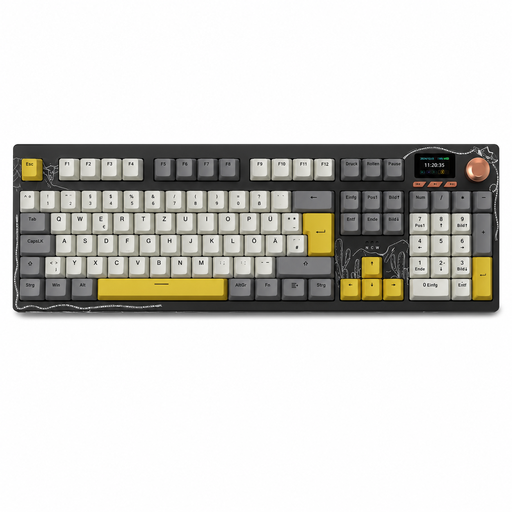
Why it's a great fit: This model combines a full-size layout with modern features. The tri-mode connectivity offers flexibility, while the TFT colour screen and rotary knob provide quick access to key functions. Ideal for gamers and power users who value control and customisation.
Instead of just focusing on RGB effects, the AK35I V4 offers tangible benefits like a hot-swap PCB for both 3-pin and 5-pin switches and a gasket-mount structure. These are features that provide real value beyond pure "gaming" marketing.
A combination of a full feature set (number pad, available in QWERTZ), modern features (TFT screen, rotary knob), and high customisability thanks to its hot-swap capability.
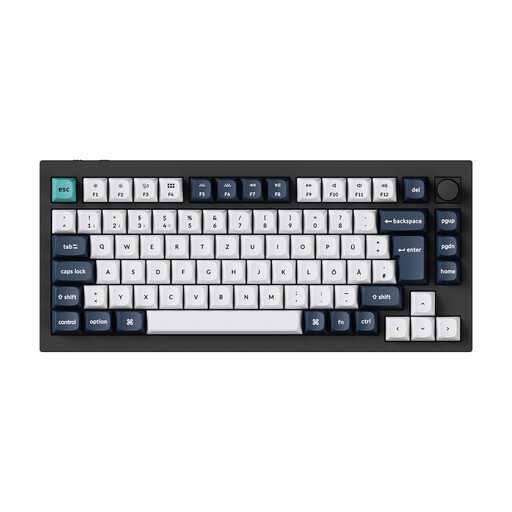
Why it's a great fit: The Q1 Max is a high-quality foundation for the custom keyboard hobby. A solid case made from 6063 aluminium, a double-gasket structure, and full programmability via QMK/VIA software provide enthusiasts with the platform they need for deep customisation.
This model addresses the "hot-swap trap" by offering a robust PCB designed for frequent switch changes. The entire construction is built for durability and modifiability, not for short-lived trends.
High-quality materials, thoughtful acoustic dampening, and full programmability make it a future-proof investment for anyone looking to personalise their typing experience down to the smallest detail.
We have compiled a comprehensive, up-to-date list of products that meet these strict selection criteria and comply with regional standards.
1. How long does a mechanical keyboard last? The lifespan of a mechanical keyboard is largely determined by its switches. Most mechanical switches are rated for 50 to 100 million keystrokes, which translates to many years of normal use. On models with a hot-swap feature, faulty switches can also be easily replaced individually, significantly extending the entire keyboard's lifespan.
2. Are mechanical keyboards always loud? No, that's a common misconception. The volume depends on the type of switch used. While "clicky" switches are intentionally designed to produce a loud click, linear and tactile switches are significantly quieter. Many modern keyboards, especially those with a gasket-mount structure and sound-dampening materials, are designed as a quiet mechanical keyboard and are well-suited for office environments.
3. What does QWERTZ mean and why is layout important?QWERTZ is the standard keyboard layout in Germany and Austria. The arrangement of the keys is adapted to the German language, particularly the positions of "Z" and "Y" and the dedicated keys for umlauts (?, ?, ?) and the Eszett (?). Just as QWERTZ is crucial for German speakers, other regions use different layouts like AZERTY in France or the widely-used QWERTY in the US and UK. Purchasing a keyboard with the correct layout for your region is essential for efficient typing and work, as many characters would otherwise only be accessible through cumbersome key combinations.