
Lieferung heute & morgen

Qualitätsgarantie

Willkommens-Angebote freischalten: KOSTENLOSE Lieferung | Bis zu 80 % RABATT | Kostenlose 30-Tage-JoyPlus-Testphase
App herunterladen
The search for a high-performance gaming laptop can quickly become overwhelming. Manufacturers advertise with impressive numbers and technical jargon, but not every specification delivers on its promises in practice. Many buyers invest in expensive hardware, only to find that performance throttles after a short time or that crucial details were overlooked. Before you buy an HP OMEN 16, it's critical to recognise the common marketing traps and understand which technical parameters truly matter.
This guide, created by your Joybuy Product Recommendation Officer, focuses on the objective criteria that define a reliable gaming notebook for AAA games. We'll highlight three common pitfalls and show you what to look for to make an informed decision.
To avoid these pitfalls, you should focus on three core areas. These determine the actual, sustained performance and user experience of your device.
A harmonious balance between the processor (CPU) and graphics card (GPU) is essential for a smooth gaming experience in current AAA titles. A configuration like an Intel Core i7 laptop combined with a gaming laptop RTX 4060 provides a very balanced foundation for Full HD gaming. The processor is powerful enough to consistently feed data to the graphics card, preventing a CPU bottleneck. This combination also offers enough performance headroom for parallel tasks like streaming or video recording.
An advanced cooling system is the key to stable performance. Look for features that go beyond standard fans. The OMEN Tempest Cooling system, for example, uses a Vapor Chamber. Unlike conventional heat pipes, a Vapor Chamber distributes heat over a larger surface area and dissipates it more efficiently from critical components like the CPU and GPU. This allows the laptop to maintain high and consistent performance without thermal throttling, even during hours-long gaming sessions.
A 16-inch 144Hz notebook display is a good standard for smooth gameplay. However, you should also pay attention to the following features:
Based on the criteria above, we have put together a selection of devices suitable for different user profiles.

Why This Fits Their Persona: This model is designed for gamers who want to play current AAA titles in Full HD with high frame rates. The combination of the Intel Core i7-13620H and RTX 4060 offers excellent, future-proof performance for demanding gaming.
The OMEN Tempest Cooling system with its Vapor Chamber actively prevents thermal throttling. The CPU/GPU pairing is balanced, and the 144Hz IPS display offers high quality that goes beyond just the refresh rate.
Advanced cooling system for stable performance; Balanced hardware for smooth Full HD gaming; Upgradability of RAM and SSD.

Why This Fits Their Persona: For users who not only game but also stream or edit videos. The Intel Core i7-14650HX delivers strong multi-core performance, while the RTX 4060's NVENC encoder offloads the system during streaming. The 16-inch, 16:10 aspect ratio display offers more vertical screen real estate for timelines and applications.
The dual-fan cooling system is designed for long, demanding tasks like rendering or streaming. The hardware is tuned not just for gaming but also for productivity applications, which minimises bottlenecks during video editing.
Strong multi-core performance for multitasking; 16:10 display for enhanced productivity; Large 1 TB SSD for extensive projects.
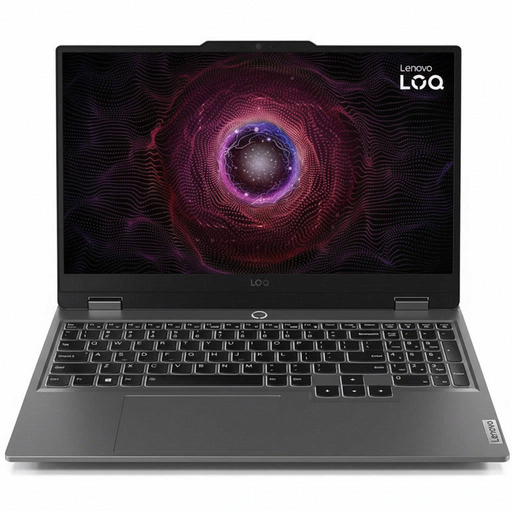
Why This Fits Their Persona: This notebook offers an affordable entry point into the world of modern gaming. The RTX 4050 is capable of rendering many current games in 1080p at solid frame rates, and the Ryzen 5 processor provides reliable everyday performance.
Instead of relying on exaggerated marketing features, this model focuses on balanced core hardware. It avoids the bottleneck effect that plagues many budget "gaming" laptops with poorly matched components.
Great entry point into RTX 40-series gaming; Solid price-to-performance ratio; 144Hz display for smooth visuals.
We have compiled a complete, real-time updated list of products that fully meet these strict selection criteria and German safety regulations.
Yes, upgradability is a key advantage of the HP OMEN 16. According to the product data, the HP 16-wd0474ng model has two SO-DIMM slots for RAM and two M.2 slots for SSDs. Typically, one M.2 slot is occupied, leaving another available for a storage expansion. This allows you to cost-effectively adapt the device to future needs.
Under a heavy load, such as when playing AAA titles, the fans will be audible. This is a normal and necessary process to cool the components effectively and ensure stable performance. However, using the pre-installed "OMEN Gaming Hub" software, users can select different performance profiles, including a quieter mode for less demanding tasks like web browsing or office work.
An RGB laptop keyboard offers more than just appealing aesthetics. The primary advantage is improved key visibility in low-light conditions. Additionally, per-zone or per-key illumination allows you to highlight important keys (e.g., WASD) with colour, which can make it easier to orient yourself in-game. In the OMEN Gaming Hub, the lighting can be customised and synchronised with other compatible devices.