
Lieferung heute & morgen

Qualitätsgarantie

Willkommens-Angebote freischalten: KOSTENLOSE Lieferung | Bis zu 80 % RABATT | Kostenlose 30-Tage-JoyPlus-Testphase
App herunterladen
The search for a new premium laptop can quickly become overwhelming. Especially with versatile devices like the HP OmniBook X Flip 16, manufacturers promote a plethora of technical specs and marketing buzzwords. However, not every advertised feature is truly relevant in daily use. This guide will help you identify the crucial characteristics and avoid common purchasing pitfalls, ensuring your investment pays off in the long run.
Before making a decision, it's important to critically examine common marketing promises. Many users invest in expensive features they either don't need or that are poorly implemented in practice.
To avoid these pitfalls, you should focus on a few critical technical specifications. These define the true performance and longevity of your device.
If you plan to buy an AI PC, the NPU is the most crucial component. Unlike the CPU (Central Processing Unit) and GPU (Graphics Processing Unit), the NPU is specifically optimised to accelerate machine learning algorithms. For example, an Intel Core Ultra 7 laptop with an integrated Intel AI Boost can run AI-powered features like real-time translations, background blur in video calls, or intelligent system optimisations directly on the device, without relying on a cloud connection. This not only preserves battery life but also protects your privacy.
For creative professionals and discerning users, a notebook with an OLED display is the superior choice. Unlike conventional LCD/IPS panels, OLED pixels do not require a backlight. The result is perfect black levels, an extremely high contrast ratio, and more vibrant colour reproduction. Look for the following specifications:
For a premium laptop experience, RAM and solid-state storage (SSD) are crucial. While 16 GB of RAM is sufficient for most everyday tasks, an HP laptop with 32GB RAM and a 1TB SSD is the better choice for power users, developers, and creatives. Fast LPDDR5x RAM enables seamless multitasking with numerous open applications. A PCIe 4.0 NVMe M.2 SSD ensures extremely short loading times for the operating system and programs, as well as fast file transfers.
The right choice of device heavily depends on your individual user profile. Here are some recommendations tailored to different requirements.
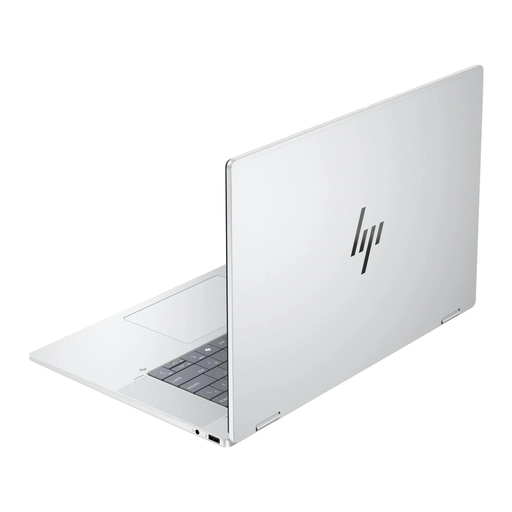
Why It's a Match: Ideal for users who need maximum performance and visual brilliance. The 3K OLED display with 120 Hz and the powerful combination of an Intel Core Ultra 7, 32 GB of RAM, and a 1 TB SSD effortlessly handle demanding graphics and video editing. The elegant silver design underscores its premium status.
Features a dedicated Intel AI Boost NPU, a true 3K OLED display with 100% DCI-P3, and a robust, sandblasted metal chassis for stability in any mode.
A combination of future-proof AI hardware and a reference-level display. Comprehensive connectivity with Thunderbolt 4 and Wi-Fi 7.
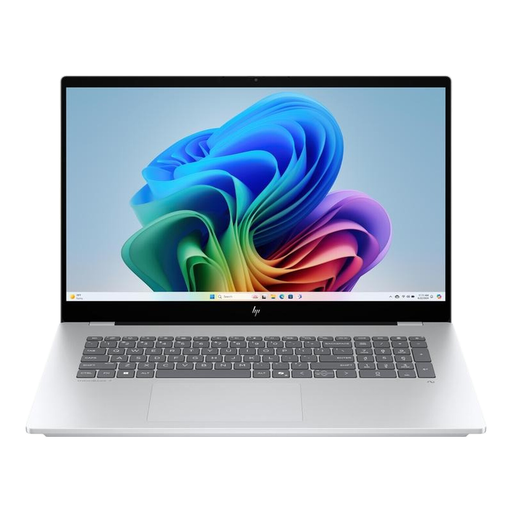
Why It's a Match: For professional users who need a large display and high reliability for daily business use. The 17.3-inch display offers plenty of screen real estate, while the dedicated RTX 4050 graphics card handles more demanding applications. Compliance with military-grade standards promises high durability.
It focuses on durability and balanced performance rather than a flexible convertible design. The bright IPS display is a solid all-rounder for office use.
Large 17.3-inch touchscreen and dedicated NVIDIA graphics for advanced use cases. Extensive port selection, including Thunderbolt 4.
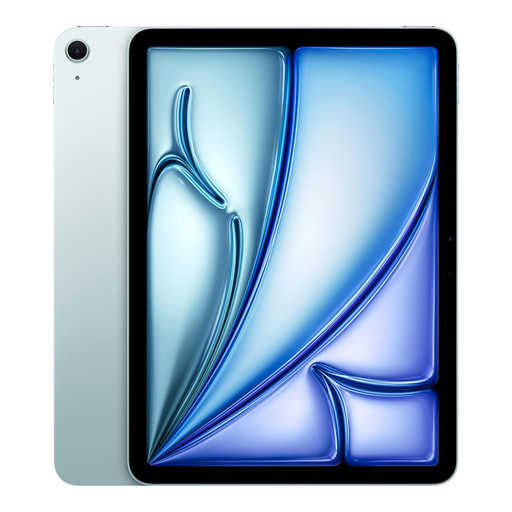
Why It's a Match: For users where mobility and intuitive touch operation are a priority. The iPad Air is extremely lightweight and, with the M3 chip and its Neural Engine, offers powerful AI performance for creative apps. Paired with the Magic Keyboard, it becomes a lightweight laptop alternative.
It sidesteps the issue of clunky convertibles with a design conceived from the ground up for mobile use. The Liquid Retina display is colour-calibrated and bright, while the M3 architecture ensures efficient AI performance.
Outstanding portability and a mature ecosystem of apps optimised for touch. Long battery life for a full day of mobile work.
We have compiled a complete, up-to-date list of products that fully meet these strict selection criteria.
1. What is the practical benefit of the NPU in the HP OmniBook X Flip 16 in daily use? The NPU (Neural Processing Unit) works in the background to increase efficiency. It accelerates features in Windows 11 like Live Captions for videos or optimisations for video conferences (e.g., background effects) without burdening the main CPU. This leads to better system responsiveness and longer battery life, especially when using AI-powered software.
2. How durable is the 360-degree hinge on a 16-inch convertible laptop like the OmniBook X Flip? Premium convertibles like the OmniBook X Flip typically use precision-engineered metal hinges designed to withstand tens of thousands of open-and-close cycles. They provide consistent resistance, keeping the screen stable in any position while still being easy to adjust. The chassis, made from sandblasted, recycled metal, further contributes to the overall torsional rigidity of the device.
3. Is a notebook with an OLED display suitable for long workdays, or is there a risk of burn-in? Modern OLED displays in laptops have built-in protection mechanisms to minimise the risk of burn-in (permanent image retention from static images). These include pixel-shifting technologies, which imperceptibly move pixels, and screen savers. According to HP, advanced algorithms are used to monitor pixel usage to maximise the panel's lifespan. With normal, varied use (word processing, web browsing, media consumption), the risk for modern devices is very low.