Who are reception robots suitable for?

Reception teams dealing with recurring questions

You want to supplement greetings and standard information, while making sure visitors can speak to a member of staff when they have more complex requests. The City of Düsseldorf documented the use of Pepper to provide directions and answer service-related questions in a library. This does not prove that it is suitable for every reception area on a permanent basis.

Showrooms offering visitor tours

You want to do more than greet guests: you also want to guide them along suitable routes to exhibits. PAL Robotics describes an ARI installation in Barcelona. The way it operates there does not prove that the model is suitable for another building or for use in Germany.

Operators of visitor areas where data privacy matters

You need to check which camera, voice and cloud features are actually enabled and how visitor data is processed. Before choosing a model, you need clear information about data flows and settings for the version of the model and software on offer.

What should you look for when buying?

Service and reception

Suitable if: greetings, frequently asked questions and on-screen information are your main priorities.

Consider: Voice and display features show that interaction is possible, but they do not guarantee the quality of every answer or continuous operation without supervision.

Visitor guidance with navigation

Suitable if: guests need to be guided to specific destinations along routes that have been checked and approved in advance.

Consider: Mapping, changing obstacles and handover to staff all need to be tested at the intended location.

Controlled camera and cloud features

Suitable if: your operating plan needs to limit the processing of visitor images or connections to external services.

Consider: Ask for written confirmation of which settings are available for the version on offer and which dialogue or navigation features depend on them.

Requirement What to look for when buying Who should pay particular attention
Clear information Check sample conversations in German, common and unexpected questions, how content is updated, the touchscreen and handover to staff. If you want the robot to answer frequently asked questions, you need clear, up-to-date information and a straightforward way for visitors to reach staff. Around 25% of consumers put answers to standard questions first.
Control over data For the specific version, ask about and check on the device the types of data collected, purposes, storage, recipients, remote access and separate ways to switch features off. If visitors or staff may be within the area being monitored, you need to understand how data is actually processed and what settings are available. Around 31% of consumers prioritise control over camera, voice and cloud data.
Visitor guidance Test planned routes, obstacles, stopping points and how to end a journey with the configuration on offer. If guests are to be guided around indoor spaces, you need to check the intended routes and how the robot handles changing levels of footfall. Around 19% of consumers put visitor guidance first.
Accessible operation Test ease of use, supported languages, content updates, support responsibilities and what happens if the network goes down. If a range of visitors will regularly interact with the system, you need suitable ways to use it and clear responsibilities for its operation. Around 25% of consumers prioritise continuous operation that is accessible and properly supported.

Common misconceptions when buying

  • The presence of a camera does not automatically mean that recording takes place or that its use is permitted.

    Which data is processed also depends on the software, settings and how the system is used. A list of sensors alone tells you neither how data actually flows nor what requirements apply to your use.

    Ask for a written description of the features enabled and data flows for the version on offer, then check them as part of acceptance testing.

    Configuration, documentation and checks for the specific use case may involve additional organisational work.

  • A demonstration at reception does not prove that the robot can guide visitors autonomously on an ongoing basis.

    Greeting visitors in a fixed location involves different requirements from travelling through areas with changing levels of footfall. Routes, obstacles and support from staff all need to suit the specific environment.

    Plan tours only along routes that have actually been tested, and decide how staff can take over or stop a journey.

    Mapping, ongoing route maintenance and staff handovers may create additional tasks during operation.

  • Multilingual product information does not guarantee suitable conversations in German.

    A documented use case or product description does not prove that the software version on offer will answer your visitors’ typical questions clearly.

    Test sample conversations in German with common and unexpected questions, and clarify who will update the content.

    Creating your own content and maintaining it over time may require additional workflows.

Brands to consider

UBTECH

The Cruzr 1S and Walker C1 product lines are described as supporting different types of reception and visitor interaction.

  • For Cruzr 1S, UBTECH lists greetings, dialogue, U-SLAM guidance and charging modes.
  • Details for Cruzr 1S cannot be applied to Walker C1. Manufacturer descriptions are not independent performance tests and do not prove suitability for continuous operation or confirm specific data flows.

PAL Robotics

According to its product description, ARI combines social interaction, a touchscreen and customisable content with documented navigation capabilities.

  • PAL Robotics describes editable screen content, speech and gestures; its navigation documentation lists autonomous navigation.
  • The reception report relates to an installation in Barcelona. The languages and procedures described there do not automatically apply to a product offered in Germany or to another location.

SoftBank Robotics

Pepper is a humanoid robot that uses speech and a screen. The City of Düsseldorf documented its use to provide directions and answer service-related questions.

  • The Düsseldorf report describes the robot’s role at the time in the entrance area of a library.
  • The case study does not prove current availability or suitability for continuous operation. Specifications on a Japanese product page should not be applied without checking that they also apply to a version offered in Germany.

Products for interactive visitor demonstrations

The selection below includes humanoid robots for speech-led or movement-based visitor demonstrations. Several are described as development platforms, so they are not automatically ready-made reception solutions. Before using a camera-equipped model, check how data is processed in the specific configuration.
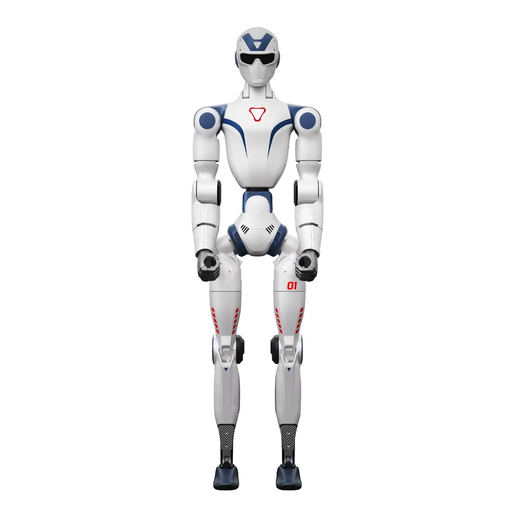
Unitree R1 Air humanoid robot with monocular camera and AI language model

Unitree R1 Air, 20 degrees of freedom

The built-in AI language model is described as supporting voice-controlled commands and conversations, which may be useful for an interactive demonstration.

The product title specifies a monocular camera and 20 degrees of freedom. Before using it in a public area, check the data protection requirements for the specific configuration.

The safety guidance advises against operating the robot near stairs, edges or uneven surfaces, and notes that it is not waterproof.

View on Joybuy
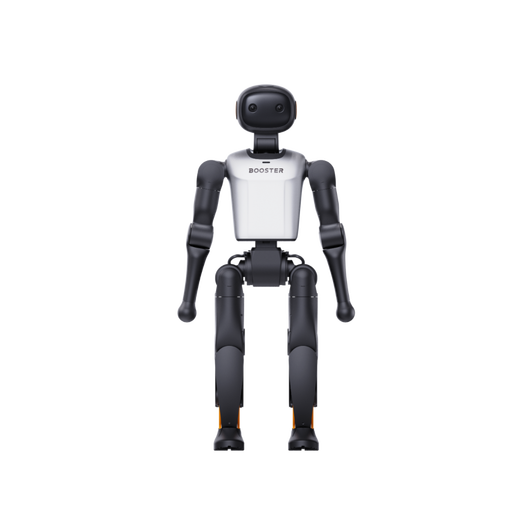
Booster Robotics K1 Geek humanoid development platform

Booster Robotics K1 Geek, 48 TOPS, 22-DoF

The description presents this humanoid platform for research, development and human-robot interaction experiments. Check whether it is suitable for your planned demonstration.

The product title specifies 48 TOPS and 22-DoF. The description also mentions experiments involving autonomous navigation.

View on Joybuy
Booster Robotics K1 Edu humanoid education and research platform

Booster Robotics K1 Edu, 117 TOPS, 22-DoF

The description highlights programmable interactions and movements for education and research, which may make it suitable for a development-focused visitor demonstration.

The product title specifies 117 TOPS and 22-DoF. The description also lists software APIs and development tools.

View on Joybuy
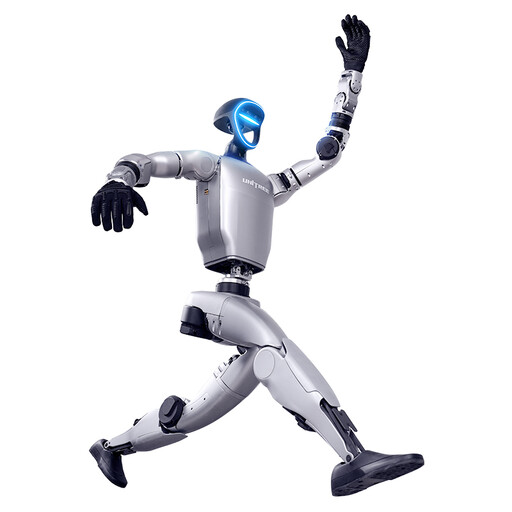
Unitree G1 humanoid robot for commercial demonstrations

Unitree G1, 29 degrees of freedom

The product description lists commercial demonstrations and interactive guidance as potential uses. Check how the robot will work in practice before planning to use it with visitors.

The title specifies 29 degrees of freedom in total and 16 degrees of joint freedom. According to the title, an SDK/API is not currently available for this version.

The safety guidance states that the product is not suitable for anyone under 14 and calls for particular care when children are present.

View on Joybuy
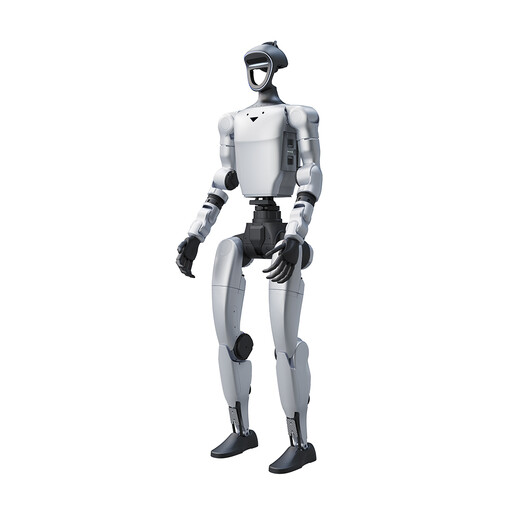
Unitree G1 Pro humanoid robot

Unitree G1 Pro, 29 degrees of freedom

The description lists entertainment, commercial demonstrations and interactive guidance as potential uses. This does not mean it is suitable for reception duties without supervision.

The product title specifies 29 degrees of freedom in total and 16 degrees of joint freedom.

The safety guidance states that the product is not suitable for anyone under 14 and calls for particular care when children are present.

View on Joybuy

Frequently asked questions

Is a sign at the entrance enough if a camera captures visitors?

A sign alone does not establish whether the specific use is permitted. For the actual configuration, check factors including the purpose, legal basis, data processing and information provided to the people affected. The German Data Protection Conference considers video surveillance on a case-by-case basis.

Do visitors always have to consent to the processing of their images?

Not necessarily; the appropriate legal basis depends on the purpose and the data processing involved. The German Data Protection Conference notes that simply entering an area marked as being under camera surveillance does not constitute informed consent.

What documentation should be checked before enabling features that process personal data?

For the specific processing involved, clarify and document the purpose, legal basis, information for the people affected and the actual data flows. Depending on the use, you may also need to check data processing agreements, data retention and deletion arrangements, and whether a data protection impact assessment is required.

What does a robot need to do to guide visitors at your location?

For the documented ARI navigation, a suitable map and the robot’s ability to locate itself are prerequisites. Test the planned routes, stopping points, obstacles and handover to staff at the intended location. A manufacturer’s claim about a different model is no substitute for this test.

Do voice controls and a touchscreen guarantee accessibility?

No. Voice and screen are possible ways to interact with the system, but they do not guarantee that the specific configuration has been assessed for accessibility. Test how easy it is to use with the visitor groups the reception area is intended for.