For supervised lessons on gestures, language and human–robot interaction, a compact platform such as NAO6 could be a good fit, provided its programming environment and supervision requirements suit the course. For university practicals involving custom software, sensor access and simulation, more open development platforms such as Unitree R1 EDU may be worth considering. However, before operating the robot in motion, you’ll need to check the documentation for the exact variant, the space available and the supervision arrangements. If you’re only teaching programming fundamentals, a humanoid form isn’t a necessary learning objective.
Which teaching format is right for you?
Teaching teams running supervised interaction sessions
You want to demonstrate language, gestures and sensor-based tasks repeatedly, or give groups the chance to work on them. This calls for reliable supervision, a suitable area for the robot to stand and clear procedures for transport and charging.
University teams running programming practicals
Here, the robot itself is the focus of the development work: students are expected to work with interfaces, simulation or sensors. This requires technical support, a suitable area for movement and access to the required model variant.
Course leaders with limited time for operation
When there’s little time for setup and supervision, the day-to-day running of the robot is a key factor in whether it’s practical to use. Sort out transport, charging times, supervision, network access and data functions before planning ambitious movement or AI projects.
What matters when choosing?
First decide whether physical interaction or developing your own robotics software is the learning objective. You can then check which programming features and operating conditions the specific variant requires.
Compact interaction robot
A good fit for: Supervised lessons where gestures, language and human–robot interaction are to be explored in a hands-on way. Maxtronics Robotics SAS lists Choregraphe, as well as SDK and API access, for NAO6.
Bear in mind: Maxtronics requires children under 14 to be supervised by a responsible adult who has read and understood the safety instructions.
Open development platform
A good fit for: University practicals covering interfaces, control and simulation. Unitree Robotics describes open joint and sensor interfaces for R1.
Bear in mind: Development features depend on the R1 EDU variant. Before testing the robot in motion, your institution will need safety documentation for the exact model and an appropriate operating plan.
| Requirement |
What to check before buying |
Who it matters to |
| Programming environment |
Check which licences and examples are included, and whether the languages and SDK access required for the course are available. |
If learners are just starting out with programming, I need activities they can follow during the course. Around 27% of consumers would rank a suitable introduction to coding as a priority. |
| Development and simulation |
For the exact variant, check that sensor access, programming level and simulation integration match the practical exercises. |
If students are expected to develop their own controls or sensor processing, I need usable interfaces, not just demonstration features. For around 33% of consumers, this development work would be the main focus. |
| Safe operation during lessons |
Get model-specific guidance on supervision, movement areas, transport and charging. |
For regular lessons, I need to be able to set up, move and put away the robot safely. Around 20% of consumers would prioritise an operating routine that’s easy to manage. |
| Interaction and data |
Check how the humanoid form supports the learning objective, and which camera, audio and network functions are enabled. |
If the class is exploring body language or dialogue, I want to demonstrate the interaction without overlooking data flows. Around 20% of consumers would put this interaction objective first. |
Which planning mistakes can you avoid?
-
Choosing a variant based on the model name alone
According to the product listings from reichelt elektronik, R1 EDU variants differ in their development and equipment features. A practical course involving students’ own code needs the right version for the job.
Before ordering, make a note of the programming level, simulation, sensors and, where relevant, hand functions that the course will actually use.
Changing variants later or buying additional hardware can also add to the course preparation workload.
-
Confusing the humanoid form with a learning objective
A robot with a moving body doesn’t, by itself, make clear what learners should be able to programme or understand by the end. For tasks unrelated to movement or interaction, a less complex robotics platform may also be suitable.
Start by setting a task with a clear, observable outcome, such as studying a movement sequence or designing a dialogue. Then consider how the humanoid form contributes to it.
Setup, supervision and troubleshooting all take up lesson time, so you’ll need to allow for them in the course plan.
-
Leaving space and supervision arrangements until after delivery
Moving joints, transport and charging all need clear procedures. Maxtronics’ safety guidance for NAO6 should not be treated as guidance for a different platform.
Request documentation for the exact model and plan the movement area, responsible supervision, storage location, transport and response to malfunctions before use.
-
Enabling the camera and microphone without checking data flows
Processing personal data may be relevant when using image, voice or connected AI features. In its guidance on AI systems from June 2025, the Data Protection Conference highlights such data and the potential risks.
Before the course, check the purpose of the functions, which features are enabled, how data flows and what your institution requires. For the NAO V6 use it describes, Kaiserslautern University of Applied Sciences lists a Wi-Fi network as a requirement for remote control, camera feeds and voice signal monitoring.
An overview of relevant platform manufacturers
Maxtronics / NAO
NAO6 is a compact humanoid platform for supervised interaction and programming tasks. Maxtronics Robotics SAS lists a height of 58 cm, 25 degrees of freedom, and access to Choregraphe and the SDK/API.
- The manufacturer’s documentation sets out procedures for safe transport and charging, and European NAO6 customers have access to a support contact.
- Maxtronics requires children under 14 to be supervised by a responsible adult. Moving parts and the potential use of image or audio data should also be covered in the operating plan.
Unitree
R1 EDU and G1 EDU are variants for development tasks with technical support. Unitree Robotics describes open interfaces for R1; listings from reichelt elektronik show that EDU versions differ in development and hardware features, among other things.
- For practical courses, programming, sensor access and simulation can be checked as specific selection criteria for each variant.
- Features are not the same across all variants. Before using the robot in lessons, you’ll need complete safety guidance for the chosen model and planned movements.
ROBOTIS
ROBOTIS describes OP3 as a smaller humanoid platform for educational and research activities. The manufacturer’s tutorials cover Linux and ROS2 workflows, among other topics.
- The documented technical learning paths may be relevant to advanced courses involving learners’ own robotics software.
- Before buying for an institution in Germany, check sales and support arrangements, spare parts and the documentation supplied with the specific device.
Products for development and project courses
These two humanoid platforms are most suitable for courses involving development work or interaction with a physical robot. For each course, check that the programming tools, support and operating conditions all meet your needs.
 No image available
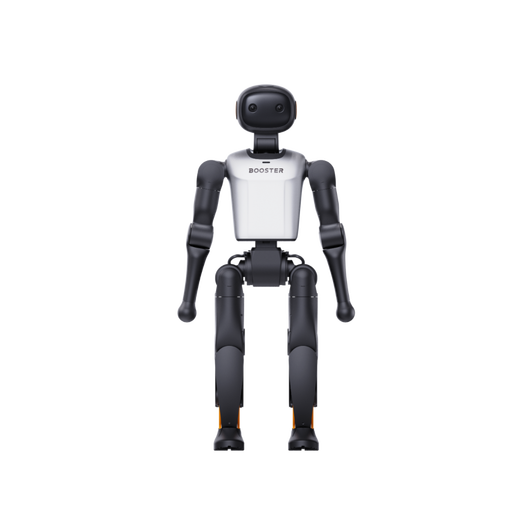
Booster Robotics K1 Edu Humanoid Robot
The K1 Edu may be worth considering for a course involving software development on a humanoid system. The product title lists 22 degrees of freedom and 117 TOPS; before buying, check which programming environment and teaching materials are suitable for your planned course. Also request the safety, charging and operating instructions for the exact model.
View at Joybuy
 No image available
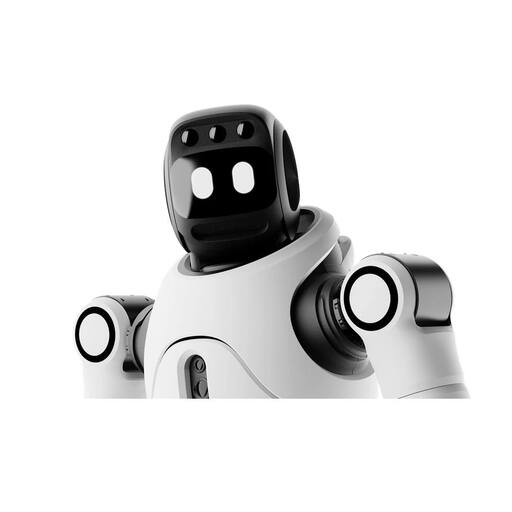
AGIBOT X2 Ultra Humanoid Robot
The X2 Ultra may suit university projects involving further development, provided they have technical support; the product title mentions secondary development. The product listing specifies a minimum distance of 2 m during operation, with supervision, and warns against allowing children near the robot while it is running. Before buying, check the exact development environment and plan its use in line with the documentation for this variant.
View at Joybuy
Frequently asked questions
Does a coding course need a humanoid robot?
No. A humanoid form isn’t essential for teaching programming fundamentals. It becomes part of the task when learners are exploring things such as gestures, interaction or the link between software and body movement.
What supervision does NAO6 require for younger learners?
For children under 14, Maxtronics Robotics SAS requires a responsible adult to supervise their safety and to have read and understood the safety instructions. You’ll need to check the manufacturer’s guidance for other robot models.
How should NAO6 transport and charging be planned?
According to the Maxtronics Robotics SAS user manual, NAO should be put into Rest mode for transport or when changing position; the documentation describes charging it in a crouched position. Also decide who will handle these steps during the course and where the device can be stored safely.
Can the camera, microphone and AI features be switched on during lessons?
There’s no blanket approval. For the features you actually plan to use, check their purpose, data processing and network access, as well as your school or university’s requirements. In its June 2025 guidance, the Data Protection Conference addresses personal data and potential risks associated with AI systems.
Can private individuals buy the Unitree R1 EDU U3 on offer?
The specific listing from reichelt elektronik states that delivery is only available to businesses, institutions and public authorities. If you’re buying for a school or university, check the requirements for this listing; they don’t establish a general purchasing rule for other retailers or models.


