A traditional laptop is enough for writing long passages and making digital edits, as long as its keyboard and word-processing software suit the way you work; you don’t automatically need a stylus. A convertible is worth considering if you want to annotate illustrations directly on screen. If so, check stylus compatibility and what’s included with the exact configuration. If you regularly edit images, also check the requirements of your specific software, available storage and how you’ll back up your files separately.
Which laptop is right for you?
Writers working on long drafts and revisions
If you write longer passages and need to keep track of edits or comments, a comfortable keyboard and the features in your word-processing software matter. Microsoft Support explains how to track changes in Word; you don’t need a touchscreen or stylus to edit text digitally.
Image editors who make handwritten notes
If you want your notes to sit alongside an illustration or at a specific point on a page, check that the exact device configuration supports a compatible stylus. Lenovo notes that the stylus for the Yoga model in question is optional and sold separately.
Field guide writers who work on the move
If you regularly carry your laptop and image files around, weigh up screen size, weight, ports and power options. Also decide early how you’ll back up drafts and images separately from your laptop; the German Federal Office for Information Security recommends regular backups.
What should you look for when choosing?
Traditional laptop
A good fit if: you mainly write and make revisions in a word-processing application.
The trade-off: The laptop configurations described don’t confirm stylus input for handwritten annotations directly on images.
Convertible
A good fit if: you want to use a stylus to work directly on illustrations or pages on screen.
The trade-off: A touchscreen alone doesn’t confirm stylus compatibility or that a stylus is included.
| What matters |
What to check before buying |
Who is this particularly important to? |
| Long-form writing and revisions |
Check the keyboard layout and display on the exact device. Confirm which word-processing application and change-tracking features you’ll need for your shared workflow. |
If I’m writing long chapters and need to keep track of edits, the right writing and software setup matters to me. Around 28% of consumers put text revision first. |
| Handwritten notes on images |
Check stylus support and what’s included against the full model number; test how annotations work in the application you use. |
If I want my notes to sit directly alongside an illustration, input with a compatible stylus is essential. Around 22% of consumers prioritise handwritten notes on images. |
| Image editing |
Check the operating system, RAM, graphics and available SSD space against the requirements of your specific application. For Photoshop Desktop version 27.x and later on Windows, Adobe lists 8 GB RAM as the minimum and at least 16 GB as recommended. |
If I regularly edit photos or scans digitally, the configuration I choose needs to suit my image software. Around 22% of consumers put image editing first. |
| Working on the move |
Weigh up the laptop’s weight, including any accessories you’ll need, its ports and battery life against your own workflow. The manufacturer’s battery-life figures aren’t a measure of how long it will last in your own use. |
If I often take my laptop and drafts with me, I want to strike the right balance between carrying weight and usable screen space. Around 17% of consumers prioritise frequent travel with their device. |
| File backups |
Think ahead about how you’ll regularly back up and restore text and image files separately; check which ports or adapters you’ll need for the exact configuration. |
If losing my drafts and images would be a major risk, a reliable backup routine is part of choosing the right laptop. Around 11% of consumers put backing up their work first. |
Avoid common assumptions
-
A touchscreen doesn’t automatically mean a stylus is included
A compatible stylus is important if you want to make handwritten notes on images. Lenovo describes the stylus for the Yoga model in question as optional and sold separately.
Before ordering, check the full configuration, stylus compatibility and the accessories actually listed as included.
-
Don’t assume a power adapter or accessories are included
For the documented OmniBook X Flip 14-kb0752ngx, HP lists the power adapter as sold separately.
Check what’s included and make sure the power supply you need matches the details for the exact variant.
-
Don’t assume manufacturer battery-life figures reflect your working day
The battery-life figures given by ASUS and Apple are manufacturer estimates, not measurements taken while writing and editing images as described in this article.
Compare battery-life figures only with their respective test conditions in mind, and make sure you have a suitable power source for longer periods of mobile working.
-
A large SSD isn’t a backup
Text and images saved locally can be lost. The German Federal Office for Information Security recommends regular backups and checking that you can restore your files.
Set up a backup separate from your laptop at the start of each project, and test that you can restore your files.
Key brands at a glance
Lenovo
The Yoga 7 2-in-1 Gen 10 (14-inch, AMD), configuration 83JR000PGE, is a convertible option with touchscreen controls.
- For this configuration, Lenovo lists a 360-degree hinge, 32 GB of soldered RAM and a 1-TB SSD.
- Lenovo says the stylus is optional and sold separately; check compatibility and what’s included with the exact variant.
HP
According to HP, the OmniBook X Flip 14-kb0752ngx combines touchscreen controls with a laptop keyboard.
- For this variant, HP lists a 14-inch OLED touchscreen, 16 GB RAM and a 512-GB SSD.
- The product page lists the power adapter as sold separately. Also check stylus compatibility and what’s included with the exact configuration.
ASUS
The Zenbook 14 OLED UX3405MA is a traditional laptop for writing and reviewing images on the move.
- For the product variant in question, ASUS lists a 14-inch OLED display and a weight of 1,2 kg.
- The stated battery life of up to 15 hours is a manufacturer estimate, not a measurement taken while editing images. Stylus input isn’t confirmed.
Apple
The 13-inch MacBook Air with M5 is a macOS option, provided the text and image applications you need are available for it.
- For the base configuration shown, Apple lists 16 GB of unified memory, a 512-GB SSD and a 13,6-inch display.
- The stated battery life of up to 18 hours is a manufacturer estimate. Check that your software is compatible and that the ports suit your workflow.
Our laptop picks on Joybuy
This selection includes traditional laptops for longer writing and editing sessions, as well as a convertible for working directly on screen. For each model, check that the exact specification suits your text and image software.
 Image unavailable
Acer TravelMate TMP216-41-TCO, 16-inch
A traditional laptop option for longer writing sessions and text and image files stored locally.
16-inch WUXGA IPS display, AMD Ryzen 3 PRO 7335U, 16 GB DDR5 and 512-GB SSD.
The description lists Windows 11 Pro Education, as well as USB4, USB-A, HDMI 2.1 and RJ-45.
View on Joybuy
 Image unavailable
HP OmniBook Ultra Flip 14-fh0670ng, 14-inch
A convertible for workflows where you want to work directly on screen, too.
The product details list a 14-inch 2.8K OLED touchscreen, Intel Core Ultra 7 258V, 32 GB RAM and a 1-TB SSD.
The description lists an included stylus and laptop, tablet, stand and tent modes; check these details for the configuration on offer.
Windows 11 Home; stated weight: 1,34 kg.
View on Joybuy
 Image unavailable
HONOR MagicBook X16 AMD 2025, 16-inch
A traditional laptop option for writing on a German-layout keyboard and storing files locally.
AMD Ryzen 5 6600H, 16 GB RAM and 512-GB SSD.
The product name specifies a German keyboard layout.
View on Joybuy
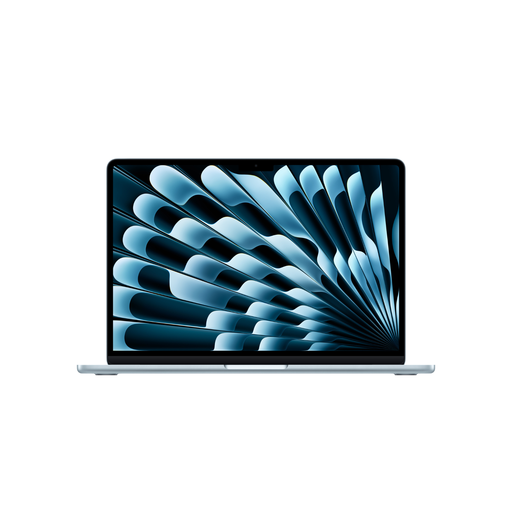 Image unavailable
Apple 15-inch MacBook Air M5, 2026
A macOS option for keyboard-based writing and image workflows, provided your applications are compatible.
16 GB of unified memory and a 512-GB SSD; the description lists a 15,3-inch display and a weight of 1,51 kg.
German QWERTZ keyboard. The description says a power adapter isn’t included and must be purchased separately.
View on Joybuy
 Image unavailable
Apple 13-inch MacBook Air M5, 2026
A more compact macOS option for keyboard-based writing and image workflows, provided your applications are compatible.
16 GB RAM and a 512-GB SSD; the description lists a 13,6-inch display and a weight of 1,23 kg.
German QWERTZ keyboard and two Thunderbolt 4 ports. The description says a power adapter isn’t included and must be purchased separately.
View on Joybuy
Frequently asked questions
Do I need a touchscreen to make revision notes?
No, not if you’re adding text comments or tracking changes. Microsoft Support documents these features in Word. If you want to write notes directly on images, however, it depends on whether the exact device configuration supports a compatible stylus.
How should I back up text and images?
Regularly back up files you’ve created to a suitable separate device or a backup service you’ve chosen carefully, and check that you can restore them. The German Federal Office for Information Security recommends regular backups.
Which accessories should I check before buying?
Check that what’s included with the exact variant suits your workflow, especially the power adapter, a compatible stylus and any adapters you need. For the documented OmniBook X Flip 14-kb0752ngx, HP lists the power adapter as sold separately; Lenovo describes the stylus for the Yoga model in question as optional and sold separately.


