
Lieferung heute & morgen

Qualitätsgarantie

Willkommens-Angebote freischalten: KOSTENLOSE Lieferung | Bis zu 80 % RABATT | Kostenlose 30-Tage-JoyPlus-Testphase
App herunterladen
Choppy video conferences, buffering streams, or dead zones upstairs? Unreliable Wi-Fi can significantly disrupt your daily digital life. The causes are varied, ranging from outdated hardware to structural issues like thick walls or multiple floors. The search for a solution often leads to a confusing array of routers, extenders, and systems.
This article provides a practical guide to optimizing your home network. We'll explain the differences between the available technologies and introduce select devices that can help you achieve stable Wi-Fi for your home.
Before making a purchase, it's helpful to understand the basic device types and technologies. The right choice depends on your living situation, the number of devices you have, and your usage requirements.
The three main categories for improving Wi-Fi have different use cases:
Wi-Fi 6 (also known as 802.11ax) is the current Wi-Fi standard. It was designed to improve efficiency in environments with many simultaneously connected devices. Compared to its predecessor, Wi-Fi 5 (802.11ac), it offers higher theoretical speeds and better traffic management. If your household has numerous smartphones, laptops, smart TVs, and smart home devices online at the same time, a Wi-Fi 6 router or a corresponding mesh system can noticeably improve your network's stability and responsiveness.
Pay attention to the available ports. Gigabit LAN ports are standard for fast wired connections, which are beneficial for stationary devices like PCs, gaming consoles, or Network Attached Storage (NAS). If you're considering a new router, such as a FRITZ!Box, check its compatibility with your internet connection (e.g., DSL, cable, or fiber). Most devices are universally compatible, but models with an integrated modem, like the FRITZ!Box 7590 AX, are specifically designed for DSL connections.
Here we present three different hardware solutions designed for various use cases.
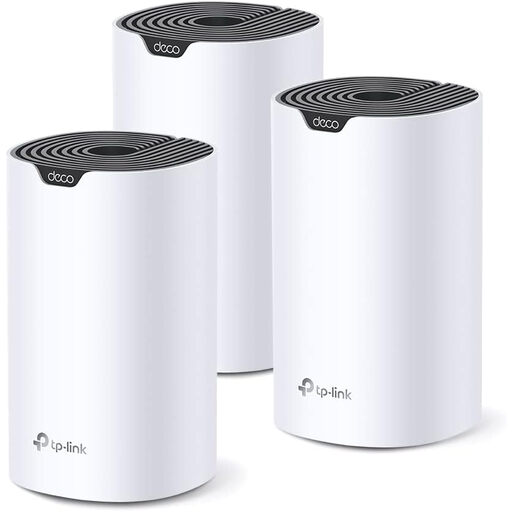
Why it stands out The TP-Link Deco S7 is a complete mesh Wi-Fi system, consisting of three units to ensure comprehensive Wi-Fi coverage. The units work together to create a single, unified network that enables seamless roaming. With the AC1900 standard, it offers higher performance than common AC1200 systems, according to the manufacturer, and is designed to handle over 100 connected devices simultaneously.
Advantages
Who is it for? This system is a great choice for users in larger apartments or houses who struggle with multiple dead zones and need stable, continuous coverage for many devices, such as families or shared living spaces.
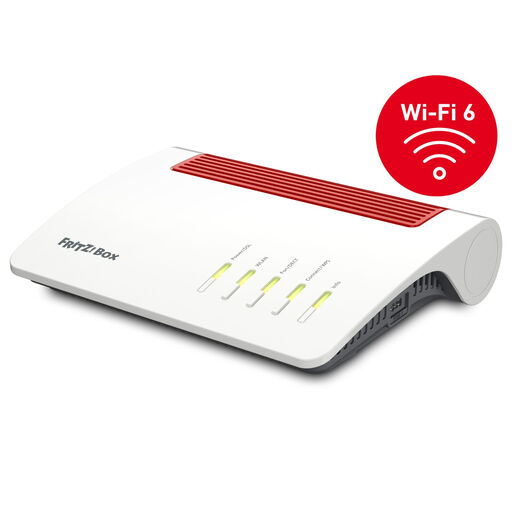
Why it stands out The FRITZ!Box 7590 AX is a powerful hub for the home network, combining a router and a DSL modem in one device. It supports Wi-Fi 6 for high speeds and efficiency, as well as VDSL supervectoring 35b for internet connections up to 300 Mbps. As a FRITZ!Mesh master, it can be seamlessly expanded with FRITZ!Repeaters to create a mesh system. Additional features, like an integrated DECT base for cordless phones and smart home control, make it a versatile all-in-one solution.
Advantages
Who is it for? Users with a DSL connection who are looking for a powerful and feature-rich hub for their home network. Anyone who wants to buy a FRITZ!Box to replace their provider's standard router and benefit from additional features like telephony and smart home capabilities will find this a suitable option.
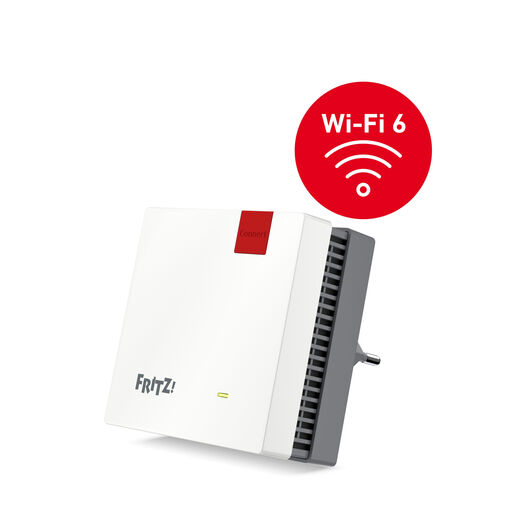
Why it stands out The FRITZ!Repeater 1200 AX is a compact Wi-Fi extender that supports the modern Wi-Fi 6 standard. It is designed to easily and efficiently extend the range of an existing Wi-Fi network. When combined with a FRITZ!Box, it integrates seamlessly into the FRITZ!Mesh to ensure a stable connection. Setup is straightforward via the push of a button (WPS).
Advantages
Who is it for? This device is suitable for users who already have a good router (especially a FRITZ!Box) but want to specifically provide a stronger Wi-Fi signal to a particular area, such as a home office or a patio.
If these recommendations don't include the perfect solution for your specific needs, you can find a wider selection of devices to optimize your home network in our Mesh Systems category.
1. What is the difference between a Wi-Fi extender and a mesh system? A Wi-Fi extender (repeater) picks up your router's signal and rebroadcasts it. This can increase range but often results in a loss of speed and may create a separate network or require a manual connection. A mesh system consists of multiple nodes that form a single, large Wi-Fi network. Your devices automatically and seamlessly switch to the strongest signal point, which provides more stable and consistent coverage.
2. Will a new router automatically improve my internet speed? A new router cannot increase the speed that reaches your devices beyond the bandwidth provided by your internet service provider. However, if your old router is a bottleneck and cannot handle the speed you're paying for, a new, more powerful router (e.g., one with Wi-Fi 6) can significantly improve Wi-Fi performance within your home and ensure that the full speed of your connection is utilized.
3. How do I set up a new Wi-Fi system? Most modern routers, repeaters, and mesh systems are designed for easy setup. Typically, you connect the main unit to your modem or phone jack with a cable, plug it into a power source, and follow the instructions in a smartphone app or web interface. For repeaters, a simple push of a button (WPS) is often enough to connect them to the router.