Walkers crossing roads
If you need to cross roads or watch out for cyclists while listening to directions, you’ll need to balance clear instructions with awareness of your surroundings.


When walking near traffic or crossing roads, awareness of your surroundings should take priority over maximum isolation; the German Road Safety Council advises against wearing headphones while walking. On quiet routes separated from traffic, a well-fitting monitor with passive isolation can make quiet speech easier to understand. However, neither an ambient sound filter nor a particular fit guarantees that you will hear warning signals.
If you need to cross roads or watch out for cyclists while listening to directions, you’ll need to balance clear instructions with awareness of your surroundings.
If you want to make out softly spoken sections, try checking the fit and ear tip size first rather than turning up the volume across the board.
If you notice hiss or fluctuating volume between spoken sections, assess the monitor alongside your own recording and playback device.
Best suited to: Listening mainly on quiet routes separated from traffic, and looking for a well-fitting monitor.
Consider: A tighter seal can also make bicycle bells and vehicles less audible. Shure quotes up to 37 dB of noise reduction for the SE215 with the right ear tips. This is a manufacturer’s claim, not a measurement taken on a walking route.
Best suited to: If you want to hear outside sounds alongside the monitor signal.
Consider: The filter still reduces outside noise, so there’s no guarantee you’ll hear warning signals. Westone describes the AM Pro X10 for stage use, not for any particular walking route.
Best suited to: If fit, a compatible device connection and, where needed, controls on the cable are important to you.
Consider: Fit and isolation vary from person to person. Check the connection on your playback device, and if you later replace the cable, check the connector type on the earpiece too.
| Priority | What to check before buying | Who it matters most to |
|---|---|---|
| Understanding quiet speech | Try different ear tip sizes and check the fit with your own recording; don’t assume the manufacturer’s isolation claims will apply on your route. | If I want quiet sections to remain clear at a comfortable volume, fit and the right ear tips are my priorities. Around 25% of consumers prioritise this. |
| Being aware of traffic | Check whether outside sounds come through and whether you can quickly pause playback before crossing; don’t rely on a filter alone. | If I need to watch out for vehicles and warning signals while walking, awareness of my surroundings is essential. Around 25% of consumers put this first. |
| Fit and comfort | Check the ear tip sizes supplied with the specific version and try the fit before wearing it for a long time. | For longer walks, I want a secure, comfortable fit without treating the seal as a guarantee that I’ll be aware of my surroundings. Around 20% of consumers prioritise fit. |
| Hiss between spoken sections | Test your own recording on your own playback device at a comfortable volume, and assess the whole audio chain. | If noise between directions bothers me, I want to work out whether it’s coming from the recording or the audio source. Around 15% of consumers focus mainly on quiet pauses. |
| Connections and cable replacement | Check that the device connection, model version, what’s included and the connector type on the earpiece all match. | If you want to use your existing device connection and choose a compatible replacement cable, check both connectors. Around 15% of consumers prioritise connections and replaceability. |
A tighter seal can also make bicycle bells and approaching vehicles harder to hear.
Take your route and any road crossings into account when choosing. Pause playback before crossing and focus on your surroundings. The German Road Safety Council advises against wearing headphones while walking.
Shure notes that sensitive earpieces can make electronic background noise from a connected audio source audible.
Test your own recording on your own playback device at a comfortable volume before attributing the noise to the monitor.
FiiO notes that the JD1 cable does not fit certain other connector types, despite being described as 0.78 mm.
Before buying, compare the connection on your specific earpiece with the replacement cable’s compatibility.
An incompatible replacement cable could mean you have to make an additional purchase.
The wired SE215 is a stage monitor with strong passive isolation, a choice of ear tips and a replaceable MMCX cable.
The AM Pro X10 is a stage IEM with a passive filter for ambient sounds.
In the documented version, the wired IE 200 has a 3.5 mm plug, an MMCX cable, adjustable ear hooks and a choice of ear tips.
One documented version of the JD1 has a 3.5 mm cable, microphone, controls and a replaceable 2-pin cable connection.
The CHU II is documented as a wired in-ear monitor with a 3.5 mm plug, a 2-pin connection and three ear tip sizes.
The ER2SE is an example of a design with particularly strong passive isolation.
The following Joybuy products include wired models with controls on the cable, as well as wireless options with an ambient sound mode or open design. If you’ll be walking near traffic, check whether each design suits your route; none guarantees that you’ll hear warning signals.
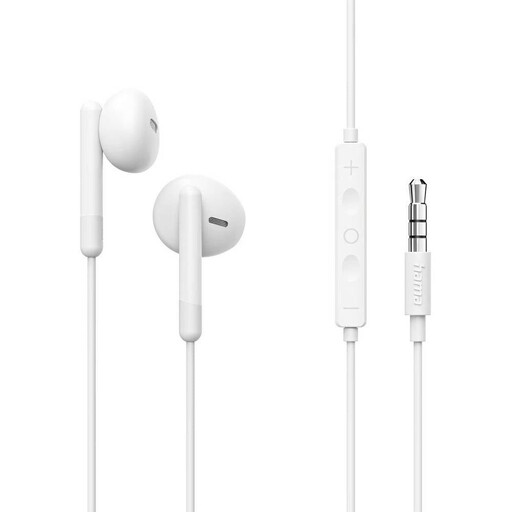 No image available
An option for playback devices with a 3.5 mm headphone socket, if you want to control playback on the cable.
Includes an integrated microphone and inline controls.
 No image available
An option if your playback device has a 3.5 mm connection and you want to control volume and playback on the cable.
According to the product description, the inline remote controls volume, playback and calls.
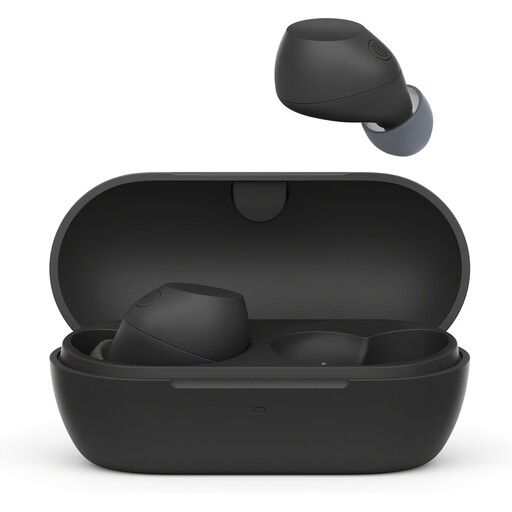 No image available
The product description mentions an ambient sound mode and touch controls for switching between this mode and noise cancelling.
The product description advises against using noise cancelling in situations where ambient sounds are important, such as in traffic.
 No image available
The product description presents the open design as suitable for environments where outside sounds should remain audible.
Includes touch controls and an integrated microphone. Don’t rely on the open design alone to hear warning signals while walking.
 No image available
A wired option for devices with a 3.5 mm connection, if you need a microphone and an inline remote.
The product description mentions close-fitting ear tips to reduce ambient noise. On routes with traffic, stronger isolation can make you less aware of your surroundings.
First, check the ear tips, fit and recording volume. The World Health Organization recommends well-fitting, noise-reducing headphones so you don’t have to keep turning up the volume to drown out background noise.
Choose the right size and follow the instructions for your specific model when fitting the ear tips and routing the cable. Sennheiser’s quick guide for the IE 200 covers changing the ear tips and routing the cable; you’ll need to judge the comfort for yourself.
Check the connection to your playback device, the connection on the earpiece and the exact model version. FiiO notes that its JD1 cable is not compatible with certain other connector types, despite being described as 0.78 mm.
The German Road Safety Council advises against wearing headphones while walking, as warning signals may be harder to hear. Section 23(1) of the StVO applies to vehicle drivers; when crossing a road, Section 25 of the StVO requires pedestrians to pay attention to vehicle traffic.