
Lieferung heute & morgen

Qualitätsgarantie

Willkommens-Angebote freischalten: KOSTENLOSE Lieferung | Bis zu 80 % RABATT | Kostenlose 30-Tage-JoyPlus-Testphase
App herunterladen
A baby monitor with camera should make everyday life easier for parents without making setup unnecessarily complicated. Many families look for a video baby monitor that works without an app, cloud service or smartphone. Models can vary considerably, however, in their connection, screen, battery life and mounting options.
Before you buy, it’s worth taking a closer look at the technical specifications. Marketing terms such as “HD”, “long range” or “smart detection” don’t tell you much on their own about how practical a device will be in a nursery.
Figures such as 300 metres or 960 feet often refer to open spaces. In a home, walls, ceilings, furniture and other sources of radio interference can reduce the actual range. So, if you live in a flat or a large house, the building’s construction matters just as much as the manufacturer’s stated range.
A long-range baby monitor should provide a stable connection between the camera and parent unit. It’s still a good idea to test it around your home after purchase.
Wi-Fi cameras let you access the video feed via an app when you’re out and about. But they require a stable network, an account and usually a smartphone. If you prefer a local connection, look specifically for a baby monitor without Wi-Fi.
Models with a 2.4 GHz FHSS connection transmit directly between the camera and screen. The data doesn’t necessarily leave your home network. With Wi-Fi models, check the app permissions, cloud storage, privacy settings and any ongoing costs.
A high pixel count can be useful in daylight, but it says little about picture quality in a darkened room. Automatic infrared night vision, a sufficiently wide field of view and a position that avoids backlighting are what matter.
Digital zoom can also magnify details, but it doesn’t add any new image information. So, a baby monitor with night vision should above all provide a clear overall picture.
For many families, a direct wireless connection is the right choice. Look for:
A baby monitor with a screen is ready to use straight away and leaves your smartphone free for other things. Wi-Fi models are better suited to parents who want to access the camera feed when they’re out and about.
A camera head that pans and tilts makes it easier to point the camera where you need it. Depending on the model, the stated horizontal rotation range is around 270 to 360 degrees, with a range of vertical tilt angles. These figures describe the camera’s mechanical movement; they don’t necessarily mean it can monitor every area without blind spots.
A baby monitor wall mount can save space and improve the viewing angle. Make sure the mount is secure and keep cables out of your child’s reach. Never position the camera where a cable could become caught in or around the cot.
Useful features may include:
These features are no substitute for personal care. The device is intended only as an additional aid to monitoring.
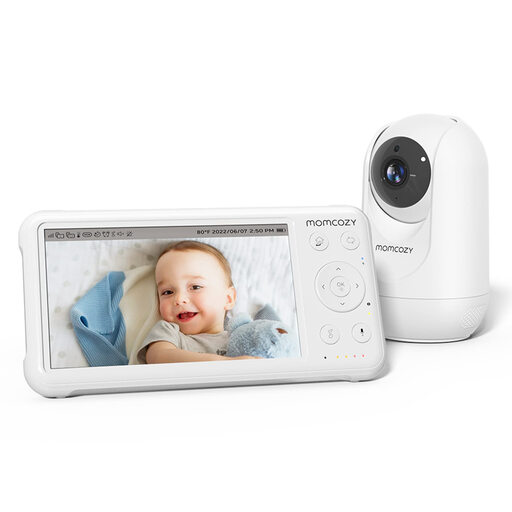
Why it suits this profile: The 5-inch screen, stated 1080p resolution and straightforward setup make it a good fit for families looking for a simple solution without a complicated installation.
VOX mode, infrared night vision and temperature monitoring bring together key features, without requiring you to use a smartphone as your only option.
1080p camera, stated battery life of up to 11.5 hours and a 360-degree field of view, according to the product description.
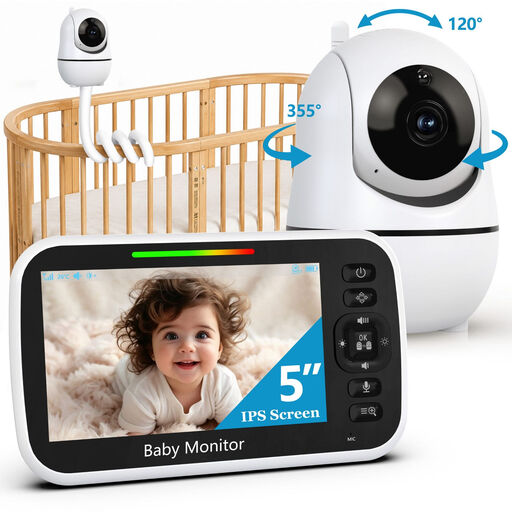
Why it suits this profile: The local 2.4 GHz FHSS connection, 5-inch monitor and flexible mount will appeal to households looking for both privacy and versatile positioning.
According to the product details, it doesn’t need Wi-Fi, an app or a smartphone. Its stated range of up to 300 metres applies in open areas.
355-degree rotation, 120-degree tilt, 2x zoom, two-way talk and eight lullabies to choose from, according to the product description.
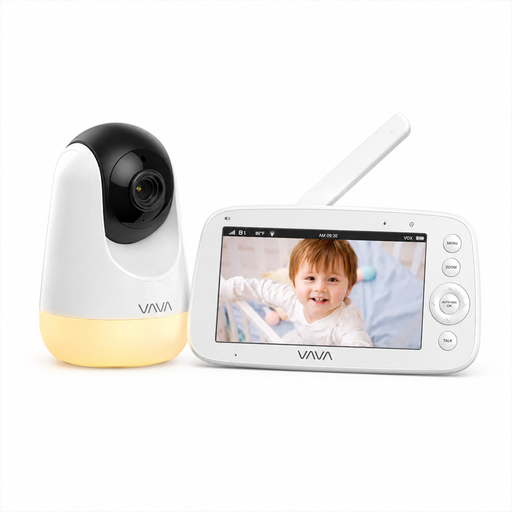
Why it suits this profile: For travel, larger homes or parents who need long audio run times, this model offers a direct connection and a separate 5-inch screen.
The stated range of 300 metres is specified as a figure for open areas, helping you make a more realistic assessment for indoor use.
720p screen, infrared night vision, 2x and 4x digital zoom, and up to 24 hours of audio use, according to the product details.
We’ve put together a complete, regularly updated list of products that meet these strict selection criteria and fully comply with the safety regulations in force in the EU.
After unpacking, pair or connect the camera and parent unit in the same room first. Then check the picture, sound, two-way talk and alerts. Only then should you install the monitor in its final position.
Also remember to:
Yes. Models with a direct wireless connection between the camera and parent unit don’t need the internet to transmit pictures and sound. However, walls and ceilings can limit the range inside your home.
Battery life depends on screen brightness, volume, transmission mode and battery capacity. VOX mode can reduce power consumption because the screen doesn’t stay on continuously during quiet periods. Always check how the manufacturer’s figures are broken down by operating mode, such as screen use and audio-only mode.
The device itself usually only needs electricity. Extra costs may apply if the provider offers cloud storage, premium app features or paid recording. If you want to avoid ongoing fees, look for local storage or a baby monitor without Wi-Fi.