First, choose a monitor based on whether you can read route and training data from your actual riding position, and whether it will fit in your training space. Then check whether your source device can output the picture mode you want through the connection you intend to use. An adjustable-height 27-inch QHD LCD monitor may suit a short to medium viewing distance, while an existing or more compact screen may be a sensible choice if it is already easy to read or space is tight. A high refresh rate does not create extra training data or incline resistance. Those depend on the app, source device and, where needed, a compatible paired smart trainer, as described by Zwift Support in its guidance on connecting devices.
Which monitor is right for you?
Data-focused indoor cyclists
If you want to read your route and training data from the saddle while riding, readability and positioning go hand in hand. Zwift lets you customise the on-screen data; how easy it is to see also depends on where you position the display.
Cyclists with limited training space
If space is limited, plan your screen and stand placement so the display is easy to see from your riding position. Stand and adjustment specifications vary by model, including those from BenQ and ASUS.
Cyclists with an existing source device
If you plan to use a PC, mobile device or Apple TV, its video output needs to be compatible with the monitor. Zwift Support distinguishes between connecting the app and display device, and pairing a smart trainer to control resistance.
What should you look for when buying?
First, check readability and positioning from your usual riding position, then look at connections and ongoing costs. Extra gaming features only matter if you plan to use them.
| What matters |
What to check when buying |
Who it matters most to |
| Reading training data |
Test the app display from your riding position; consider screen size, resolution and viewing distance together. |
If I want to see my route and training data while riding, the text and viewing angle need to work from the saddle. Around 28% of consumers put readability of the training display first. |
| Getting the positioning right |
Measure the stand’s footprint and check the height and tilt adjustment of the specific model. |
With limited space, I want to know whether the screen and stand will fit in my training area and give me a clear line of sight. Around 22% of consumers prioritise getting the positioning right. |
| Device connection |
Check that your source device’s video output, the monitor input, cable and supported picture mode are compatible. |
If I want to keep using my existing device, its video output needs to match the monitor input. Around 22% of consumers prioritise connection compatibility. |
| Total cost |
Test your existing screen and factor in any cables, mount and conditions of use for the app you choose. |
If my current screen already shows the data clearly, I don’t want to replace it unnecessarily and would like to understand any potential extra costs in advance. Around 17% of consumers put total cost first. |
| Gaming as well as training |
Check the refresh rate available through the connection you intend to use and whether the specific model has built-in speakers. |
If I also use the monitor for other games, the refresh rate it actually supports and its sound are important to me. Around 11% of consumers prioritise extra gaming features. |
Which mistakes should you avoid?
-
Confusing the monitor with a complete incline simulation
A monitor displays the picture, but it does not control a trainer’s resistance. According to Zwift Support, Zwift uses a suitable smart trainer paired with the app for this.
Before buying a monitor, check separately that the app, source device and trainer support the features you want.
Depending on your setup, you may also need a suitable source device, a compatible trainer and access to the training app.
-
Comparing only the highest refresh rate
For the models described by ASUS and Dell, the stated refresh rates vary depending on whether you use HDMI or DisplayPort. A higher monitor refresh rate does not, on its own, mean the training app will run at a higher frame rate.
Check that the specific model supports the picture mode you want through the connection you plan to use.
-
Looking only at screen size
An adjustable-height stand can give you more flexibility when positioning the monitor, but it also takes up space. BenQ lists a depth of 252.5 mm for the EX2710Q stand; ASUS does not specify height adjustment for the VG27AQ3A.
Measure the available space and check the adjustment range and your line of sight from the saddle before choosing a model.
-
Taking the product title and specifications at face value
For the Joybuy listing of the KTC H27D9, the model name and some of the resolution details do not clearly match.
Before deciding, check the full model number and the specifications that matter to you against consistent product and manufacturer information.
Relevant brands to consider
The features below relate to the specific model ranges named and are not a general assessment of each brand.
AOC
According to AOC Germany, the Q27G4XF is a 27-inch QHD model with Fast IPS and a height-adjustable stand.
- Height adjustment may help you position the display to suit your riding position.
- The advertised refresh rate does not guarantee any particular training benefit. Check the connections and footprint against your setup.
BenQ
According to BenQ Germany, the MOBIUZ EX2710Q combines a 27-inch QHD display with 100 mm of height adjustment and built-in speakers.
- The height adjustment and built-in speakers may suit you if you want to position the screen accordingly and use it without separate speakers.
- The manufacturer lists a stand depth of 252.5 mm, so check it against the space available. These specifications are not an independent assessment of suitability for Zwift.
ASUS
According to ASUS Germany, the TUF Gaming VG27AQ3A has a 27-inch QHD display, two HDMI inputs, DisplayPort and speakers.
- Multiple inputs and built-in speakers may be useful for a setup you also use for other games.
- ASUS does not list height adjustment for the stand. The stated vertical frequency ranges go up to 144 Hz over HDMI and 180 Hz over DisplayPort; check that the connection you plan to use supports your preferred mode.
Dell
For the G2725D, Dell Germany lists QHD and different maximum refresh rates depending on the connection.
- The connection specifications make it possible to compare the picture mode you actually need.
- Tilt is listed as the stand adjustment. Check whether the available adjustments are sufficient for your riding position.
LG
According to LG Germany, the UltraGear 27GS75QX-B is a 27-inch QHD IPS model with HDMI and DisplayPort.
- The listed connections and IPS display help you assess which connection and display type will suit your setup.
- LG does not list built-in speakers for this model, so plan for separate audio if needed.
Joybuy monitors for seated indoor cycling
This Joybuy selection features monitors you can compare for a seated training display based on screen size, positioning and connections. The monitor displays the picture; the app, source device and, where needed, smart trainer take care of other functions.
 No image available
Z-Edge AGEX 27-inch QHD monitor, 144 Hz, White
For a training setup where you want to adjust the screen height to suit your riding position.
27 inches, 1440p, 144 Hz, Fast IPS, height-adjustable stand, DisplayPort and HDMI; White colour option.
The monitor displays your training view. For controllable incline resistance in Zwift, you’ll also need a suitable smart trainer paired with the app.
View at Joybuy
 No image available
INNOCN 2751S PLUS 27-inch QHD Mini LED monitor, 275 Hz
For a training setup where you want to adjust the screen height to suit your riding position.
27 inches, QHD, Mini LED, 275 Hz, height-adjustable stand, HDMI and DisplayPort, plus built-in speakers.
The monitor displays the app, but does not control a trainer’s resistance.
View at Joybuy
 No image available
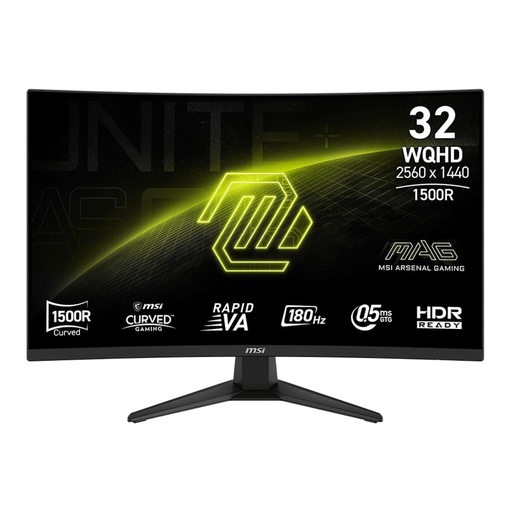
MSI MAG 321CQFDE E18, 32 inches, curved WQHD, 180 Hz
For a training space where a larger curved screen will fit the available position.
32 inches, WQHD, Curved Rapid VA and 180 Hz; the product specifications list tilt adjustment.
Check the available space and the view from your riding position; the display alone does not create incline resistance.
View at Joybuy
 No image available
Philips 276B9, 27-inch QHD IPS monitor, 75 Hz
For a training display where adjustable positioning and extra connectivity features matter to you.
27 inches, 2560 × 1440 pixels, IPS, 75 Hz, USB-C with 65 W Power Delivery, USB hub and built-in speakers. The stand is height-adjustable by 150 mm according to the product specifications.
Check that the connections suit your source device and that the screen position works for you from the saddle.
View at Joybuy
 No image available
GIGABYTE G27Q20, 27-inch QHD monitor, 200 Hz (OC 210 Hz)
For a setup where you want to adjust the monitor position and use it for other games too.
27 inches, QHD, SS-IPS and 200 Hz (OC 210 Hz); the product title lists a height-adjustable stand.
Check which picture mode will work with your source device through the connection you plan to use.
View at Joybuy
Frequently asked questions
Does a gaming monitor create incline resistance for virtual climbs?
No. A monitor displays the picture. According to Zwift Support, you can pair a compatible smart trainer with the app so it can control resistance, including on climbs. You need at least a speed or power source to move in Zwift.
How can I check the positioning before buying?
Measure the available space, including the stand and cables, and check the view from your usual riding position. Ergotron recommends a slightly downward gaze and a viewing distance of at least 51 cm for computer workstations; this is not a fixed recommendation for positioning a screen when cycling.
What ongoing costs might there be in addition to the monitor?
A paid training app may involve extra costs. Zwift’s German-language pricing page describes a subscription and automatic billing after a trial period; check the final price shown to you before signing up.
Do monitors have an energy label?
Yes. The European Commission generally classifies computer monitors as electronic displays covered by the EU energy label. The label uses an A to G scale and also includes information for HDR; compare the details for the specific model rather than assuming its energy use based on screen size alone.
What are the rules in Germany on cancellation and faults when buying a monitor online?
According to the Verbraucherzentrale, consumers buying online generally have a 14-day right to cancel from the date they receive the goods; exceptions and the terms of the specific purchase apply. Statutory rights relating to faulty goods are claims against the seller and are separate from a voluntary guarantee.


