
Lieferung heute & morgen

Qualitätsgarantie

Willkommens-Angebote freischalten: KOSTENLOSE Lieferung | Bis zu 80 % RABATT | Kostenlose 30-Tage-JoyPlus-Testphase
App herunterladen
Whether you’re filming a travel video, capturing family moments or recording a vlog, a smartphone gimbal should smooth out movement, keep your subject in shot and be easy to use without a complicated set-up. The Insta360 Flow 2 Gimbal brings several of these features together in a foldable design. Even so, it’s worth checking the specifications and accessories carefully before choosing a smartphone gimbal.
Terms such as AI tracking, people and pet tracking, or multi-person tracking don’t tell you everything about how a gimbal will work in practice. What matters is which smartphones it supports, which app you need and which features are available on iOS and Android.
According to the product details, the Insta360 Flow 2 is compatible with iPhone 12 to iPhone 17 Pro and Pro Max models. If you have an Android phone, check the manufacturer’s latest compatibility list too. You may also need to grant the app access to your camera and Bluetooth, and possibly your location, during set-up.
A gimbal with a selfie stick and tripod is handy for spontaneous shots. However, its small feet aren’t necessarily suitable for strong winds, uneven surfaces or heavy accessories. For longer static shots, position your smartphone centrally and place the set-up on a stable, level surface.
According to the product description, the Insta360 Flow 2 offers up to 10 hours of battery life. Tracking, screen use, Bluetooth, editing in the app and charging your smartphone can all affect how long the battery lasts. If you’re filming while travelling, remember to pack a suitable USB-C charging cable and, if needed, a power bank.
3-axis stabilisation compensates for movement in several directions. This can be useful when walking, sightseeing or filming family activities. It won’t replace a steady hand, though: sudden changes of direction, stairs or fast panning can still result in visible movement.
Also check:
A foldable gimbal for iPhone and Android should fit in your rucksack or hand luggage and be quick to set up. According to the product details, the Flow 2 comes with a magnetic smartphone clamp, a USB-C to USB-A charging cable and a protective pouch. Before travelling, try the clamp with your own smartphone and case.
The product description lists multi-person and pet tracking for groups, dogs, cats and horses. It also states that precise tracking is available at up to 15x zoom. In practice, results depend on factors such as lighting, distance, movement speed, your smartphone camera and app support. If you’re filming sport or a stage performance, it’s worth testing the feature before the main shoot.
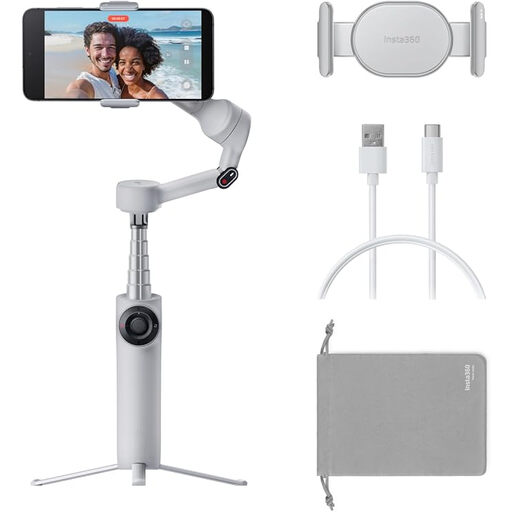
Why it suits this profile: Ideal for travellers and social media users looking for a compact smartphone stabiliser with built-in features for spontaneous filming.
The built-in selfie stick and tripod mean fewer extra parts to carry. According to the product details, the magnetic clamp makes set-up quick.
3-axis stabilisation, up to 10 hours of battery life according to the product details, plus a built-in tripod and selfie stick.
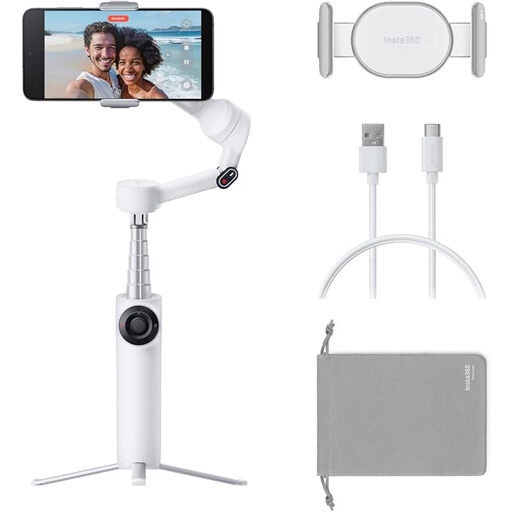
Why it suits this profile: For vloggers and content creators who want to combine tracking, remote control and app-assisted editing in one device.
It’s more than a simple phone holder: the product description lists AI tracking, gesture control and the option to use a second smartphone as a remote control.
Multi-person and pet tracking, remote control and AI-powered editing through the Insta360 app, according to the product details.
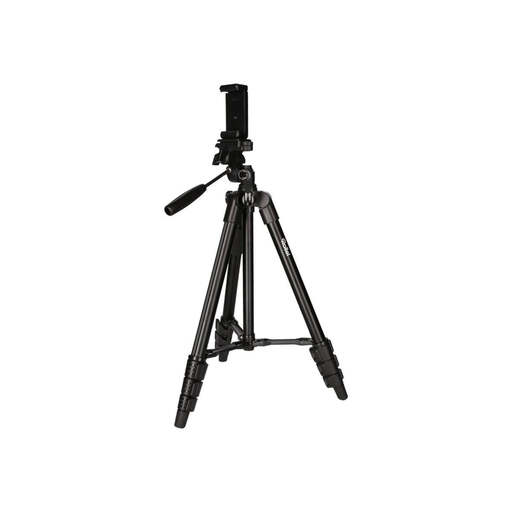
Why it suits this profile: For anyone who needs a standalone smartphone tripod rather than a motorised gimbal for static shots, travel photos or vlogs.
The stated maximum load of 2 kg and fully extendable legs make its limits clear. This helps prevent unsuitable heavy equipment from being mounted.
Weighs 595 g, folds down to 39 cm, has a Bluetooth remote shutter release with a range of up to 10 m and a working height of up to 120 cm, according to the product specifications.
We’ve put together a comprehensive, regularly updated selection of products that meet these strict selection criteria and the safety regulations in force across the EU.
Before your first extended filming session, fully charge the gimbal, install the app and check the smartphone clamp. Keep the device away from water unless it is explicitly described as waterproof. Keep magnetic accessories away from pacemakers and other medical implants.
For family videos, it’s a good idea to test the gimbal with the group you plan to film. When filming pets or fast-moving subjects, you may want to keep a hand on the smartphone for extra security until you’re confident the balance and tracking are working reliably.
According to the product description, the gimbal is designed for iPhone and Android smartphones. Before buying, check the manufacturer’s details for compatibility with your specific model, operating system and app version. The stated iPhone support covers iPhone 12 to iPhone 17 Pro and Pro Max models.
The product description states that battery life is up to 10 hours. This can vary depending on tracking, app use, Bluetooth connection, charging and your surroundings. A USB-C charging cable is a useful extra for travelling.
Yes. According to the product details, it supports multi-person and pet tracking. Accuracy depends on factors including lighting, distance, movement and the smartphone app. A test run before an important recording can help you find the right distance and settings.