What should you look for when buying?
First check that you can access your stations, then make sure the speaker connections and size suit your needs. Finally, consider only the extra connections or system features you’ll actually use.
| Buying priority |
What to check |
Who it matters to most |
| Play favourite stations quickly |
Check that your stations are available through your chosen radio service, and see whether favourites or presets are supported. |
If I often listen to the same stations, I want to access them without searching again. Around 36% of consumers put quick access to stations at the top of their list. |
| Make sure it fits your space and speakers |
Check the speaker connections and device dimensions against your speakers and available space. |
If you already have passive speakers and limited space, the device needs to fit your setup and connect to your speakers. Around 29% of consumers prioritise this kind of compatibility. |
| Connect additional sources |
Match each device to the input it needs, such as phono, optical or HDMI ARC. |
If I want to use a turntable or TV as well as the radio, the right inputs need to be available. Around 21% of consumers make additional sources their main priority. |
| Compatibility with your existing system |
Check features such as AirPlay 2 and multi-room support for the exact model variant. |
If you want to connect existing streaming devices, check that the specific combination is compatible. System compatibility is the priority for around 14% of consumers. |
Suitable products at Joybuy
Joybuy product options for listening to radio over Bluetooth and connecting speakers.
 No product image available
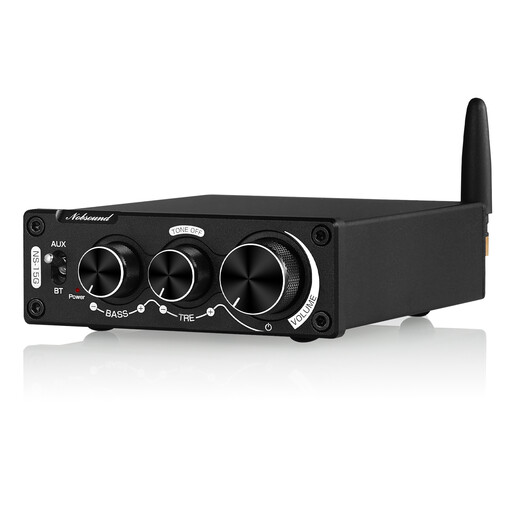
Nobsound 200 W Mini Bluetooth Digital Amplifier
An option if you want to stream radio from a Bluetooth device and the speaker connections are compatible with your speakers.
The product name specifies 200 W and Bluetooth.
View at Joybuy
Frequently asked questions
Do I need a specific radio directory to listen to my favourite stations?
Not necessarily. Check whether your specific stations are available through the service you plan to use, and find out how the favourites feature works. Denon describes TuneIn on the PMA-900HNE, but notes that the station database may become unavailable or be discontinued. Bluesound also explains how to add your own internet stream through TuneIn.
How do I set up a station I listen to often on a WiiM?
According to the WiiM Help Center, you can open a radio service in WiiM Home, find a station and save it as a preset using the three-dot menu. The direct access options available on the device or remote control afterwards depend on the model.
What are my rights if an online purchase isn’t suitable or the device is faulty?
For eligible distance purchases in Germany, you generally have a 14-day right to cancel, which must be explained to you. If a product is faulty, your statutory rights are against the seller and are separate from any voluntary guarantee. The Verbraucherzentrale explains both rights.
What product safety information should I check on a Wi-Fi amplifier?
The Bundesnetzagentur lists several checks as part of its market surveillance, including the CE mark, correct product and manufacturer details, and a German instruction manual with the required warnings. These general checks do not confirm that any specific device mentioned here has already been tested.


