Listeners who follow a regular news bulletin
You’d like to listen to the latest episode at a time that suits you. The key question is whether it will actually play on the device through the service provided or via a smartphone.


If several people need to start a live news station straight away, an internet radio with built-in speakers, easy-to-reach buttons and saved presets is usually the simplest option. If you’d rather play a particular news bulletin on demand, check before you buy that it’s available on the device or through a compatible smartphone. A network player is only suitable if you already have speakers and the right connections.
You’d like to listen to the latest episode at a time that suits you. The key question is whether it will actually play on the device through the service provided or via a smartphone.
Different people need to be able to tune in to the same news station without sharing an app account. Buttons, a remote control and saved presets can make everyday use easier.
If you already have speakers or an amplifier, a compatible network player could be a better fit than buying another all-in-one device.
For a shared space, the main things to consider are how playback starts, how easy the device is for different people to use, and what audio equipment you already have.
A good choice if: several people need to start a live news station on the device or with a remote control, and you don’t already have a suitable audio system.
Worth noting: A saved station won’t necessarily play the latest podcast episode. Check the specific programme and how playback starts.
A good choice if: you already have compatible active speakers or a stereo system in your shared space. WiiM and Bluesound describe their network players as devices for connecting to existing systems like these.
Worth noting: The player doesn’t replace your speakers. Check that its audio outputs match your system’s inputs, and consider how it will be set up and controlled.
| What matters | What to check before buying | Who it matters most to |
|---|---|---|
| Your preferred news bulletin | Check the title, provider and playback method on the specific device or through a compatible smartphone. | If I want to listen to a particular daily bulletin, I won’t rely on the number of radio stations alone. Around 28% of consumers prioritise access to that specific news bulletin. |
| Easy for everyone to use | Compare direct preset buttons, volume controls and, where relevant, a remote control. | If different people use the device, starting playback shouldn’t depend on one person’s phone or account. Around 22% of consumers prioritise simple, direct controls. |
| Sound that carries around the room | Check whether the built-in speakers are enough or whether you can connect existing speakers. | If you listen from different seats, make sure playback is clear and easy to hear around the room. Around 22% of consumers place particular importance on sound quality from different seating positions. |
| Live reception | Check Wi-Fi coverage where you’ll place the device, and, if needed, local reception for your chosen station via DAB+ or FM. | If I want to listen to local live broadcasts as well as internet radio, I’ll compare the reception options available. Around 17% of consumers prioritise additional live reception options. |
| Existing audio system | Check that the player’s analogue or digital outputs match the inputs on your amplifier or active speakers. | If you want to keep using your existing speakers, check the connections and day-to-day controls first. Around 11% of consumers prioritise using their existing audio system. |
A device may receive a wide range of live stations without offering the latest daily episode you want through its built-in controls.
Before you buy, check the specific title and whether it plays on the device or through a compatible smartphone.
A player designed for a stereo system won’t fill your shared space with sound on its own.
Check that its audio outputs match the inputs on your existing speakers or amplifier, and find out how easy it is to adjust the volume day to day.
The DIGITRADIO 370 IR and DIGITRADIO 380 CD IR aren’t the same as the DIGITRADIO 574 IR or DIGITRADIO 372 CD IR just because their names look similar.
Check the full model name and specifications before assuming a product matches a different product description.
According to the manufacturer, DIGITRADIO models combine standalone radio reception with Wi-Fi, DAB+ and FM.
According to Kenwood, the CR-ST100S combines internet radio, DAB+ and FM, and also provides access to podcasts over Wi-Fi.
The WiiM Mini is a network player for an existing stereo system or compatible speakers.
The NODE range is designed for people with an existing stereo system or active speakers. Bluesound lists radio and podcasts among the features of the NODE NANO.
LIFE internet radios are all-in-one devices with built-in speakers. For the P85333 and P85027 models, MEDION lists Wi-Fi, DAB+ and FM.
The Joybuy products below focus on internet radios for shared spaces, rather than standalone network players for an existing audio system.
 No image available
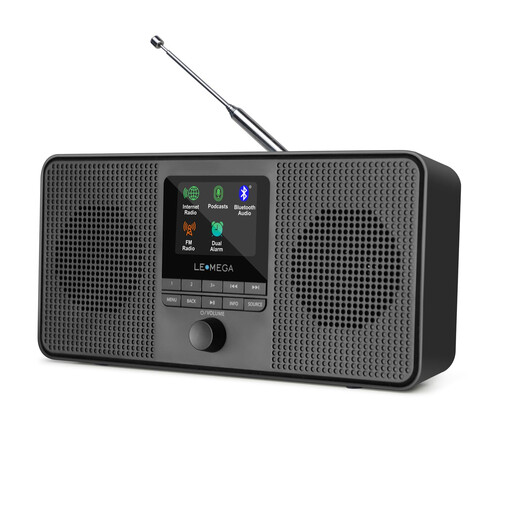
A good choice if you want one device for internet radio and podcasts, as well as DAB and FM reception.
The product name also lists Bluetooth and stereo sound.
 No image available
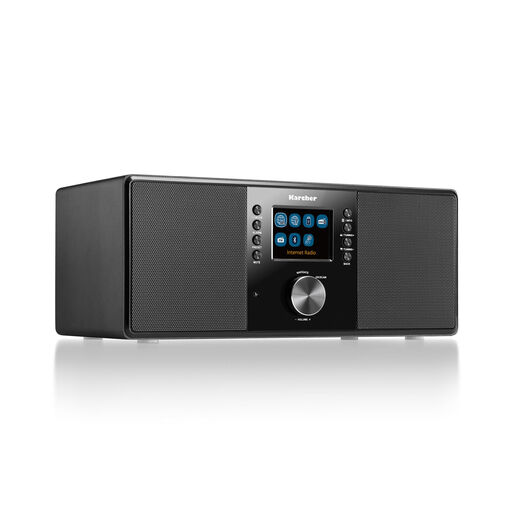
A good fit if you’re looking for internet radio and Wi-Fi, as well as DAB+, FM and a remote control.
Other listed features include Bluetooth, RDS, a 2.4-inch colour display, USB, AUX-in, line-out, a headphone socket, an alarm clock and 14 W output.
No. The term ‘internet radio’ alone doesn’t guarantee that. Check whether the specific device can find the episode through its podcast service, or whether you can play it from a compatible smartphone. A saved live station is something different.
For internet radio, the device needs access to Wi-Fi and the internet. Then set up your chosen station or supported content and try starting it with the people who’ll use the device regularly.
A network player needs suitable speakers or an amplifier, along with compatible audio connections. Also check whether your chosen content requires a paid service.
For goods bought from a business seller in the EU, you’re generally entitled to a statutory guarantee of at least two years from the date you receive them. This is separate from any voluntary manufacturer’s warranty. For most goods bought online, you generally have a 14-day right to cancel from the date of delivery, subject to legal exceptions.
Wi-Fi or Bluetooth audio devices placed on the German market must meet the applicable EU requirements for radio equipment and carry the required CE marking. The German Federal Network Agency lists product and manufacturer details, instructions in German and a declaration of conformity among the points to check. CE is not an independent sound or quality certification.