If you want to listen to the radio without additional equipment, choose a standalone internet radio with built-in speakers and check in advance that your preferred station is available. Manufacturer information for sonoro and Kenwood devices specifies integrated speakers. A network player is a better fit if you already have compatible active speakers or an amplifier. Passive speakers need an amplifier, and the connections and app setup must work with your existing system, as the WiiM Help Center explains for the WiiM Pro.
Which type of device is right for you?
For listening without a separate audio system
If you want to listen to stations in your kitchen-diner without separate speakers or an amplifier, choose a standalone internet radio. CHIP compares kitchen radios, among other products, while sonoro specifically positions its STREAM for use in the kitchen and bathroom.
For listening between the kitchen and dining table
If you want to listen in both areas, consider where you’ll place the device, how easy it is to use and how well you can hear it from your usual listening spots. Kenwood specifies integrated stereo speakers for the CR-ST120S-B, but the stated amplifier output alone doesn’t tell you how it will sound at your own dining table.
For owners of existing speakers
If you want to use your existing system for internet radio, check its inputs and the type of speakers you have. WiiM says passive speakers need an amplifier; the WiiM Pro is set up using the WiiM Home app.
What to look for when buying
Internet radio with speakers
A good fit if: You want to listen in the kitchen and dining area without a separate audio system. sonoro and Kenwood specify built-in speakers on their respective devices.
Things to consider: You’ll need space to position the device. Check that your preferred station is available and that the controls work for you where you plan to use it.
Network player for existing speakers
A good fit if: You already have compatible active speakers or an audio system with suitable inputs. WiiM describes the Pro as a network streamer for an existing audio system.
Things to consider: According to the WiiM Help Center, the WiiM Pro won’t work on its own with passive speakers; you’ll also need an amplifier. Check the connections and app controls too.
| What you’re looking for |
What to check before buying |
Who will find this especially important? |
| Finding your preferred stations |
Search for the specific station in the internet radio directory; check whether there’s a favourites or preset function. |
If I want to tune in to a particular station in my kitchen-diner, being able to find it matters more to me than a high advertised station count. Around 36% of consumers put access to their preferred station first. |
| Listening in the kitchen and dining area |
Compare the speaker setup and space required; assess how well you can hear the radio from where you plan to listen. |
I listen while cooking and at the dining table, and want to know how well I’ll hear the radio in both places. Around 29% of consumers prioritise listening in both areas. |
| Tuning in easily |
Check the controls, display, station presets and remote control on the specific model. |
When I’m cooking, I want to be able to start a saved station directly on the device or with the remote control. Just over 21% of consumers prioritise choosing a station easily. |
| Using an existing audio system |
Check that the audio inputs and outputs are compatible; allow for an amplifier if you have passive speakers. |
If I already own speakers, I want to know whether I can connect them to the network player and whether I’ll need an amplifier. Around 14% of consumers put making use of their existing audio system first. |
Avoid common buying mistakes
-
Confusing Bluetooth with standalone internet radio
Bluetooth audio from your mobile phone and internet radio over Wi-Fi are different features. So a device that lists Bluetooth won’t necessarily play radio stations over the internet on its own.
If you want the device to stream stations independently of your mobile phone, check the exact model listing for internet radio or Wi-Fi.
-
Expecting a network player to work as a complete radio
A player such as the WiiM Pro needs an external audio system. According to the WiiM Help Center, passive speakers can’t be used without an additional amplifier.
Before choosing a player, check that its outputs are compatible with your existing speakers and audio inputs.
-
Assuming the station count or wattage proves it’s right for you
An advertised station count doesn’t guarantee that your specific programme is available. And the stated amplifier output alone doesn’t tell you how well you’ll hear the radio from the dining table.
Search for your preferred station before buying and, if possible, assess the device where you plan to place it and listen to it.
Brands to help you choose
sonoro
sonoro specifically positions the STREAM for use in the kitchen and bathroom.
- The manufacturer lists DAB+, Bluetooth, controls on the device and via remote, and a splash-resistant casing.
- Follow the specific placement instructions. Splash resistance doesn’t mean you can expose the device to water or place it next to a hob without care.
Kenwood
According to KENWOOD, the CR-ST120S-B combines internet radio and podcasts over Wi-Fi with integrated stereo speakers.
- KENWOOD lists DAB+/FM, a remote control, station presets and 2.4 and 5 GHz Wi-Fi.
- The manufacturer’s stated output of 2 × 10 W RMS doesn’t prove how well you’ll hear the device from your chosen listening spot.
MEDION
MEDION offers the LIFE P85333, a stereo internet radio with DAB+/FM.
- The manufacturer lists Wi-Fi, Bluetooth and 2 × 6 W RMS for this model range.
- Check the exact colour and model variant you’re considering rather than assuming the specifications apply to other versions.
Hama
Hama distinguishes standalone digital radios in its DIR range from DIT hi-fi tuners designed for existing audio systems.
- The German product range page lists DAB+ and internet radio for the models shown.
- Check the speakers, connections and features of the exact model: a tuner isn’t automatically a standalone kitchen radio.
WiiM
WiiM describes the Pro as a network player for an existing audio system, not as a radio with built-in speakers.
- According to WiiM, the Pro offers internet radio and analogue and digital audio outputs.
- The manufacturer says setup is handled through the WiiM Home app; passive speakers also need an amplifier.
Joybuy products for your kitchen-diner
This selection features standalone internet radios with integrated stereo speakers for your kitchen-diner.
 No image available
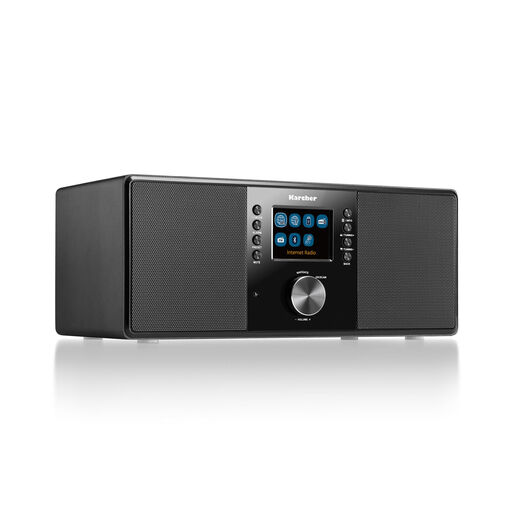
Karcher DAB 7000i internet radio
For anyone looking for a standalone internet radio with remote control for their kitchen-diner.
The product name lists Wi-Fi, Bluetooth, DAB+, FM, RDS, a 2.4-inch colour display and a remote control.
View at Joybuy
 No image available
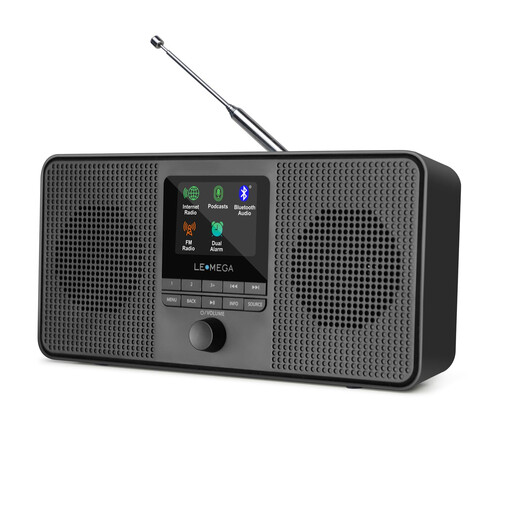
LEMEGA IR4S internet radio
For anyone looking for a standalone internet radio with integrated stereo speakers for their kitchen-diner.
The product name lists podcasts, Bluetooth, DAB, FM and stereo sound.
View at Joybuy
Frequently asked questions
Do I need additional speakers for a network player on its own?
Yes. The WiiM Pro needs an external audio system. You can connect active speakers to a compatible output; passive speakers also need an amplifier. Check the inputs on your existing system before choosing a device.
What should I check during the initial setup?
An internet radio needs an internet connection. According to the manufacturer, the WiiM Pro is set up using the WiiM Home app. Afterwards, test your preferred station and save it if your chosen model supports station presets.
What documentation should I look for when buying a Wi-Fi radio for Germany?
Wi-Fi radio equipment placed on the market in Germany must meet the applicable requirements for labelling and accompanying documentation. The Bundesnetzagentur notes that retailers must check, among other things, for the required CE marking and necessary documents such as user instructions and safety information in German. This doesn’t automatically confirm that a specific product listing complies.
What are your rights in Germany if the radio develops a fault?
Your statutory rights against the seller are separate from any voluntary guarantee. In its article dated 28 September 2026, the Verbraucherzentrale explains that, if a product is faulty, you can initially ask for it to be repaired or replaced.


