Upgrading an existing system
If you already have a hi-fi system or active speakers, check whether a network player can connect to an available input. With passive speakers, you’ll also need to make sure they have an amplifier.


If you already have a hi-fi system or active speakers, a separate network player is a sensible place to start, provided its outputs match an available input. For passive speakers without an amplifier, you’ll also need an amplifier or a network receiver. If you don’t have a suitable system, an all-in-one system with built-in speakers is a compact alternative. If you want to listen in several places, check that the specific devices and radio service are compatible. WiiM and Bluesound describe grouping devices within their respective systems, not mixing and matching any devices you like.
If you already have a hi-fi system or active speakers, check whether a network player can connect to an available input. With passive speakers, you’ll also need to make sure they have an amplifier.
If you don’t have a suitable speaker system yet, you can compare an all-in-one system with built-in speakers against separate components. The key question is which extra equipment you’ll need.
If you want to listen in several places in an open-plan home, plan your devices and preferred playback route as a complete system. Check whether the specific players can be grouped together.
A good fit if: you already use an amplifier with speakers or active speakers, and have a suitable input available.
The trade-off: A player such as the WiiM Pro won’t amplify passive speakers. WiiM and Cambridge Audio list internet radio and audio outputs for their respective models.
A good fit if: you want to power passive speakers and combine network features with amplification in one component.
The trade-off: You’ll need to supply speakers separately; a receiver doesn’t replace the entire speaker system.
A good fit if: you don’t have a system yet and would prefer a device with built-in speakers.
The trade-off: Compared with separate components, you’ll have less freedom to choose and position your speakers.
| Buying priority | What to look for | Who is this important to? |
|---|---|---|
| Connecting existing equipment | Active or passive speakers; suitable analogue or digital inputs on your system. | If I want to keep using my existing system or active speakers, the player’s output must match an available input. Around 33% of consumers put connecting existing equipment first. |
| Radio without an existing system | Compare an all-in-one system with speakers against separate components, including the amplification you’ll need. | If I don’t have a system yet, I want to know before buying what extra equipment I’ll need for playback. Around 27% of consumers put finding a complete solution without an existing system first. |
| Listening in several places | Check that the players and speakers are compatible, and that you can group the radio source you want to use. | If I want to listen to the radio in several places, the devices I choose need to work together. Around 20% of consumers put listening in multiple places first. |
| Easy access to stations | Check how easy it is to use favourites and which radio service is available; consider Wi-Fi or, if available where you’ll set it up, Ethernet. | If I often listen to the same stations, I want to find them easily and use a suitable network connection. Around 20% of consumers put easy access to stations first. |
A separate player such as the WiiM Pro sends an audio signal, but won’t amplify passive speakers. WiiM specifies that an amplifier is needed as part of the playback chain.
Before choosing, make a note of whether your speakers are active or passive, and which inputs are available. If you have passive speakers, compare a network receiver with adding a separate amplifier.
Bluesound describes multi-room playback using other Bluesound players, while WiiM describes grouping within its own system. A single player won’t create an additional listening zone.
Check that your specific combination of devices is compatible and that you can group the radio source you want to listen to.
Yamaha Support Germany explains, using the v-Tuner service as an example, that the terms of an externally operated radio service can change.
Before buying, check that your favourite stations are available through the radio service used by the specific model, and what other playback options it offers.
The WiiM Pro is a separate streamer for an existing hi-fi system or active speakers.
The MXN10 is a separate network player for an existing audio system, controlled using the StreamMagic app.
The NODE is a separate streamer for a stereo system and can be connected to a system with other compatible Bluesound players.
The R-N600A is a network receiver for internet radio and passive speakers.
According to the manufacturer, the LIFE P66400 is an all-in-one system with internet radio and built-in speakers.
The following Joybuy products are internet radios with built-in speakers or integrated audio playback. They’re worth considering if you want to listen to the radio without a separate speaker system.
 No image available
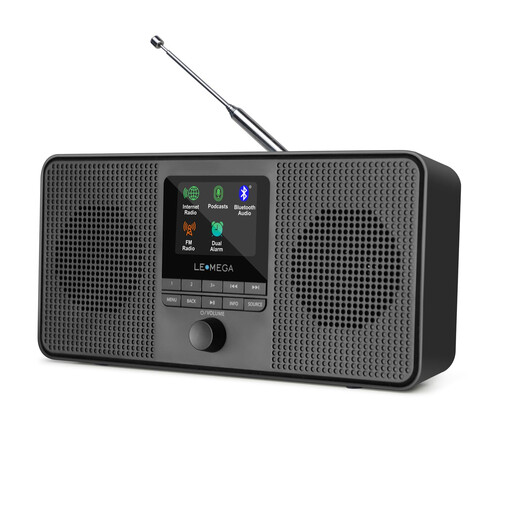
A good choice if you want internet radio without a separate speaker system: built-in stereo speakers are listed.
Wi-Fi, Bluetooth, DAB and FM; 40 internet presets; AUX and headphone connections.
 No image available
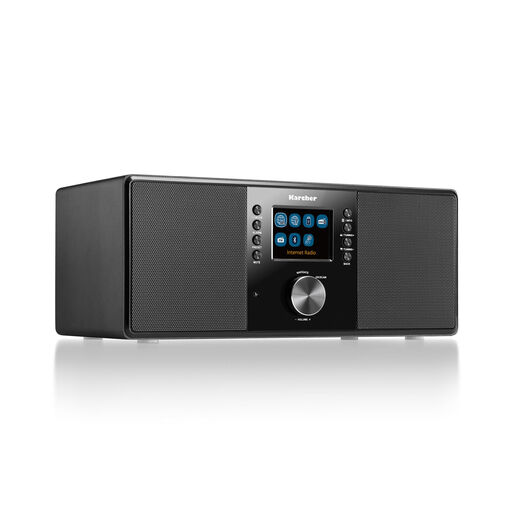
A good choice for listening in one room without a separate speaker system: the product description lists built-in stereo speakers and a remote control.
Internet radio and Wi-Fi; DAB+, FM and Bluetooth; line-out and headphone connections; 2.4" colour display.
 No image available
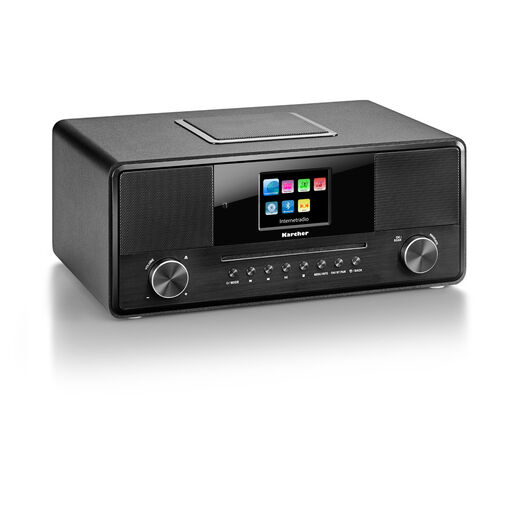
A good choice if you want an all-in-one device rather than separate audio components; the product details list a built-in subwoofer and a remote control.
Internet radio and Wi-Fi; CD player, Bluetooth and DAB+; 2.8" colour display.
You’ll need an amplifier for passive speakers. WiiM lists one as part of the required playback chain for the WiiM Pro and Pro Plus. With suitable active speakers, you can use a compatible audio output instead.
Check how easy it is to use favourites on each model, and whether your stations are available through the radio service it uses. WiiM describes presets for stations from a radio service, while Yamaha lists favourites for internet radio content on the R-N600A. This doesn’t guarantee that every model will offer a particular station list.
Check whether you can find a better place for the device or connect it via Ethernet. WiiM describes Ethernet as a wired alternative for devices with that connection; Yamaha says the R-N600A supports Wi-Fi and Ethernet. This doesn’t mean every interruption is caused by your home network.
Buying a device doesn’t, by itself, mean you’ll have to pay an extra broadcasting fee. The German consumer advice centre explains that the fee in Germany is generally charged per household, regardless of how many people live there or whether they own broadcasting devices. Individual exemptions and registering a household are separate matters.