If you already have an amplifier or active speakers, a separate network player could be a good fit, provided its outputs match the available inputs on your system; passive speakers also need an amplifier. If different people will be using it, set up station presets in advance so they can be accessed directly. If there’s no existing audio system, an internet radio with built-in speakers may be the simpler option. Check network access where you plan to put it, and clarify how the radio will be used in a public or workplace setting: GEMA includes these scenarios in its guidance on background radio music and workplace break areas.
Which option is right for you?
Using an existing audio system
If you want to listen to internet radio through an existing amplifier or active speakers, first check which inputs are available. WiiM Help Center and Cambridge Audio explain the connections required for their respective devices.
For rooms used by different people
If several people regularly switch between their favourite stations, it’s important to set up presets and check how they can be accessed on the device itself. WiiM and Bluesound describe these features for selected models.
For shared-space operators
If you’re planning to play radio in a shared space, consider how the device will be operated as well as how the room will be used. GEMA identifies public background radio music and workplace break areas as relevant usage scenarios.
What should you look for when buying?
First, check what audio equipment is available where you plan to use the radio. Then consider how several people will access stations, the network connection and whether your preferred stations are available.
| What to consider |
What to look for |
Who this matters most to |
| Connecting to existing speakers |
Check that the player’s output matches an available input on your amplifier or active speakers. Passive speakers also need an amplifier; WiiM Help Center and Cambridge Audio explain the connection requirements for their respective devices. |
If I want to keep using my existing audio system, the player needs to match its available inputs. Around 36% of consumers put compatibility with their existing system first. |
| Station presets for several people |
Check whether you can save favourite stations and access them on the device, with a remote control or only through an app. WiiM and Bluesound document preset features for selected devices. |
If several people regularly choose the same stations, I want to play them without having to search again. Around 29% of consumers prioritise easy access to familiar stations. |
| Network access at the chosen location |
Check the Wi-Fi connection where you plan to put the radio, and see whether there’s an accessible Ethernet port. WiiM Help Center describes setup and connection options for selected models. |
If the radio will stay in one place, I want to know in advance which network connection works there. Around 21% of consumers prioritise network access at the chosen location. |
| Availability of specific stations |
Search for your favourite stations in the radio service on the specific device. If needed, check whether it supports a direct stream link and whether that link actually plays; WiiM describes a feature for adding these links. |
If I want to listen to specific stations, I want to check that they’re available rather than relying on a general claim that the device supports internet radio. Around 14% of consumers prioritise access to specific stations. |
Avoid common misconceptions
-
A separate streamer is a complete audio system
A network player won’t power passive speakers on its own. You’ll need a suitable amplifier to complete the audio system.
Before choosing a device, check whether the room has active speakers or an amplifier with a suitable input. If not, consider a radio with built-in speakers too.
-
“Internet radio” means it’s easy for everyone to use
Selecting stations in an app and accessing them directly through presets on the device are two different ways to control the radio. Features vary by model.
Check how to set up frequently played stations on the specific device and how to access them later.
-
A station list guarantees access to every favourite station
General internet radio support doesn’t guarantee that a specific station is available in the device’s directory.
Search for important stations in the service on your chosen device. If you need a direct stream link, test it before you plan to use it; WiiM describes a feature for this called Open Network Stream.
-
A workplace break area is automatically the same as listening at home
GEMA identifies public background radio music and music in workplace break areas as relevant usage scenarios. Whether this applies to a particular room depends on how it’s actually used.
Before playing the radio, clarify who operates the room, who has access and how the radio will be used.
Brands to consider
WiiM
The WiiM Pro and Pro Plus are standalone streamers that can be added to an existing audio system.
- WiiM says you can save radio stations as presets. On the Pro and Pro Plus, you can access them using a preset button.
- These devices need an external audio system. Check that the output matches the input on your amplifier or active speakers.
Cambridge Audio
The MXN10 is a compact network player designed for use with an existing audio system.
- Cambridge Audio lists internet radio as a feature; according to the manufacturer, you can connect the MXN10 to compatible active speakers using RCA.
- Check whether the station controls are easy enough for several people to use without repeatedly navigating an app. Manufacturer specifications aren’t an independent assessment of sound quality.
Bluesound
The NODE is a standalone streamer for an existing stereo system.
- Bluesound describes presets for radio stations. According to the manufacturer, you can access them using programmable buttons on the NODE N132.
- Identify the exact product version before buying, and check that its connections are compatible with your audio system.
TechniSat
The DIGITRADIO 370 CD IR is an example of a radio with built-in speakers rather than a separate network player.
- TechniSat lists internet radio, DAB+ and FM, as well as built-in speakers.
- If you want to add the radio to an existing audio system, check separately whether the connections on the specific model are suitable.
Joybuy products for a standalone radio setup
The products below are internet radios with built-in speakers – an option if you don’t want to use a separate audio system in your shared space.
 No image available
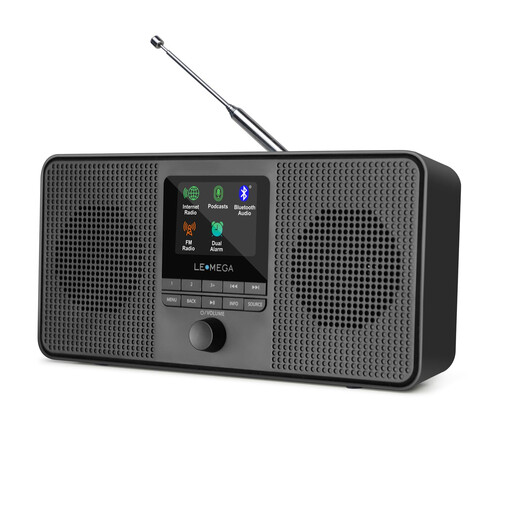
LEMEGA IR4S Internet Radio, Black
A standalone radio option for a room where you don’t want to connect a separate audio system.
Listed features include Wi-Fi internet radio, built-in stereo speakers, Bluetooth, DAB and FM. It also has 40 internet presets for stations you listen to regularly.
Internet radio requires network access where you plan to put the device. For a radio device sold in Germany, check the CE marking and conformity information in the specific product listing; the German Federal Network Agency includes these points in its market surveillance.
View on Joybuy
 No image available
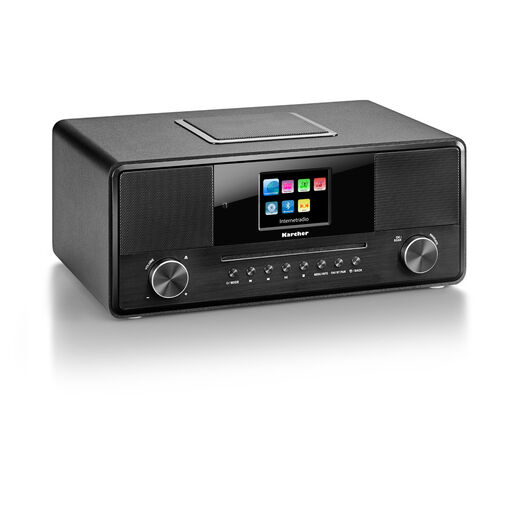
Karcher DAB 9000CDi All-in-One Internet Radio
A standalone radio option if you want internet radio without a separate audio system.
Listed features include Wi-Fi, a CD player, Bluetooth, DAB+, RDS, stereo output, a built-in subwoofer and a remote control. It also has a 2.8-inch colour display, USB, AUX-in and a headphone socket.
Internet radio requires network access where you plan to put the device. For a radio device sold in Germany, check the CE marking and conformity information in the specific product listing; the German Federal Network Agency includes these points in its market surveillance.
View on Joybuy
Frequently asked questions
Can I connect a network player directly to passive speakers?
The separate streamers described here need an amplifier to work with passive speakers. If you have active speakers or an existing amplifier, check that its available inputs match the player’s outputs.
How do I set up frequently played stations for different users?
With WiiM, you can save stations as presets; according to WiiM, you can also access them using a preset button on the Pro and Pro Plus. Bluesound explains how to set up station presets in BluOS; whether a particular device has buttons for this depends on the model.
What can I do if my station isn’t listed in the radio directory?
Check whether the station offers a direct stream link that can be played. WiiM explains how to add these links using Open Network Stream; this doesn’t mean every station link will work.
Do I need to check with GEMA before playing radio in a shared space?
You can’t decide this based on the term “shared space” alone. GEMA describes its Tariff R as covering the public playback of musical works as background radio music, and also identifies workplace break areas as a usage scenario. Clarify how the specific room will actually be used before planning to play the radio.
What should I check about product compliance for a radio device sold in Germany?
As part of its market surveillance, the German Federal Network Agency lists requirements including correct CE marking, manufacturer details, a German-language instruction manual and a declaration of conformity. According to the Agency, CE marking is a declaration by the manufacturer, not an independent quality mark for sound or ease of use.


