For large interview archives that you rarely edit, a sufficiently roomy HDD is a good choice. If you regularly transfer project folders or work on them while you’re out and about, an SSD is likely to suit you better. CHIP’s comparison describes SSDs as faster and less vulnerable to knocks than HDDs. However, the Federal Office for Information Security says keeping a separate backup remains important if you need to be able to restore your recordings. For confidential interviews, access protection and backup are separate considerations.
Which option is right for you?
Project archives that need plenty of space
If you want to keep lots of interview files, transcripts and other project folders together, work out how much storage you’re using now and how quickly you expect it to grow. For example, Toshiba lists a 4 TB version of its Canvio Flex.
People responsible for confidential interviews
If loss or unauthorised access could have serious consequences, plan for backup and access protection separately. The Federal Office for Information Security explains data backup and encryption, while the Federal Commissioner for Data Protection and Freedom of Information covers suitable protective measures for those responsible for data.
Interview teams working on the move
If you regularly transfer project folders between different devices or work on them while you’re out and about, weigh up speed, portability and connections. CHIP’s comparison describes SSDs as faster and less vulnerable to knocks than HDDs.
What should you look for when buying?
External HDD
A good choice if: Large archives and plenty of storage matter more than fast transfer times, and the drive will usually stay at your desk.
The trade-off: CHIP says HDDs are slower and more vulnerable to knocks than SSDs.
Portable SSD
A good choice if: You regularly transfer project folders or work on them while you’re out and about, and the capacity is enough for your growing collection.
The trade-off: Manufacturers’ maximum transfer speeds depend on using a compatible host device and cable. An SSD is no substitute for backup or access protection.
| What matters when buying |
What to check |
Who it matters most to |
| Space for project folders |
Check how much storage you’re using and how much you expect to need; confirm the capacity of the specific version. |
If I want to keep recordings, transcripts and other project files together, I need space for future folders too. This is a priority for around 29% of consumers. |
| Being able to restore files |
Plan to keep a backup on a separate storage device and test that you can restore files from it. |
If I don’t want a fault or loss to make my interviews disappear, I need a separate, up-to-date copy that I can read. Around 22% of consumers put backup first when buying. |
| Confidentiality |
For recordings containing personal data, consider the risks, suitable protective measures and how you’ll manage the decryption key. |
If stored conversations need to be protected from unauthorised access, I’ll plan access protection and secure key storage. Around 21% of consumers say confidentiality is their top priority. |
| Speed and portability |
Check how often you’ll transfer files and what USB capabilities your computer and cable support; treat manufacturers’ figures as maximum speeds. |
If I often transfer or edit folders while I’m out and about, speed and portability are essential. Around 14% of consumers prioritise speed on the move. |
| Using the drive with more than one computer |
Check the connections, supplied cables and file system; back up any existing files separately before formatting. |
If I want to use the same drive with different computers, its connection and file system need to suit the way I use it. Around 14% of consumers prioritise switching between devices. |
Avoid common buying mistakes
-
Mistaking an archive drive for a backup
If the original and your only copy are on the same drive, a drive failure could affect both at once.
Keep your working copy and backup on separate storage devices, and check that you can restore files from the backup.
Remember to factor in the cost of an additional storage device and the time needed for regular backups.
-
Mistaking an IP rating or SSD design for data protection
Physical protection won’t automatically stop someone accessing a lost drive. Samsung notes that liquid and dust damage to the T7 Shield isn’t covered by the warranty.
Treat resistance to knocks, data backup and access protection as separate considerations.
-
Assuming advertised MB/s speeds without checking your computer
Samsung says you need a host device and cable with USB 3.2 Gen 2 to reach the T7 Shield’s maximum read and write speeds.
Check your computer’s ports and cable before buying. If you’ll mainly use the drive for archiving, weigh the benefit of SSD speed against how much storage you need.
-
Reformatting a full drive to use it with another device
Formatting deletes the files already on the drive.
Choose the file system before you first add files, and back up anything you need separately before formatting the drive later. Apple warns that formatting results in data loss.
Making a backup first takes time and requires extra storage space.
Brands to consider
Toshiba
The portable Canvio Flex range is designed for storage needs and use with compatible devices. Toshiba lists, among other options, a 4 TB version.
- Toshiba says the Canvio Flex comes with USB-A and USB-C cables and a three-year warranty.
- As an HDD, the range is less suitable if fast transfer times or greater resistance to knocks are a priority, according to CHIP.
Samsung
The Portable SSD T7 Shield is one option for project files you carry around regularly. The details below refer to the blue 2 TB version, MU-PE2T0R/EU.
- Samsung quotes an IP65 rating under controlled test conditions, as well as maximum sequential speeds of 1.050 MB/s read and 1.000 MB/s write.
- To reach these maximum speeds, both the host device and cable must support USB 3.2 Gen 2. Samsung says liquid and dust damage isn’t covered by the warranty; the protection rating doesn’t guarantee against data loss.
Kingston
The XS1000 and XS2000 are different portable SSD ranges, and the connection and speed details apply to each specific model.
- Kingston says the XS1000 comes with a USB-A cable and USB-C adapter, and has a five-year warranty. The XS2000 is listed with USB 3.2 Gen 2x2, a removable sleeve and IP55 protection.
- The manufacturer’s maximum speeds for the XS1000 and XS2000 aren’t interchangeable.
Seagate
The Expansion Portable is an HDD range designed to provide extra storage. The documented model version has a capacity of 5 TB.
- For the documented model, Seagate lists USB 3.0 and a USB-A cable in the box. A two-year limited warranty is listed for EMEA.
- For frequent file transfers on the move, HDDs are slower and more vulnerable to knocks than SSDs, according to CHIP.
Joybuy products for large project folders
This selection includes external HDDs for storing large project archives. Before you buy, check that the capacity, connections and file system suit your files and devices.
 No image available
WD Elements Portable 5TB USB-C
For large project folders when archive capacity is your main priority.
5 TB; USB-C.
For frequent file transfers on the move, HDDs are slower and more vulnerable to knocks than SSDs, according to CHIP.
View at Joybuy
No image available
WD Elements Portable 6TB USB-C
For large project folders when archive capacity is your main priority.
6 TB; USB-C.
For frequent file transfers on the move, HDDs are slower and more vulnerable to knocks than SSDs, according to CHIP.
View at Joybuy
No image available
WD Elements Portable 4TB USB-C
For project folders and other files if you’re looking for a portable 4 TB HDD.
4 TB; USB-C.
For frequent file transfers on the move, HDDs are slower and more vulnerable to knocks than SSDs, according to CHIP.
View at Joybuy
 No image available
WD Elements 2TB Portable External Hard Drive, USB-C, USB 3.2 Gen 1, 2.5", exFAT
For portable storage if 2 TB is enough for your project files.
2 TB; USB-C; USB 3.2 Gen 1; 2.5"; exFAT.
The product description warns against exposing the drive to knocks or vibration. For frequent use on the move, HDDs are slower and more vulnerable to knocks than SSDs, according to CHIP.
View at Joybuy
 No image available
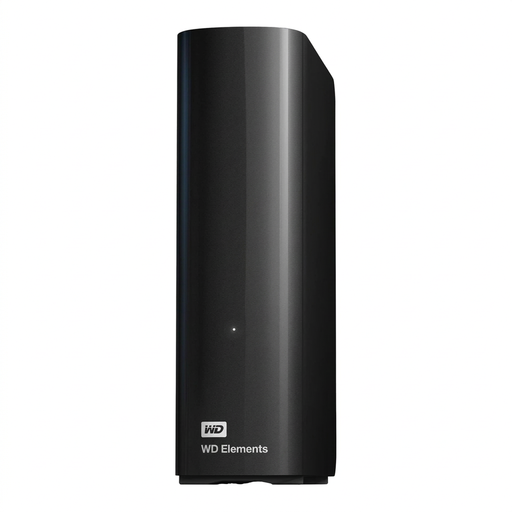
WD Elements 14TB Desktop External Hard Drive, USB 3.0, 3.5", NTFS
For storing large archives in one place if a desktop drive suits the way you’ll use it.
14 TB; USB 3.0; 3.5"; NTFS.
The product description says the drive needs a power supply while in use. It also says you’ll need to reformat it to use it with macOS, so back up any existing files separately first. For frequent file transfers on the move, HDDs are slower and more vulnerable to knocks than SSDs, according to CHIP.
View at Joybuy
Frequently asked questions
Is an external drive enough as the only copy of my interviews?
No, not if you need to be able to restore the files after a fault or loss. The Federal Office for Information Security recommends regular data backups; an external drive can be used as a backup device kept separately.
How do I set up a drive for Mac and Windows?
First, check that you can connect the drive to both devices and that its file system suits the way you’ll use it. Apple recommends exFAT for a drive larger than 32 GB that you want to use with both Mac and Windows. Formatting deletes any existing files, so back them up first.
Does the external hard drive itself need to have an encryption feature?
Not necessarily. For interviews containing personal data, those responsible need to assess suitable technical and organisational measures in light of the specific risks. The Federal Office for Information Security also describes software that encrypts entire storage devices. Make sure it’s set up properly and that the key is stored securely.
Can I record and archive a private interview without permission?
No, not without the necessary authorisation. Section 201 of the German Criminal Code covers recording another person’s privately spoken words without authorisation, as well as using or sharing a recording made in this way. Whether a particular recording and its processing are permitted depends on the circumstances; owning a drive doesn’t give you permission to record.
What should I allow for when buying extra storage and cables?
If you need a separate backup, allow for an additional storage device and a regular backup routine. You may also need suitable cables or adapters when switching between devices. Toshiba says the Canvio Flex comes with USB-A and USB-C cables, while Kingston lists a USB-A cable with a USB-C adapter for the XS1000.


