
Lieferung heute & morgen

Qualitätsgarantie

Willkommens-Angebote freischalten: KOSTENLOSE Lieferung | Bis zu 80 % RABATT | Kostenlose 30-Tage-JoyPlus-Testphase
App herunterladen
An iPad keyboard case transforms a tablet from a media consumption device into a productivity tool. For users who employ their iPad as a flexible laptop replacement for studies, work, or travel, choosing the right case is crucial. Functionality hinges on the keyboard layout, connectivity, and additional features like an integrated trackpad. This article analyses the technical criteria for selection and presents a curated list of models for 2026.
The decision for a suitable model should be based on objective parameters tailored to your individual needs.
The most fundamental aspect is compatibility with your specific iPad model. Apple regularly releases new generations of the iPad Pro, iPad Air, and the standard iPad, which differ in dimensions, camera placement, and port layout. Before purchasing, check the exact model name and release year of your device. For example, a case for a 4th generation 11-inch iPad Pro will not necessarily fit an 11-inch iPad Air. Precise cutouts for ports, speakers, and cameras are essential for unrestricted functionality.
For the English-speaking market, a QWERTY layout is essential for intuitive use without a learning curve. The quality of the typing experience is determined by the key mechanism. Many high-end keyboards use a scissor-switch mechanism, which provides stable and precise key travel. A key travel of around 1 mm is considered comfortable for extended typing sessions. Pay attention to the key spacing to minimise input errors.
The connection between the keyboard and the iPad is typically handled in one of two ways:
An integrated trackpad is a key feature for achieving a laptop-like experience. It allows for cursor control and the use of multi-touch gestures in iPadOS, significantly boosting productivity.
The case design influences its use cases:
Materials range from polyurethane (PU) to more robust plastics (ABS). They determine the weight, feel, and level of protection the case provides.
Based on the technical criteria mentioned, we present three models that cover different user profiles.
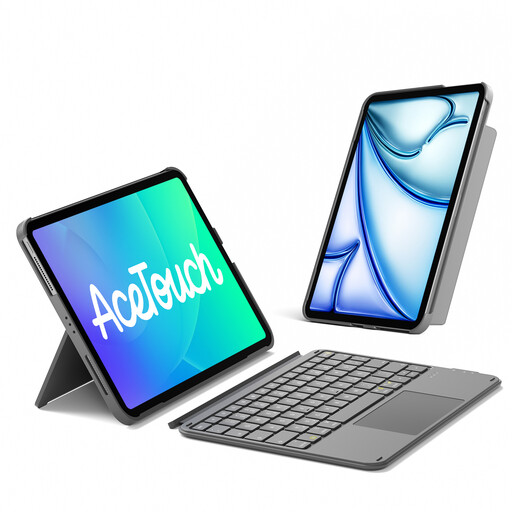
Why We Recommend This Product: The Inateck KB04122 stands out for its exceptionally low weight of 450g and a thickness of just 7.6mm. Its broad compatibility with various iPad models, including different generations of the iPad Air and 11-inch Pro, makes it a versatile option. The magnetically detachable design allows for a quick separation of the keyboard and case, and the back cover supports both horizontal and vertical orientations for the iPad. The scissor-switch keys with 1mm of travel ensure a comfortable typing experience.
Pros:
Who It's For: Users who prioritise portability and flexibility and are looking for a single keyboard solution for various compatible iPad models.
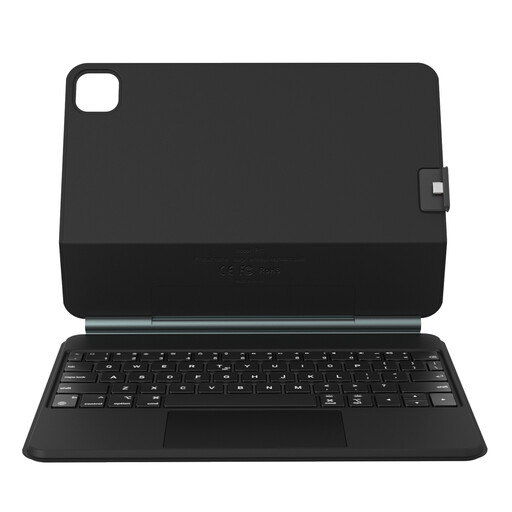
Why We Recommend This Product: The Rexsun P11-1 uses a magnetic floating hinge design, which gives the iPad an ergonomic, floating position above the keyboard. This emulates the look and feel of a modern laptop. The large precision glass trackpad supports multi-touch gestures smoothly and without lag. The two-piece design allows the magnetic back cover to be used as a separate protective case. Compatibility is focused on specific models of the 11-inch iPad Pro and 10.9/11-inch iPad Air.
Pros:
Who It's For: Users seeking a premium, laptop-like experience who value design aesthetics and a stable work setup.
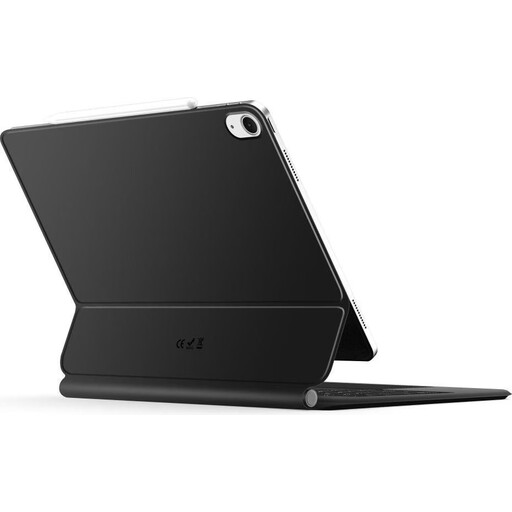
Why We Recommend This Product: The Tech-Protect Smartcase combines a protective case with a functional keyboard in a single unit. A key feature is the integrated key backlighting, which makes typing easier in low-light environments. It connects easily via Bluetooth. The magnetic design ensures the iPad is held securely in the case. Weighing 667g, it offers a solid compromise between protection and functionality.
Pros:
Who It's For: Users who frequently work in varying light conditions and prefer a straightforward, protective, all-in-one solution for their 10.9-inch iPad.
If none of the featured models meet your specific requirements, or if you are looking for other accessories like styluses or screen protectors, it's worth exploring a wider range of products. You can find an extensive selection in our Tablet with Accessories category.
1. What should I look for when buying an iPad keyboard case? The most important criteria are exact compatibility with your iPad model, a QWERTY keyboard layout, the type of connectivity (Bluetooth or Smart Connector), and functional features like an integrated trackpad or a detachable keyboard.
2. How do I ensure the keyboard has the correct layout (e.g., QWERTY)? Check the product specifications for your regional layout. If your physical keyboard types the wrong characters after connecting (e.g., "Z" instead of "Y"), you can adjust the layout in iPadOS. Navigate to Settings > General > Keyboard > Hardware Keyboard and select the correct layout for your connected device.
3. Does every iPad keyboard case need its own power supply? No. Models that use the iPad's Smart Connector draw power directly from the tablet and do not need to be charged separately. Keyboards that connect via Bluetooth have their own battery, which is typically recharged with a USB-C cable.