
Lieferung heute & morgen

Qualitätsgarantie

Willkommens-Angebote freischalten: KOSTENLOSE Lieferung | Bis zu 80 % RABATT | Kostenlose 30-Tage-JoyPlus-Testphase
App herunterladen
An iPad is a versatile tool for creativity and consumption. But when it comes to typing long texts, emails, or working on spreadsheets, the on-screen keyboard can feel limiting. An external iPad keyboard with a touchpad can transform your tablet into a productive, laptop-like device.
As your Joybuy Product Recommendation Officer, my mission is to provide you with clear guidance in the market for iPad keyboards. This guide introduces various models and explains the key criteria to consider, helping you find the perfect solution for your iPad Air or iPad Pro.
The range of available keyboards is vast. To make the right choice, several technical and functional aspects are crucial.
Compatibility is key. Before making a purchase, be sure to check the model number of your iPad (starting with "A" on the back). Manufacturers specify precisely which models their keyboards or cases are designed for, whether it's an iPad Air keyboard or an iPad Pro 11 keyboard.
Additionally, there are different connection types:
For an efficient typing experience, a standard QWERTY tablet keyboard layout is essential for English speakers. Pay close attention to this specification to ensure you have familiar key positions for punctuation and special characters.
Other useful features include:
Do you just want a keyboard, or protection for your device as well?
Based on functionality, compatibility, and user needs, we have selected a few models for you.
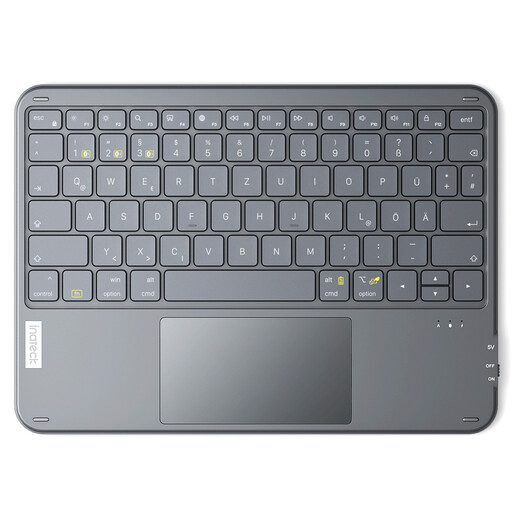
Why it stands out: This model is an extremely slim and lightweight wireless keyboard designed for maximum mobility. At just 5 mm thick and weighing 228 g, it's barely noticeable in your bag. Its strength lies in its universal compatibility and multi-device capability.
Pros:
Best for: Users who already own a protective case for their iPad and are looking for a separate, extremely lightweight, and versatile keyboard for travel, business trips, or use with multiple devices.
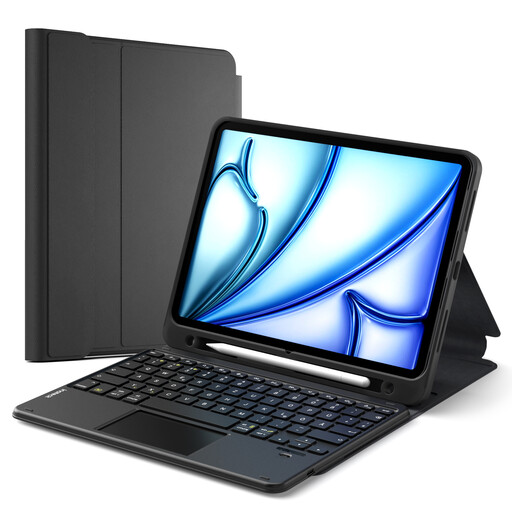
Why it stands out: This iPad case with a keyboard combines protection and productivity. Its key feature is the magnetically detachable keyboard, which allows you to switch between a full productivity setup and a lightweight tablet mode depending on your needs.
Pros:
Best for: Students and professionals looking for an all-in-one solution that offers both robust protection and a flexible, detachable keyboard for work, study, and leisure.
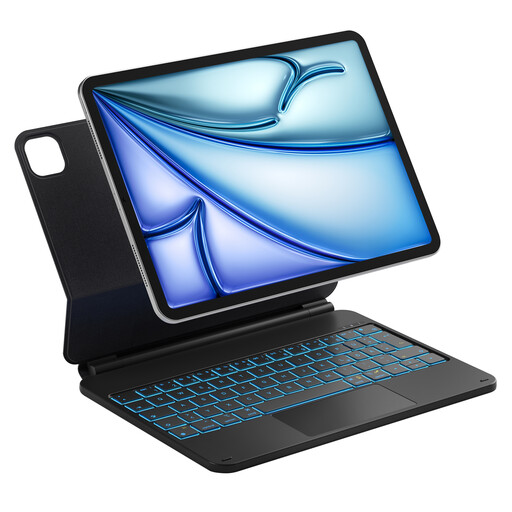
Why it stands out: The NeoMagic keyboard case is designed as a premium Magic Keyboard alternative. It features a magnetic floating cantilever stand that holds the iPad securely and allows for smooth tilt adjustment up to 130 degrees. The design visually and functionally transforms the iPad into a compact laptop.
Pros:
Best for: Demanding users and content creators who want an aesthetically pleasing and highly functional keyboard case that offers an experience similar to the Apple Magic Keyboard, including backlighting and a premium floating hinge.
The models presented here cover common use cases. However, if you are looking for other designs, colours, or specific features, there is a wider selection to explore.
? Explore more keyboard cases with trackpads on Joybuy
1. Can any Bluetooth keyboard be connected to an iPad? Yes, in principle, any standard Bluetooth keyboard for iPad can be paired. However, models designed specifically for iPadOS often offer additional benefits like dedicated function keys for features such as the Home Screen, Search, brightness control, and media playback, which enhance the user experience.
2. What distinguishes a Magic Keyboard alternative from other keyboard cases? The main difference often lies in the connection and power method, as well as the design. The original Apple Magic Keyboard uses the Smart Connector for power and data, enabling an instant connection without Bluetooth pairing or separate charging. Alternatives typically use Bluetooth but often offer additional features like a detachable keyboard, more protection, or a multi-colour backlight at a different price point.
3. How important is a touchpad on an iPad keyboard? A touchpad is a crucial feature for turning the iPad into a more productive tool. Since the introduction of cursor support in iPadOS, a touchpad allows for precise control, easy text selection, and the use of multi-touch gestures to switch between apps or access the Dock. It bridges the gap between a tablet and a laptop, making navigation significantly more efficient.