
Lieferung heute & morgen

Qualitätsgarantie

Willkommens-Angebote freischalten: KOSTENLOSE Lieferung | Bis zu 80 % RABATT | Kostenlose 30-Tage-JoyPlus-Testphase
App herunterladen
As a Joybuy Product Recommendation Officer, I see every day how customers are overwhelmed by marketing promises and complex technical specs. Especially with high-end devices like the Apple iPad Pro 13-inch (2025), it's crucial to separate fact from hype. This guide is designed to help you make an informed decision and avoid common buying pitfalls.
Before you invest in a professional tablet, you should be aware of the most common mistakes that often lead to unnecessary expenses.
To ensure the iPad Pro meets your needs, focus on these three core aspects. They are crucial in determining the device's performance and utility in your daily workflow.
The heart of the new iPad Pro is the iPad Pro with M5 chip. This processor is engineered to handle demanding tasks and AI-powered workflows directly on the device. For creative professionals, this means smoother 4K video editing, faster rendering of 3D models, and seamless use of Apple Intelligence on iPad. The dedicated Neural Engine accelerators in the chip are specifically optimised for machine learning, which translates to intelligent software features and improved responsiveness in pro apps. If your workflow relies on compute-intensive applications, the M5 chip's performance is a deciding factor.
The Ultra Retina XDR display delivers exceptional brightness and precise contrast, which is essential for color-critical work like graphic design or photo editing. The critical question, however, is the surface finish.
A professional tablet for creatives must be able to move large amounts of data quickly. The iPad Pro (2025) is a Wi-Fi 7 tablet, which enables significantly higher transfer speeds and lower latency on compatible networks. This is particularly relevant if you regularly download or upload large project files from the cloud.
When it comes to storage, you should realistically assess your needs. The option of buying an iPad Pro 2TB is intended for users who work with extremely large files, such as uncompressed 4K or 8K video footage, or who need an extensive library of software and media available offline. For most other professional users, 512 GB or 1 TB offers a good compromise between storage and cost.
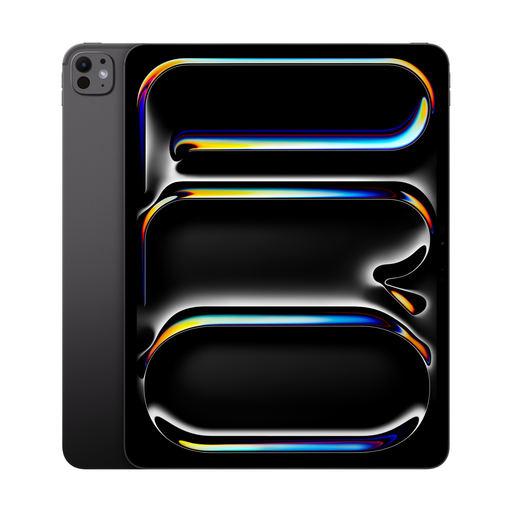
Why This Fits Their Persona: This configuration is designed for professionals whose income depends on the performance of their tools. Videographers, 3D artists, and high-end photographers need the maximum performance of the M5 chip, the massive 2 TB of storage for large project files, and the nano-texture glass for precise work under any lighting condition.
For this target audience, the high specs aren't overkill but a necessary investment. The nano-texture glass solves the real-world problem of reflections on set or in the field.
Maximum performance for AI-powered creative apps and large media files. The display minimises glare for color-critical work in variable lighting conditions.
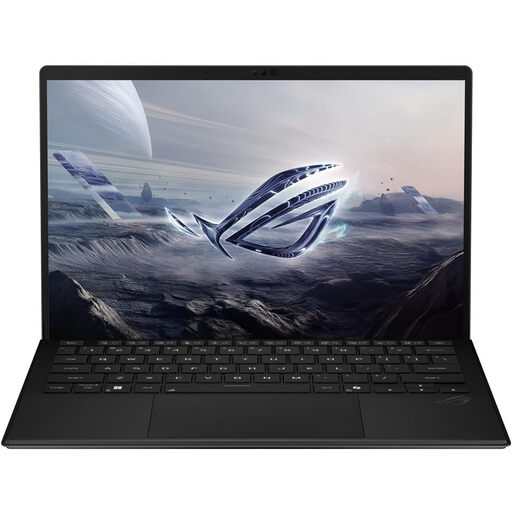
Why This Fits Their Persona: For users who need the power of a laptop and the flexibility of a tablet but don't want to be locked into the Apple ecosystem. This 2-in-1 device with Windows 11 is ideal for business users, engineers, or gamers who rely on specific desktop software.
It bypasses the ecosystem lock-in trap and offers the full functionality of a Windows operating system. Accessory costs are often lower than for comparable Apple products.
Combines tablet portability with the software compatibility and performance of a Windows laptop. The AMD Ryzen AI processor is optimised for AI and productivity tasks.
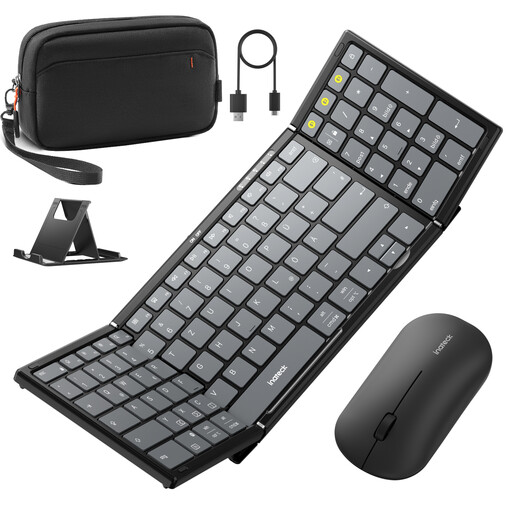
Why This Fits Their Persona: For students, frequent travelers, and budget-conscious users who want to turn their tablet into a fully-fledged mobile workstation without breaking the bank on first-party accessories. This set provides a keyboard, mouse, and stand in one portable package.
This set directly addresses the high ancillary cost trap. It offers a comprehensive and cost-effective alternative to expensive branded keyboards and mice.
A complete, portable, and cross-platform solution for boosting productivity. The keyboard features a full-size layout with a number pad.
We've compiled a complete, up-to-date list of products that meet these strict selection criteria and comply with local regulations.
Is the nano-texture glass on the iPad Pro 13-inch (2025) worth the extra cost? That depends entirely on your use case. If you frequently work in bright environments, outdoors, or in rooms with multiple light sources, the nano-texture glass can significantly reduce glare and make your work more comfortable and precise. For users who primarily work indoors with controlled lighting, the standard glass already offers excellent performance, and the extra cost for nano-texture glass may not be justified.
How much storage do I really need for a professional tablet? Analyse your current storage usage and plan for the future.
What are the benefits of Wi-Fi 7 on the new iPad Pro?Wi-Fi 7 (802.11be) is the next standard in wireless networking and offers several advantages over Wi-Fi 6/6E. These include higher maximum speeds, significantly lower latency, and better performance in congested networks. For iPad Pro users, this means faster downloads and uploads of large files, smoother streaming of high-resolution content, and a more stable connection for video conferencing and online collaboration, provided you are using a compatible Wi-Fi 7 router.