
Lieferung heute & morgen

Qualitätsgarantie

Willkommens-Angebote freischalten: KOSTENLOSE Lieferung | Bis zu 80 % RABATT | Kostenlose 30-Tage-JoyPlus-Testphase
App herunterladen
An iPhone 16 case should help prevent scratches, absorb knocks and leave the camera, buttons and charging port easy to use. Many people also want a slim design, a clear finish or the option to use MagSafe accessories.
However, similar product names and vague marketing claims can easily lead to the wrong choice. An iPhone 16 protective case advertised with ‘drop protection’ won’t necessarily suit every situation. And ‘wireless charging compatible’ doesn’t automatically mean MagSafe accessories will attach securely. The criteria below will help you make sense of the claims.
A case for the iPhone 16 won’t necessarily fit the iPhone 16 Pro, iPhone 16 Pro Max or other models. The camera cut-out, dimensions and button positions may differ. Before buying, make sure iPhone 16 is explicitly listed as a compatible device.
A basic case may support wireless charging using the Qi standard. But that doesn’t tell you whether MagSafe chargers will align magnetically or stay attached. If you want to use a magnetic charger, wallet or mount, choose a version specifically described as an iPhone 16 case with MagSafe.
A slim iPhone 16 case feels comfortable in your hand and adds little bulk. However, very slim designs may offer less material around the corners and edges if you drop your phone. On the other hand, a heavily reinforced case can make your smartphone noticeably heavier and more awkward to handle. The key is to consider the material, raised edges and corner protection together.
If you’re choosing a clear iPhone 16 case, check whether it says anything about discolouration. UV light, heat, skin oils and dyes from clothing can change the appearance of clear materials over time. A label such as ‘yellowing-resistant’ describes a material property, but doesn’t guarantee that the case will stay colourfast in all conditions.
Raised edges around the display and camera help keep them clear of flat surfaces. They’re not a substitute for a screen protector and won’t prevent damage from every drop. Check that the camera area is fully cut out and that the lenses won’t be obstructed by the rim or an additional cover.
If you’re looking for an iPhone 16 case with camera and screen protection, check whether it has raised edges or an integrated cover. You may need to remove a camera cover before taking photos.
Look for a clear description such as MagSafe-compatible, or an integrated magnetic ring. An iPhone in a case without a magnetic ring may still charge with a Qi charger, but magnetic accessories may not attach reliably.
Before charging, make sure the back of the case and the charger are clean and free from foreign objects. Thick stickers, metal parts or additional mounts can interfere with charging. Stop charging if the device becomes unusually hot.
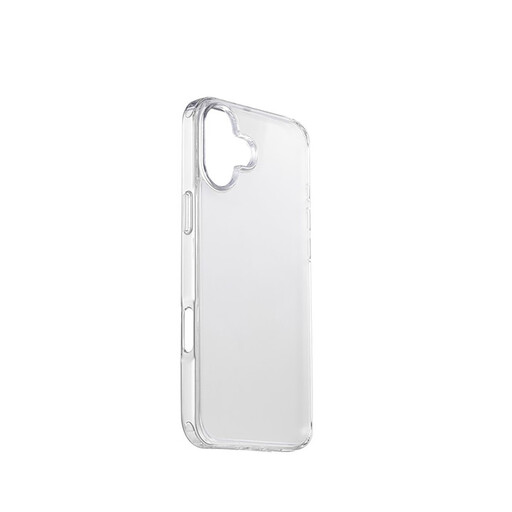
Why it suits this profile: This semi-transparent TPU case is lightweight, slim and designed for everyday protection. Reinforced corners and precise cut-outs cover the essentials in a straightforward iPhone 16 case.
The product details explicitly name the compatible model and describe the reinforced corners, rather than making a vague claim about protection.
Semi-transparent TPU, low weight, reinforced corners and access to the buttons, camera and ports.
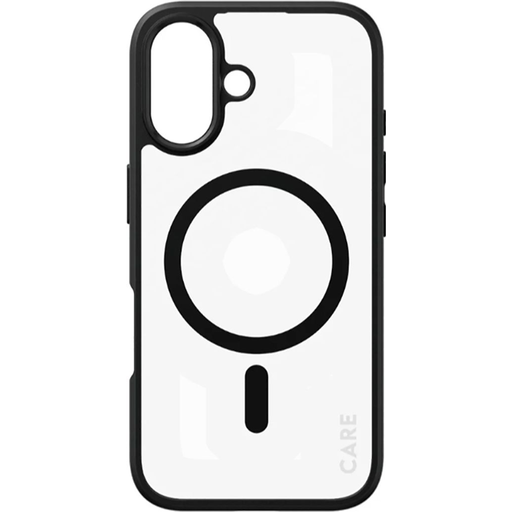
Why it suits this profile: This clear case pairs a discreet design with MagSafe compatibility. According to the product details, it uses yellowing-resistant materials and has precise cut-outs.
MagSafe and wireless charging are specifically mentioned, rather than making a general promise that it’s ‘charging compatible’.
Clear design, MagSafe compatibility, added everyday protection and access to all controls.
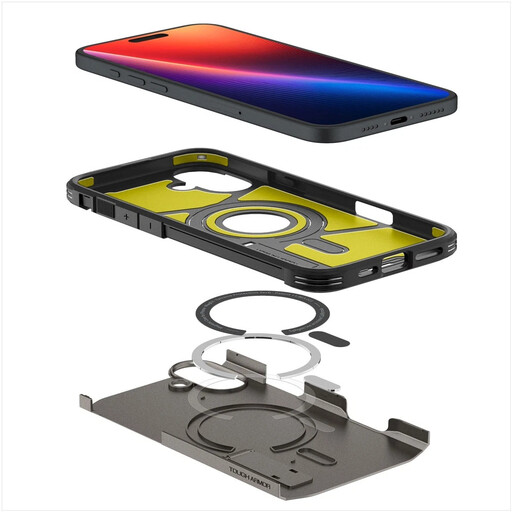
Why it suits this profile: Combining MagSafe, a dual-layer construction, technical foam elements and a built-in stand, this case is designed for people who use their smartphone frequently on the go or for watching media.
The product details list specific construction features, as well as a 1.2-metre drop test and the MIL-STD 810G-516.6 standard.
MagSafe magnetic ring, raised edges, dual-layer construction and a built-in stand; the case weighs 69 grams according to the product details.
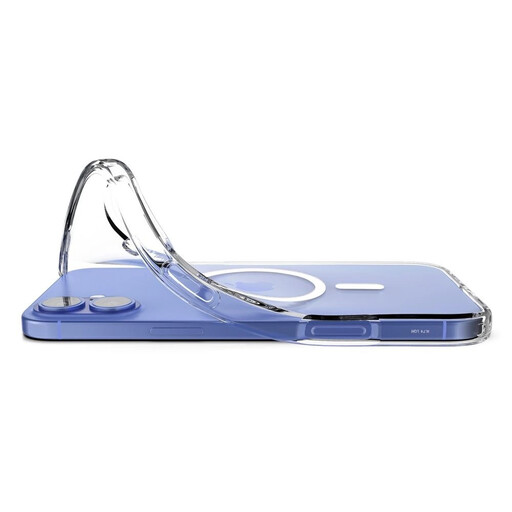
Why it suits this profile: This flexible, clear TPU case shows off your phone’s colour and has an integrated MagSafe magnetic ring. It’s a good choice if you want a slim, transparent case that supports wireless charging.
The product description clearly distinguishes standard Qi charging from MagSafe and notes that UV light may cause discolouration.
Clear TPU construction, integrated magnetic ring, raised edges and support for MagSafe and Qi chargers.
We’ve put together a complete, regularly updated list of products that meet these strict selection criteria and the safety regulations applicable in the EU.
Remove your case regularly and clean it along with your iPhone. Dust particles trapped between the phone and case can cause fine friction marks over time. Use a soft, slightly damp cloth and follow the manufacturer’s instructions on cleaning products.
Replace the case if you notice cracks, stretched edges, damaged corners or a fit that has become unreliable. A heavily discoloured or sticky surface may also indicate that the material is wearing out. A case won’t protect your phone from damage indefinitely, so stop using it if it shows significant signs of wear.
No. Only buy a case whose product description explicitly lists the iPhone 16 as compatible. Cases for Pro or Pro Max models may have different dimensions and camera cut-outs.
Many TPU, silicone and hybrid cases support wireless charging. If you want to use magnetic accessories, also check for MagSafe compatibility. If you have charging problems, remove any metal accessories and check that the case and charger are clean and sitting flush against each other.
Its lifespan depends on the material, exposure to UV light and heat, friction and drops. Check the corners, edges and cut-outs regularly. Replace the case if you notice any damage, no matter how long you’ve been using it.