
Lieferung heute & morgen

Qualitätsgarantie

Willkommens-Angebote freischalten: KOSTENLOSE Lieferung | Bis zu 80 % RABATT | Kostenlose 30-Tage-JoyPlus-Testphase
App herunterladen
Anyone who uses their iPhone 17 on the train, in the office or in a café wants to protect the screen from more than just scratches. Messages, passwords and business content should not be visible to people viewing the screen from the side either. An iPhone 17 privacy screen protector made from tempered glass may be suitable for this purpose – provided the model, dimensions and installation system are genuinely compatible with the device.
The term “360°” is used for many anti-spy screen protectors. It generally means that the screen darkens when viewed from a certain angle from the side. How pronounced this effect is depends, among other things, on the viewing angle, brightness and surroundings. From the front, the content remains visible; from the side, it may be more difficult to make out.
A privacy screen protector is therefore no substitute for proper device security. For sensitive information, you should also use a screen lock, a short automatic lock time and take care over how you use the display.
9H tempered glass describes a hardness rating stated by the supplier. It can be a useful point of comparison when choosing a product, but on its own it does not mean that the glass will remain undamaged after every fall. Even a scratch-resistant screen protector can crack on impact and must then be replaced carefully.
You should therefore also consider the glass thickness, the edge finish and whether the product is explicitly designed for your iPhone model.
A screen protector with easy installation is practical when it comes with a suitable applicator or alignment guide. Even so, preparation remains crucial. Dust on the display, incorrect positioning or pressure during installation can cause bubbles and lifting around the edges.
Automatic adsorption helps with alignment, but it does not replace cleaning the screen or working in a low-dust environment.
The iPhone 17, iPhone 17 Pro and iPhone 17 Air must not simply be treated as identical. Product details vary in terms of compatible models and the device dimensions specified. Before buying, check:
An iPhone 17 Pro privacy screen protector is not automatically suitable for the standard model or the iPhone 17 Air. Even with a similar screen diagonal, the shape and edge area may differ.
With an iPhone 17 privacy screen protector, the display should remain clear when viewed from the front, while appearing darker from the side. The stronger the filter, the more likely it is that the display will be harder to see from an angle. This is useful on the train, but it can be inconvenient when looking at photos or presentations together.
Also look for information about light transmission and touch sensitivity. Manufacturer descriptions such as “ultra-clear” or “sensitive” are product claims and should be considered alongside the other technical details, not in isolation.
According to the product description, an oleophobic and hydrophobic coating may help make fingerprints, oil and sweat less noticeable. However, it does not keep the screen permanently free from dirt. Frequent removal and reapplication may, according to the supplier, affect the existing coating on the display.
An applicator, cleaning accessories, instructions and a precisely fitting piece of glass are all useful additions to the package. Before ordering, also check whether it contains one protector or several.
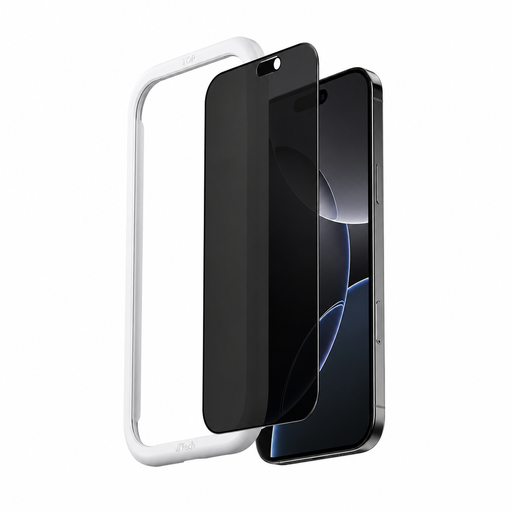
Why this product suits this profile: According to the product details, the glass is designed for the iPhone 17 and combines side privacy protection with a stated 9H hardness rating. This makes it suitable for users looking for a compact solution for commuting and everyday office use.
The product data explicitly states “iPhone 17” as the compatible model. The supplied applicator and the described automatic adhesion may make positioning easier.
Stated 9H hardness, anti-fingerprint coating and applicator included.
Why this product suits this profile: This iPhone 17 Pro privacy screen protector is aimed at professionals who frequently use their device in public places and value tempered glass, easy cleaning and guided installation.
The product details specify the compatible model, a 9H hardness rating and an applicator. This allows you to compare key purchasing criteria directly before ordering.
Stated anti-fingerprint, dust and scratch protection properties, as well as an OCA adhesive process according to the product description.
Why this product suits this profile: For iPhone 17 Air users, matching the exact model is crucial. According to the product details, this iPhone 17 Air screen protector is designed for this model and intended for regular use on the go.
The description names the iPhone 17 Air as the compatible model and highlights guided one-click installation. Before buying, check that it fits with your own case.
Stated 9H hardness, automatic adhesion, applicator and oil- and water-repellent coating according to the product details.
We have put together a complete, regularly updated list of products that fully meet these strict selection criteria and the safety regulations applicable in the EU.
Avoid installing the protector in a dusty environment. If the glass is cracked, do not continue using it. Sharp edges can cause injuries when the protector is removed.
An integrated privacy filter limits how clearly the display can be seen from the side. From the front, the display remains generally readable, while it may appear darker from certain angles. Its effectiveness depends on the viewing angle, screen brightness and lighting conditions.
It is not possible to give a reliable fixed service life. Items in your bag, keys, drops, pressure and frequent cleaning all affect how long it lasts. Replace the glass if cracks, deep scratches, lifting around the edges or reduced touch responsiveness appear.
A precisely fitting tempered glass protector can largely preserve touch control. Privacy filters can, however, intentionally alter how the image appears from the side. After installation, check the touch sensitivity and remove the protector if it has not adhered correctly or noticeably affects usability.