
Lieferung heute & morgen

Qualitätsgarantie

Willkommens-Angebote freischalten: KOSTENLOSE Lieferung | Bis zu 80 % RABATT | Kostenlose 30-Tage-JoyPlus-Testphase
App herunterladen
When shopping for iPhone accessories, many products look similar at first glance. A screen protector might claim to fit your model yet still cover essential cutouts, while an external SSD with impressive top speeds can run much slower on your iPhone. If you don't check compatibility, connection standards and what's included in the box, you could end up buying twice.
This buying guide focuses on two common areas: iPhone screen protectors and external SSDs for iPhone. Our recommendations are based on verifiable product specifications and different usage needs.
The iPhone 13, iPhone 13 Pro, iPhone 14, iPhone 14 Pro and their Plus variants all have different dimensions and camera cutouts. A protector for the iPhone 14 Plus won't necessarily fit an iPhone 14. Before you buy, always check the model name and display size against what's stated on the packaging.
For an iPhone 15 Pro screen protector or iPhone 16 Pro Max screen protector, pay close attention to the exact Pro or Pro Max version. The product name alone isn't enough if several variants are listed in the same offer.
A USB 3.2 Gen 2x2 SSD can reach up to 2,000 MB/s according to the manufacturer. However, this speed is only possible if your iPhone, cable and target device all support the same transfer standard. The app you're using and the file format also affect real-world performance.
For direct ProRes recording, iPhone models with USB-C are the ones to consider. The magnetic SSDs mentioned in product specs are designed for iPhone 15 and iPhone 16. An iPhone 14 or older model with a Lightning connector won't automatically be compatible.
A MagSafe SSD can attach magnetically to your iPhone or a compatible case. That doesn't necessarily mean it supports wireless MagSafe charging. The Lexar ES4, for example, explicitly states that wireless MagSafe charging is not supported. You'll still need a USB-C cable for data transfer.
For an iPhone tempered glass screen protector, these points are crucial:
Before fitting, make sure the display is dry, grease-free and as dust-free as possible. If bubbles appear, you can often gently push them from the centre towards the edges. Damaged glass should be replaced, as sharp edges can cause injury.
For iPhone 13 and 14, for example, there are suitable tempered glass protectors for iPhone 13, 13 Pro, 14 and 14 Pro. For the iPhone 15 Pro, there's a version with a dust-free installation tray: view the iPhone 15 Pro screen protector. The iPhone 16 Pro Max also has its own screen protector with a matching alignment aid listed.
When choosing a portable USB-C SSD, you should compare at least these technical details:
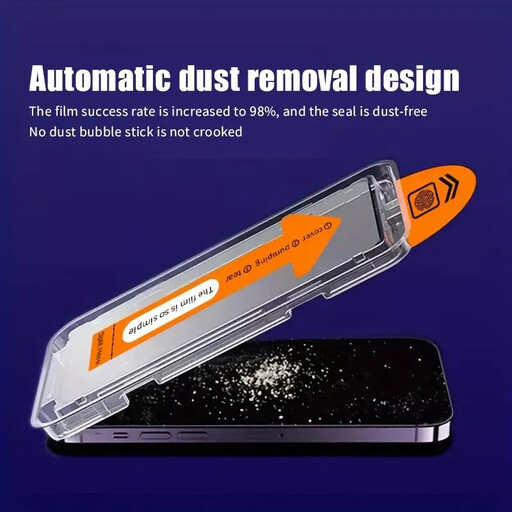
Why this product fits the profile: This protector is aimed at users who want to protect their compatible iPhone from scratches and everyday wear, and who prefer a simpler installation process.
The compatible model groups are clearly stated. The dust-free installation tray can reduce particles and alignment errors during fitting.
Tempered glass, high transparency according to the product description, and an installation aid for several listed iPhone models.
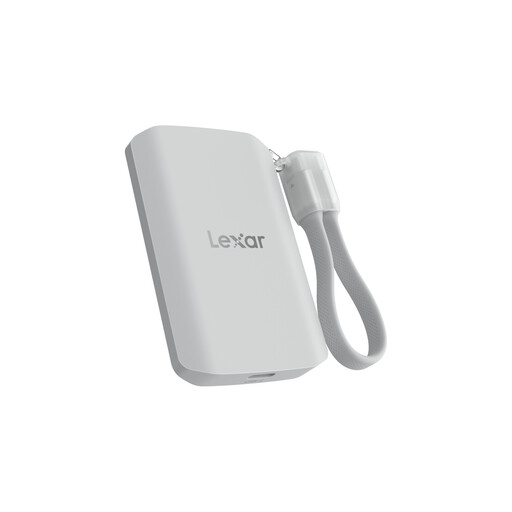
Why this product fits the profile: Suitable for users with large photo and video libraries who need magnetic attachment, high capacity and protective features for mobile workflows.
The product specifications note lower performance on systems without USB 3.2 Gen 2x2, helping you set realistic speed expectations.
2 TB capacity, up to 2,000 MB/s read and write according to the manufacturer, IP65 rating and stated drop resistance up to 3 metres.
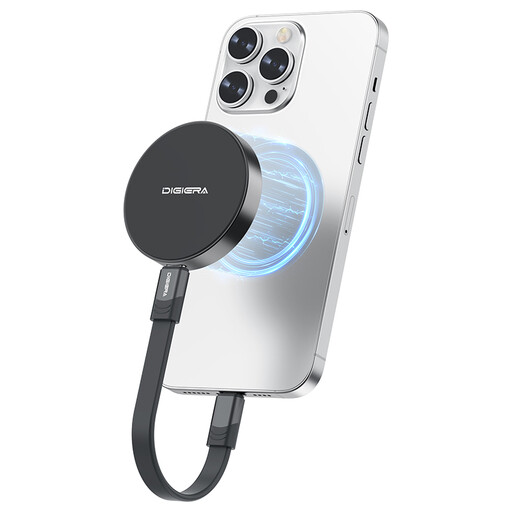
Why this product fits the profile: For mobile content creators and users of iPhone 15 or iPhone 16 Pro or Pro Max who want to transfer files or record ProRes footage directly to an SSD.
The compatibility information excludes iPhone 14 and older models. Buyers can check their Lightning or USB-C connector beforehand.
1 TB, USB 3.2 Gen 2x2, up to 2,000 MB/s read speed according to the product specification and magnetic attachment.
We've put together a full, regularly updated list of products that meet these strict selection criteria and comply with EU safety regulations.
That depends on the specific model. The iPhone 13, iPhone 13 Pro, iPhone 14 and iPhone 14 Pro can have different dimensions and cutouts. A protector should therefore be explicitly designed for your particular model or a clearly stated compatible group of models.
Not every SSD works directly with every iPhone. The magnetic USB-C models in this selection are designed for iPhone 15 and iPhone 16 according to the product specifications. iPhone 14 and older devices generally need a different connection solution; adapters, power supply and file management may also be relevant.
For regular backups, photos and shorter video projects, 1 TB can be sufficient. If you frequently store high-resolution material or ProRes files, you'll benefit from 2 TB or an additional backup. The actual available capacity is slightly less than the advertised size due to formatting and system data.