
Lieferung heute & morgen

Qualitätsgarantie

Willkommens-Angebote freischalten: KOSTENLOSE Lieferung | Bis zu 80 % RABATT | Kostenlose 30-Tage-JoyPlus-Testphase
App herunterladen
By the Joybuy Product Recommendation Officer, August 29, 2026
Finding a 65% mechanical keyboard with a true ISO-DE layout can quickly become a complicated task. The market is flooded with models that look impressive at first glance but reveal critical flaws upon closer inspection. Many users invest in a supposedly high-end keyboard, only to discover it's impractical for the German language or lacks essential features. Before you make a purchase, you should be aware of the most common pitfalls.
To avoid a bad purchase, you should focus on three core technical specifications. These define the quality, durability, and functionality of your future keyboard.
The 65% form factor is a popular compromise for users who want a compact gaming keyboard but don't want to give up dedicated arrow keys. Unlike 60% keyboards, this layout retains the arrow keys and often some navigation keys like "Del" or "Home".
The crucial factor, however, is the ISO-DE layout. Look for the following features to ensure it's a genuine German layout:
<>| key next to it.A true ISO-DE layout is fundamental for typing and programming in German-speaking regions and saves you frustration and the time needed to retrain your muscle memory.
The hot-swap feature allows you to change the keyboard's mechanical switches without soldering. This offers tremendous advantages:
Make sure the printed circuit board (PCB) supports both 3-pin and 5-pin switches. 5-pin switches offer better stability on the PCB thanks to two extra plastic legs and are the standard for many high-quality switches, such as the Akko V3 Cream Yellow Pro.
The keycaps are the most heavily used components of a keyboard. The material has a direct impact on their feel and durability.
A particularly durable option is "double-shot" PBT keycaps. With this method, the legend is moulded from a second piece of plastic, so it can never wear off. This feature, often combined with an RGB mechanical keyboard, is a clear sign of a well-designed product.
Based on the criteria above, we have identified a model that meets the needs of demanding users in the German-speaking market.
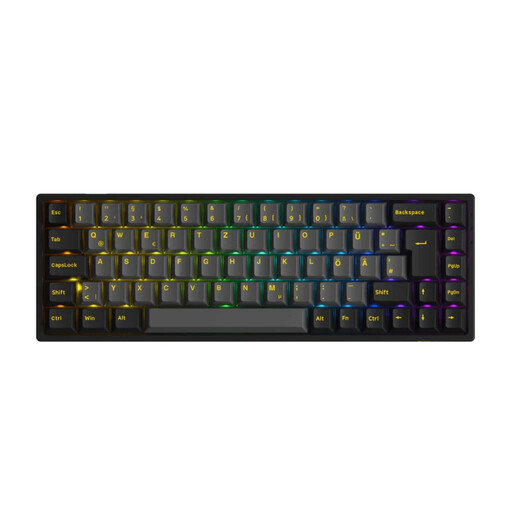
Why This Fits Their Persona: This model is aimed at users looking for a compact yet fully functional keyboard for gaming and productive work. The combination of an ISO-DE layout, hot-swap capability, and tri-mode connectivity meets the demands of advanced users who refuse to compromise on performance or customisation.
The Akko 3068B Plus offers an authentic ISO-DE layout, avoiding the compatibility issues of ANSI variants. The PCB supports both 3-pin and 5-pin switches, guaranteeing true hot-swap freedom, and the tri-mode keyboard delivers stable performance across all connection modes.
Versatile connectivity (Bluetooth 5.0, 2.4 GHz, USB-C) for every use case. Durable double-shot PBT keycaps and high-quality, pre-lubed Akko V3 Cream Yellow Pro switches provide a premium, out-of-the-box typing experience.
We have compiled a complete, up-to-date list of products that fully meet these strict selection criteria.
1. What is the difference between an ISO-DE and an ANSI-DE layout? The main difference lies in the physical arrangement of the keys. The ISO layout has a large, L-shaped Enter key that spans two rows and an extra key to the left of the Z key. The ANSI layout uses a single-row, wide Enter key and has no key between the left Shift and Z. An "ANSI-DE" layout is therefore just a compromise that lacks keys essential for German language use.
2. Are hot-swap keyboards suitable for beginners? Yes, absolutely. The hot-swap feature actually makes it easier to get into the world of mechanical keyboards. You don't need to learn how to solder to try out different switches or replace a faulty one. Using the included tool (a switch puller), switches can be removed and new ones inserted safely and easily.