
Lieferung heute & morgen

Qualitätsgarantie

Willkommens-Angebote freischalten: KOSTENLOSE Lieferung | Bis zu 80 % RABATT | Kostenlose 30-Tage-JoyPlus-Testphase
App herunterladen
In the modern workplace, whether in an open-plan office or a home office, a reliable headset is a critical tool. However, the market is saturated with products whose marketing promises often don't align with reality. Many users invest in a supposedly premium device, only to be faced with unstable connections, inadequate microphone quality, or poor comfort. This guide highlights the technical features that truly matter and shows you how to make an informed decision that will genuinely boost your productivity.
Before we dive into the technical details, it's important to recognise two common misconceptions that often lead to a poor purchase:
To distinguish the best from the rest, you should base your selection on objective, technical parameters. Three features are particularly important.
For clear communication, the number and arrangement of microphones are crucial. Models like the Jabra Evolve2 75 MS Teams Headset use an array of eight microphones combined with a digital signal processor (DSP). This technology analyses and actively filters out ambient sounds, ensuring only your voice is transmitted clearly. Look for specifications like "HD Voice" and microphone technology explicitly designed for background noise suppression. A retractable boom arm is also a practical feature that provides a more discreet look when not in use.
A Jabra headset for Microsoft Teams with official certification offers more than just compatibility. It guarantees seamless plug-and-play integration. Features like a dedicated Teams button for instantly answering calls or opening the app are standard. The included Jabra Link 380 Bluetooth adapter (available in USB-A or USB-C versions) establishes a stable connection with a range of up to 30 metres and allows simultaneous pairing with a second device, such as your smartphone (dual connectivity).
A headset worn all day must be comfortable. The design of the earcups (supra-aural, meaning on-ear), the weight, and the headband materials are crucial factors. The Evolve2 75 uses special "dual-foam" padding that reduces pressure points while providing good passive noise isolation. Another often-overlooked feature is the headset with a busylight. This integrated red LED light automatically activates during a call, signalling to colleagues that you do not wish to be disturbed—a simple yet effective tool for promoting focus in the office.
Based on the criteria mentioned, we have compiled a selection of products for different needs.
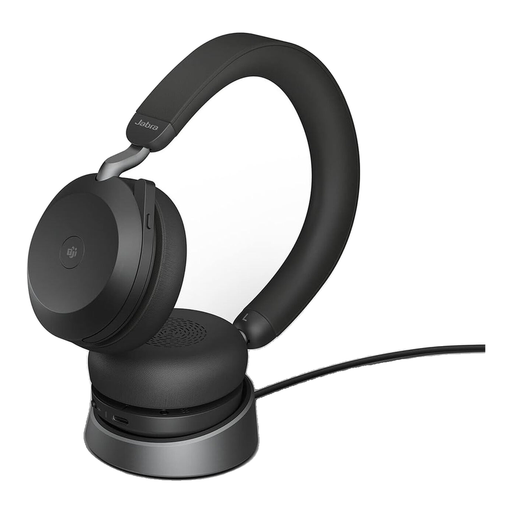
Why it's a match: Ideal for professionals in hybrid or noisy office environments who depend on uncompromising call quality, focus through ANC, and seamless MS Teams integration. The included charging dock ensures a tidy desk and a headset that's always ready to go.
The 8-microphone technology with DSP ensures voice clarity, not just the listening experience. The Jabra Link 380 USB-C adapter guarantees a stable connection to your PC.
Full MS Teams certification with a busylight and advanced ANC for maximum productivity. Long battery life of up to 24 hours of talk time.
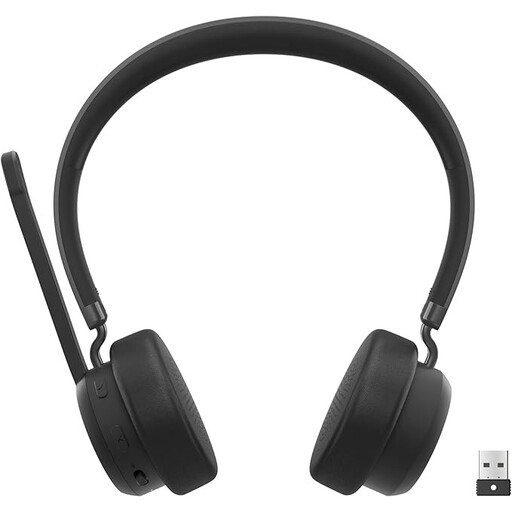
Why it's a match: A solid and cost-effective choice for users who need a reliable, MS Teams-certified solution but can forgo advanced features like ANC. Ideal for quieter work environments.
Provides a stable connection via the included USB-A Bluetooth audio receiver and is optimised for clear communication in Teams calls, even without ANC.
Plug-and-play functionality and official MS Teams certification at an accessible price point. Dual connectivity allows you to connect to two devices simultaneously.
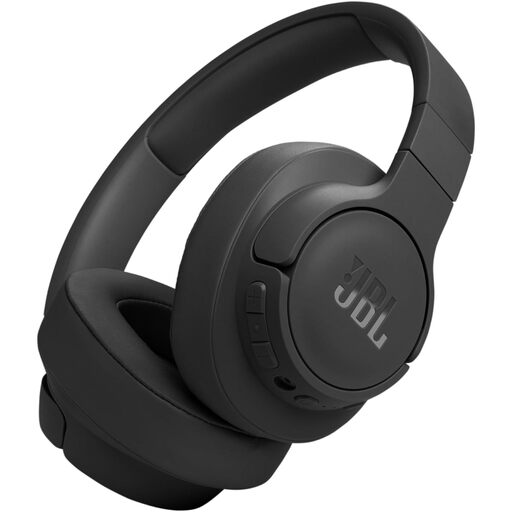
Why it's a match: For users seeking a versatile headset for work, commuting, and leisure. The focus is on strong ANC for music and exceptionally long battery life. It's a great choice if a specific UC certification is not required.
The adaptive noise cancellation ensures an undisturbed listening experience. Although not optimised for office calls, it offers solid performance for occasional phone calls in less noisy environments.
Outstanding battery life of up to 70 hours (with ANC off) and a quick-charge feature. Its foldable design and light weight make it a great travel companion.
You might need specific connectivity solutions for your devices. We've curated a selection of accessories to ensure compatibility between your gear.
A certification for Microsoft Teams means the device meets strict audio quality and user experience standards set by Microsoft. Certified headsets like the Jabra Evolve2 75 offer a seamless plug-and-play experience, often with a dedicated button to control Teams functions (e.g., answering/ending calls). The integration is deeper and more reliable than with non-certified devices.
The Jabra Evolve2 75 supports dual connectivity. Plug the included Jabra Link 380 USB adapter into your PC for a stable connection. Simultaneously, enable Bluetooth on your smartphone and pair it with the headset. The headset can now manage calls from both devices, switching between them intelligently.
According to the manufacturer, the Jabra Evolve2 75 offers up to 24 hours of talk time (with ANC and busylight off) or up to 36 hours of music playback (with ANC off). With typical office use involving a mix of calls and focus periods, a full charge should last for several workdays. A full recharge takes approximately 2.7 hours.