
Lieferung heute & morgen

Qualitätsgarantie

Willkommens-Angebote freischalten: KOSTENLOSE Lieferung | Bis zu 80 % RABATT | Kostenlose 30-Tage-JoyPlus-Testphase
App herunterladen
Choosing the right headset for your daily work, whether in the office or at home, is crucial for productivity and focus. The wrong device can lead to poor call quality, distractions, and discomfort during long periods of use. Many users invest in a professional Bluetooth headset only to find it falls short of the demands of the modern workplace. This guide highlights the common pitfalls to avoid and the technical features that truly matter when making your selection.
When searching for a new headset, buyers often encounter marketing promises that don't hold up in practice. Three misconceptions are particularly common:
To avoid a poor investment, base your decision on objective technical criteria. Three features are paramount for a wireless office headset used in both corporate and home settings.
The quality of your voice on the other end of the line is paramount. Look for headsets equipped with a multi-microphone array and a digital signal processor (DSP). This technology identifies the speaker's voice and separates it from disruptive ambient noise. Models like the Jabra Evolve2 75, for example, use an 8-microphone technology to ensure clear communication even in loud open-plan offices or a home office with background activity.
Software compatibility is critical for seamless integration into your workflow. A Microsoft Teams certified headset guarantees that all features, from answering calls with a button on the headset to syncing your "busy" status, work right out of the box. The connection should be established via a dedicated USB adapter (dongle), which provides a more stable and reliable link than a computer's standard Bluetooth. Modern standards like Bluetooth 5.2 also ensure greater range and the ability to pair the headset with two devices simultaneously (e.g., a PC and a smartphone).
A noise-cancelling headset for the home office not only enhances call quality but also helps you focus. Advanced Active Noise Cancellation (ANC) effectively filters out low-frequency, monotonous sounds like air conditioning or fans. Wearing comfort is just as important. Look for a lightweight design, an adjustable headband, and soft ear cushions. The earcup design (e.g., supra-aural, or on-ear) and the cushion material (e.g., dual-foam technology) are key factors in determining whether a headset will remain comfortable after hours of use.
Based on these criteria, we have compiled a selection of devices for different user groups.
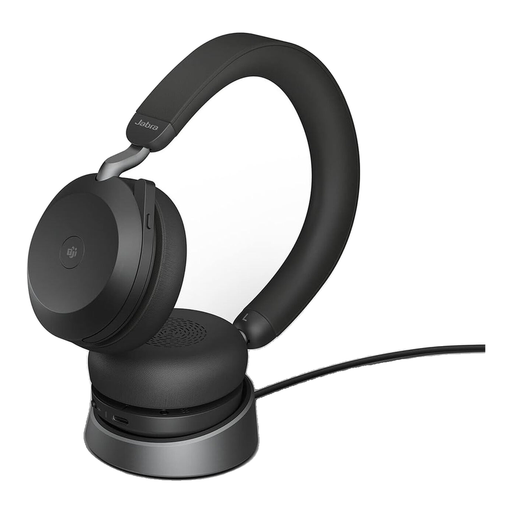
Why it's a good fit: Ideal for professionals who move between a noisy office and their home office. It combines premium voice quality with effective noise cancellation for focused work and professional calls in any environment.
The 8-microphone technology provides excellent voice isolation (solves pitfall #1). The MS Teams certification and Link 380 adapter guarantee full functionality (solves pitfall #3).
Advanced ANC for focus, seamless MS Teams integration, and a retractable boom arm for a discreet look.
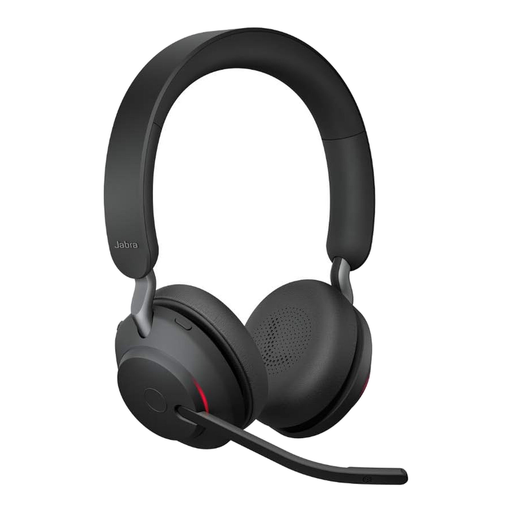
Why it's a good fit: Designed for users in call centers or sales roles who spend their entire day on calls. The focus is on long battery life, reliable connectivity, and superior comfort.
With up to 37 hours of battery life, it bypasses the pitfall of misleading claims (pitfall #2). Its UC certification ensures stable performance on all major platforms (solves pitfall #3).
Outstanding battery life for uninterrupted work and 3-microphone technology for clear calls.
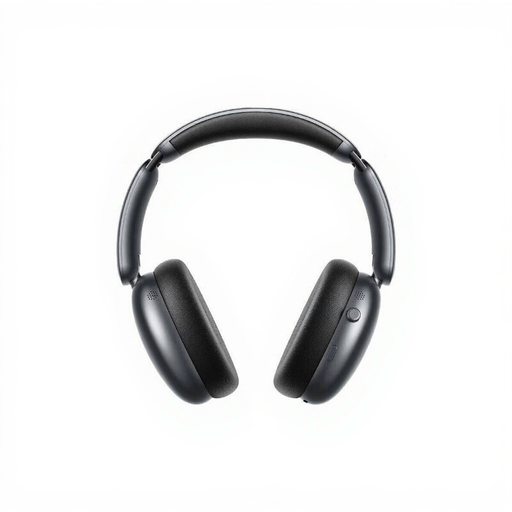
Why it's a good fit: A great choice for users seeking effective ANC for focused work and long battery life, but who do not require certified integration with communication platforms.
It offers an extremely long battery life (up to 70 hours with ANC), avoiding the pitfall of misleading claims (pitfall #2). It focuses on ANC for the wearer, not on certified call features.
Powerful ANC performance (up to -46 dB, according to the manufacturer) and an exceptionally large battery capacity at an accessible price.
We have compiled a complete, up-to-date list of products that fully meet these strict selection criteria and all relevant safety standards.
1. What is the difference between the MS Teams version and the UC version of a headset? A headset that is Microsoft Teams certified (MS) is specifically optimized for use with that platform. It features a dedicated Teams button that allows you to join meetings directly or check notifications. A UC (Unified Communications) version is certified for compatibility with a broader range of softphone applications like Cisco, Avaya, or Skype, offering general call control but without the specific Teams integrations.
2. How important is the included USB adapter (dongle) for a professional Bluetooth headset? The USB adapter is an essential accessory. It establishes a direct, pre-paired wireless connection between the headset and the PC, which is more stable and reliable than the computer's standard Bluetooth connection. This prevents connection drops, improves audio quality, and ensures that all of the headset's control functions (like answering or muting a call) are correctly recognized by the software.
3. Can I also use the Jabra Evolve2 75 for listening to music? Yes, the Jabra Evolve2 75 is also designed for music playback. It features 40mm speakers and supports audio profiles optimized for music (frequency response 20Hz – 20,000Hz). The retractable boom arm can be discreetly hidden away into the headband, giving the headset the appearance of regular headphones when not in use for calls.