
Lieferung heute & morgen

Qualitätsgarantie

Willkommens-Angebote freischalten: KOSTENLOSE Lieferung | Bis zu 80 % RABATT | Kostenlose 30-Tage-JoyPlus-Testphase
App herunterladen
Choosing the right headset for the office or home office can be crucial for a productive, stress-free workday. An unsuitable device leads to misunderstandings in calls, distractions from ambient noise, and discomfort after just a few hours. Especially with premium models like the Jabra Evolve2 75 Headset with Charging Stand, it's important to understand the features that make a real difference.
As your Joybuy Product Recommendation Officer, I'll help you navigate the common pitfalls of purchasing and make an informed decision. We'll focus on the facts that truly matter, cutting through the marketing hype.
Many users invest in an expensive headset only to be dissatisfied. This is often due to overlooked details that sound good in the product description but fail in practice.
To avoid the problems mentioned above, you should check three core technical areas before buying. These determine whether a headset will be an asset or a liability in your daily work.
A high-quality ANC headphone system uses external and internal microphones to analyse ambient sounds and generate a corresponding anti-noise signal. This neutralises noise before it reaches your ear. Look for specifications that indicate advanced or adaptive ANC technology. This usually means the system can adapt to different noise levels, making it more effective than simple on/off systems.
For a professional headset for the home office, voice clarity is paramount. Instead of focusing on the sheer number of microphones, their arrangement and the underlying software are what count. Systems with 8-microphone technology and digital signal processing (DSP) can precisely locate the direction of your voice and isolate it from other sound sources. A retractable boom arm is also a practical feature that optimises voice pickup when needed and stays out of the way otherwise.
While many devices offer a direct Bluetooth connection to a PC, a dedicated Jabra headset USB-C or USB-A adapter (dongle) is often the more stable solution for a wireless PC headset in a professional setting. It ensures an optimised, uninterrupted connection and greater range. The ability to pair the headset with a PC (via adapter) and a smartphone (via Bluetooth) simultaneously (Dual Connectivity) is a significant efficiency boost, as you can seamlessly switch between calls on both devices.
Based on these objective criteria, we have identified a few products that are a suitable solution for specific user profiles.
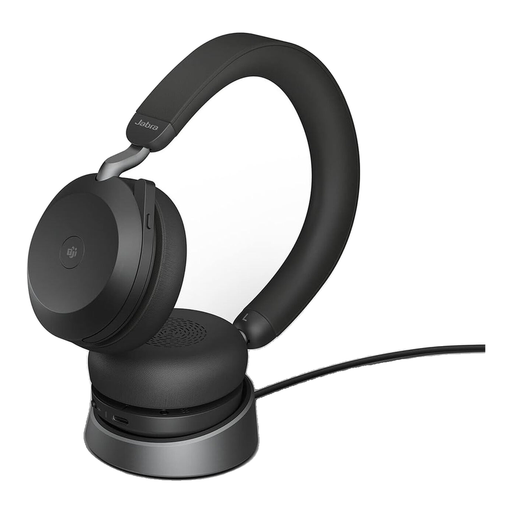
Why This Fits Their Persona: Ideal for users in demanding environments like open-plan offices or noisy home offices, where maximum concentration and excellent call quality are non-negotiable. The charging stand ensures an always-ready battery and a tidy workspace.
Directly addresses all three pitfalls: It features advanced, adjustable ANC, an 8-microphone technology for clear voice transmission, and is MS Teams certified, ensuring seamless integration with the included USB-C adapter.
The combination of powerful ANC and precise voice pickup sets a high standard. The discreet, retractable boom arm and dual connectivity offer flexibility in the daily workflow.
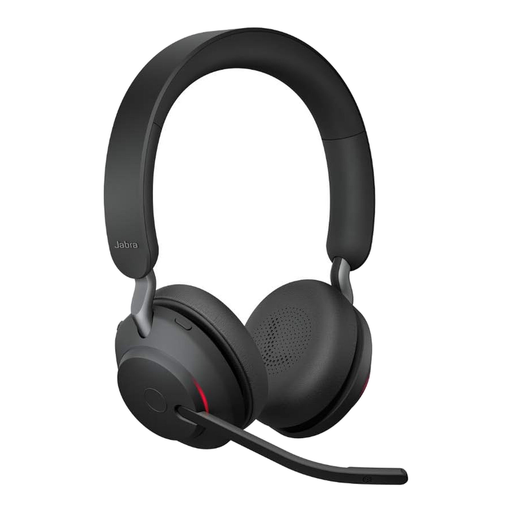
Why This Fits Their Persona: Suitable for employees in home offices or flexible office environments who need a reliable, comfortable, all-day solution without stretching the budget for a premium ANC model.
This model offers solid passive noise isolation and a 3-microphone technology for clear calls. The UC certification ensures compatibility with common platforms, thus bypassing the typical functional issues of non-certified devices.
The manufacturer-stated battery life of up to 37 hours is a key advantage for long workdays. The integrated busylight signals to colleagues that you are in a call.
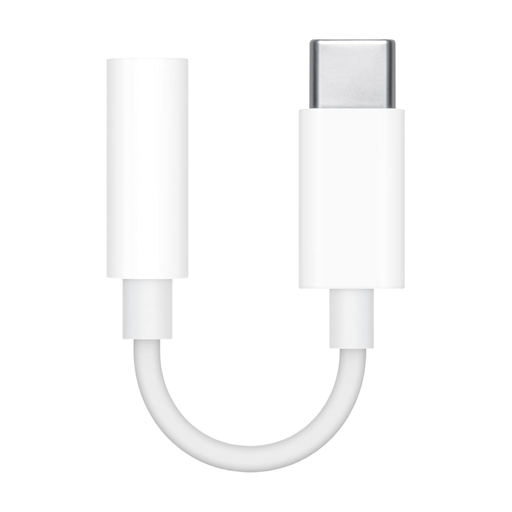
Why This Fits Their Persona: For users who already own a high-quality headset with a 3.5mm jack but whose laptop or tablet only has a USB-C port. A simple solution to continue using existing equipment.
Solves the compatibility problem directly and cost-effectively. Instead of buying a new, potentially inferior USB-C headset, the proven audio quality of the existing headphones can be maintained without any loss of functionality.
As an official accessory, this adapter ensures reliable and clear audio transmission without additional software or drivers. Its compact design makes it ideal for mobile use.
Sometimes the solution isn't a new headset, but the right adapter. We've compiled a selection of products that solve compatibility issues and meet strict selection criteria.
Question 1: How do I connect the Jabra Evolve2 75 to two devices simultaneously? The Jabra Evolve2 75 supports Dual Connectivity. For optimal performance, connect the headset to your PC or Mac using the included Jabra Link 380 USB adapter. At the same time, you can connect it to your smartphone via standard Bluetooth pairing. The headset intelligently manages incoming calls from both devices, allowing you to switch between them seamlessly.
Question 2: Is the Active Noise Cancellation (ANC) on the Evolve2 75 adjustable? Yes, the ANC feature is customisable. Using the Jabra Sound+ app on your smartphone, you can adjust the level of noise cancellation to suit your current environment. This allows you to either achieve maximum concentration or, if necessary, remain aware of some of your surroundings.
Question 3: What does the "Microsoft Teams certified" certification mean in practice? This certification guarantees a plug-and-play experience with Microsoft Teams. As soon as the headset is connected via the USB adapter, it is instantly recognised by Teams. The dedicated Teams button on the headset allows you to join meetings or answer calls with a single click. Additionally, the busylight automatically syncs with your Teams status to signal to colleagues that you are busy.