
Lieferung heute & morgen

Qualitätsgarantie

Willkommens-Angebote freischalten: KOSTENLOSE Lieferung | Bis zu 80 % RABATT | Kostenlose 30-Tage-JoyPlus-Testphase
App herunterladen
As a gamer, you know how crucial audio is to the gaming experience. A great gaming headset not only immerses you deeper in virtual worlds but can also provide a critical competitive edge. However, the market is saturated with products making bold promises. Choosing the right model, like the JBL Quantum 400 Gaming Headset, requires a close look at the technology to avoid common marketing traps.
Many buyers invest in a headset only to be disappointed a few months later due to design flaws or exaggerated marketing claims. To help you avoid that experience, we'll highlight the most common pitfalls and the features that truly matter.
Common Pitfalls When Buying a Gaming Headset:
To make an informed decision, you should focus on objective technical parameters rather than marketing buzzwords. Three factors are particularly paramount.
The heart of any headset is its drivers. Larger drivers, like the 50mm drivers common in gaming, can move more air and often produce a fuller sound, especially in the bass range.
Even more important, however, is the integrated Surround Sound Headset technology. While simple stereo only distinguishes between left and right, advanced systems create a 360-degree soundstage. A recognized technology for this is DTS Headphone:X 2.0. Unlike generic emulations, this is a licensed process that processes audio signals to enable precise spatial localization of opponents and effects—a clear advantage in competitive games. The JBL Quantum 400 uses this technology in conjunction with its proprietary JBL QuantumSURROUND software to create an immersive soundscape.
For team communication, a high-quality JBL headset with a microphone is essential. Look for a directional boom microphone that primarily captures sound from the front and dampens ambient noise. A practical feature is the flip-to-mute function, where the microphone is muted by simply flipping it up.
Another useful feature is a headset with Game-Chat Balance. This separate dial, often found on a USB PC headset, allows you to adjust the volume of game audio and voice chat independently. This lets you prioritise communication in crucial moments without missing important in-game audio cues.
Compatibility with your preferred platform is crucial. A wired Xbox headset or a headset for PS5 typically requires a 3.5mm jack that connects to the controller. A PC gaming headset, on the other hand, often benefits from a USB connection. This not only provides power for features like RGB gaming headset lighting but also enables connection to dedicated software for fine-tuning the equaliser, microphone, and surround sound settings. Models like the JBL Quantum 400 offer both connection options (USB and 3.5mm jack), ensuring maximum flexibility across different platforms.
Based on these criteria, we have selected a few models from our range that suit different user profiles.
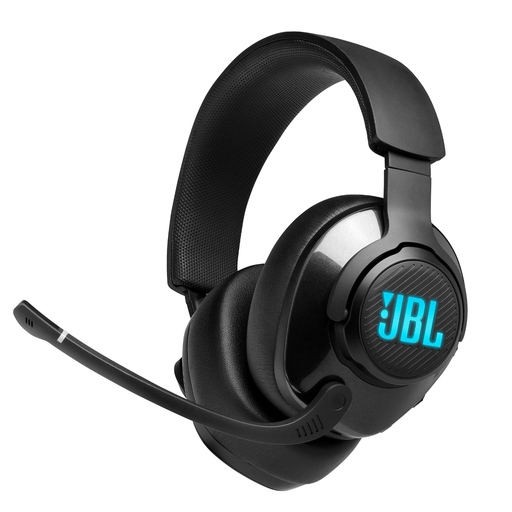
Why This Fits Their Persona: This profile seeks precise audio positioning and customisability on PC. The Quantum 400, with its QuantumENGINE software, DTS Headphone:X 2.0, and Game-Chat Balance, provides the exact tools needed for a competitive edge.
It bypasses the vague surround sound trap by using licensed DTS Headphone:X 2.0 technology. The lightweight headband and memory foam ear pads directly address the comfort issue during long sessions.
The combination of JBL QuantumSURROUND, DTS, and Game-Chat Balance delivers a tailored, immersive, and controllable audio experience on PC.
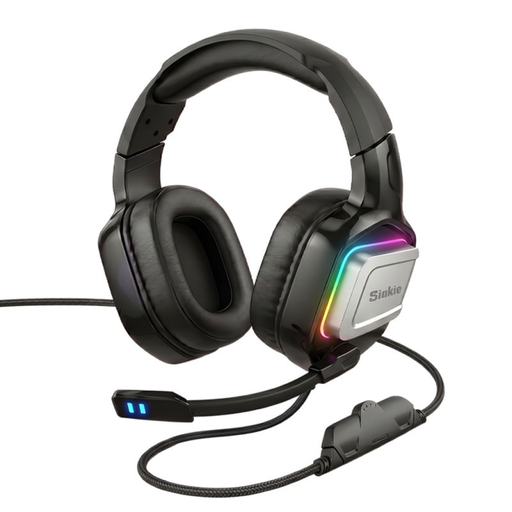
Why This Fits Their Persona: This user wants a functional headset for various platforms (PC, PS5, Xbox, Switch) without a large investment. The combination of USB and 3.5mm connections offers maximum flexibility.
It focuses on solid fundamentals: 50mm drivers for powerful sound and an over-ear design for baseline comfort. Instead of making vague promises, it delivers reliable core performance for its price point.
Its high compatibility, thanks to the dual connection (USB for RGB lighting and 3.5mm jack for audio), makes it a versatile choice for gamers who play on multiple systems.
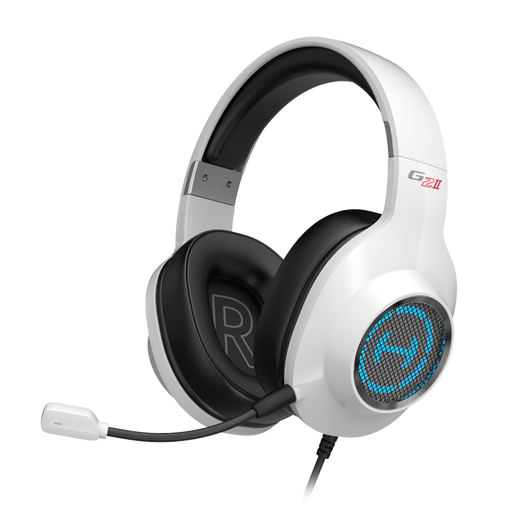
Why This Fits Their Persona: Console players (PS4/PS5) value a simple setup and high comfort for long gaming nights. This USB headset offers a straightforward plug-and-play solution with a clear focus on comfortable materials.
It directly addresses the comfort pitfall by using skin-friendly leatherette ear pads and a lightweight, flexible headband. The optional PC software for 7.1 sound suggests a more thoughtful implementation than found in generic no-name products.
The focus on wearing comfort makes it a great choice for marathon sessions. The highly sensitive, noise-cancelling microphone ensures clear communication on the console.
We have compiled a complete, up-to-date list of products that fully meet these strict selection criteria.
Does the JBL Quantum 400 work with surround sound on the PS5?
The JBL Quantum 400 can be connected to the PS5 via USB or the 3.5mm jack. However, the specific surround technologies JBL QuantumSURROUND and DTS Headphone:X 2.0 are tied to the JBL QuantumENGINE PC software and are therefore only available on PC. On the PS5, the headset delivers high-quality stereo sound, which is compatible with the console's native 3D Audio technology and also provides a spatial audio experience.
What is the difference between Game-Chat Balance and normal volume control?
A conventional volume control adjusts the overall volume of the game and chat simultaneously. A headset with Game-Chat Balance, like the JBL Quantum 400, features a certified dial that allows you to separately adjust the ratio between game audio and voice chat audio. This enables you to prioritise team communication without losing important game sounds, or vice versa.
Does an RGB gaming headset require a separate power source?
In most cases, no. With a USB PC headset, the RGB lighting is powered directly through the USB connection along with the audio signal. For headsets that offer both a USB and a 3.5mm connection, the USB is often needed exclusively to power the lighting, while the jack transmits the audio. The JBL Quantum 400 uses its USB connection for audio, lighting, and software functions.