First, decide whether you want tiny jewellery components to fill the frame, or to show your hands and the whole work surface from above. For close-ups, check the specifications of the actual lens: Canon gives the RF 35mm F1.8 MACRO IS STM a 1:2 magnification ratio, while Sony and Nikon specify 1:1 for certain macro lenses. For an overhead shot, the framing, camera height and space for a stable desk mount all need to work together. You may also need an additional lens and lighting.
Which camera suits your needs?
Close-up filming of small jewellery components
If you want to show clasps, wire or individual assembly steps in close-up, check the close-focusing capabilities of the specific lens. Canon, Sony and Nikon offer different macro lenses, each with its own magnification ratio and focusing distance specifications.
Overhead filming at your desk
For a fixed camera position that captures your hands and work surface, the framing from the available height and space for a stable mount are key. The kit zooms supplied with the Sony ZV-E10 II and Nikon Z 30 are examples of lenses that let you adjust the framing. Check the shot you want at your own workstation.
Filming with a simple room setup
If you want to get started with as few changes as possible, check whether the kit can achieve the framing you want and what additional accessories you’ll need. Sony notes that fluorescent lighting can cause flicker; the available anti-flicker options depend on the camera model.
Which buying criteria matter?
Interchangeable-lens camera with a macro lens
A good fit if: you want to show small jewellery components in close-up time and again. Canon specifies a 1:2 magnification ratio for the RF 35mm F1.8 MACRO IS STM; Sony and Nikon specify 1:1 for certain macro lenses.
The trade-off: You may need a separate lens, and at close range there’s less room in front of the subject for your hands and lighting.
Interchangeable-lens camera with a kit zoom
A good fit if: you want to start by filming the assembly as a whole and adjust the framing as needed. Sony lists a 16–50-mm zoom in the ZV-E10 II kit; Nikon lists a 16–50-mm kit for the Z 30.
The trade-off: A zoom lens doesn’t automatically offer macro capability, so you may need another lens to capture very small details.
Compact camera with a fixed lens
A good fit if: you don’t want to build a lens system and the required close-focusing distance falls within the fixed lens’s specifications. For the ZV-1, Sony lists a distance of around 5 cm at the wide-angle end and around 30 cm at the telephoto end, both measured from the front of the lens.
The trade-off: The focusing distance depends on the zoom setting, and you can’t swap the lens for a macro lens.
| What you need |
What to check before buying |
Who it matters most to |
| Small jewellery details |
Magnification ratio and focusing distance of the specific lens; space for your hands and lighting. |
If you want clasps or beads to appear large and clear, the close-up capabilities of the lens and camera combination matter. Around 28% of consumers put small details first. |
| Overhead shots at your desk |
Framing from your intended camera height and space for a stable mount. |
If you want to capture your hands and as much of your work surface as possible, check the framing at your own desk. Around 22% of consumers prioritise an overhead view. |
| Lighting in your room |
Take a short test video under your existing lighting and check which anti-flicker options are available on the model. |
If you plan to keep using your existing room lighting, it’s helpful to test the camera under that exact light. Around 17% of consumers focus primarily on room lighting. |
| Longer recordings |
Check the stated continuous recording time and conditions, as well as power and storage options. |
If you want to film assembly steps with as few interruptions as possible, plan around the conditions for longer takes. Around 17% of consumers prioritise longer recordings. |
| What your setup includes |
Plan for the camera, the lens you need and, where necessary, a mount, lighting and power supply. |
If having a complete setup matters more than buying a camera body alone, check what’s included against what you actually need. Around 16% of consumers put the overall setup first. |
Common pitfalls when choosing a camera for jewellery videos
-
Assuming 4K means macro capability
Video resolution doesn’t tell you how large a small clasp will appear in the frame from a particular distance.
Before choosing a camera body, check the close-up specifications of the lens you actually plan to use.
-
Comparing only the camera body in a kit
A kit zoom and a separately available macro lens are different products. The kit lens alone may not give you the detail you want.
Check what’s included and what extra accessories you’ll need before planning a complete setup.
-
Looking at close-focusing distance without considering the zoom setting
For the Sony ZV-1, Sony gives different focusing distances at the wide-angle and telephoto ends. A very short distance also leaves less room in front of the subject for your hands and lighting.
Check the specification for your preferred zoom setting and allow for the space you’ll need to work.
Key camera brands at a glance
Canon
Canon RF and RF-S lenses are relevant for compatible cameras such as the EOS R50 V. The RF 35mm F1.8 MACRO IS STM is a separate close-up option.
- Canon specifies a magnification ratio of 1:2 for the RF 35mm F1.8 MACRO IS STM.
- Canon states that the EOS R50 V supports RF and RF-S lenses, but not EF-M lenses. The macro capability of the lens mentioned isn’t a feature of every camera kit.
Sony
The E-mount system offers several options: a kit zoom for adjustable framing, a separate APS-C macro lens, or a compact camera with a fixed lens.
- Sony specifies a magnification ratio of 1:1 and a minimum focusing distance of 0.095 m for the SEL30M35.
- For the ZV-1, Sony lists a focusing distance of around 5 cm at the wide-angle end and around 30 cm at the telephoto end, measured from the front of the lens.
Nikon
In the Nikon Z system, you can choose between a kit zoom, such as the one supplied with the Z 30 kit, and a separately available macro lens.
- Nikon specifies a magnification ratio of 1:1 for the NIKKOR Z MC 50mm f/2.8.
- The macro lens is a different option from the 16–50-mm zoom in the Z 30 kit. Check which lens is actually included with the package you choose.
Cameras at Joybuy
The Joybuy products below are described as cameras for video recording. A stated video resolution or zoom alone doesn’t demonstrate macro capability for small jewellery components.
 No image available
Osmo Pocket 4P Standard Combo, Black
If you’re considering a camera with a wide-angle lens for an overhead view of your desk, the stated lens specifications can be a useful starting point; they don’t demonstrate macro capability.
Specifications include a 1-inch sensor, a 20-mm lens and 4K recording.
View at Joybuy
 No image available
2K Pocket Vlogging Camera with 360° Rotating Lens
If you need to change the viewing angle while filming, the stated rotation feature is worth checking; it doesn’t indicate macro capability.
The description lists 2K video and a lens that rotates through 360 degrees.
View at Joybuy
 No image available
Sony Alpha 6100 APS-C with 16–50-mm Power Zoom Lens
If you want to adjust the framing for an overhead shot, the kit zoom is an option to consider; the zoom specification doesn’t demonstrate macro capability.
Specifications include E-mount, a 16–50-mm zoom lens, 4K movie recording and a tilting display.
View at Joybuy
 No image available
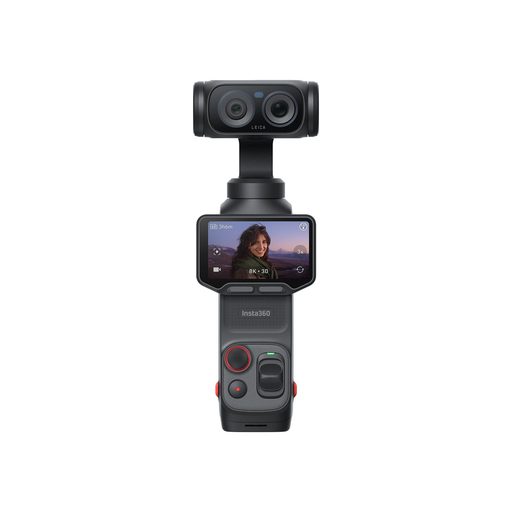
Insta360 Luna Ultra Standard Bundle, Cosmic Black
If you’re filming on your own and want to keep an eye on the shot, the detachable screen is a feature worth checking; it doesn’t indicate suitability for close-ups.
The description lists 8K30fps video, 6x lossless zoom and a detachable 2-inch touchscreen.
View at Joybuy
 No image available
KOMERY X9 4K, 64 MP, 18x Zoom, Black
If adjustable framing matters to you, the stated zoom feature is worth checking; on its own, it doesn’t confirm close-up capability.
The product name lists 4K video, 64 MP and 18x zoom; the description lists autofocus.
View at Joybuy
Frequently asked questions
Is a kit zoom enough for small beads and clasps?
The zoom range alone won’t tell you. Check the magnification ratio and focusing distance for the specific kit lens, and test the framing at your workstation. Separate macro lenses from Canon, Sony and Nikon have documented magnification ratios of 1:2 or 1:1, depending on the model.
How do I set up a camera for an overhead shot?
Check the framing from the height you can actually achieve above your desk, and make sure the camera is stable. Decide in advance whether you want to focus on your hands and work surface or on a single detail, as you may need different positions or lenses for each.
What can I do if my room light flickers in the video?
Take a short test video under the lighting you plan to use. For flicker under fluorescent lights, Sony recommends using the anti-flicker setting in the camera menu, if available. Check whether your chosen model offers this option.
Can I publish footage of people I live with without further checks?
You can’t assume that you have permission in every case. Where possible, frame the shot to show only hands and the work surface. If people are recognisable or the footage is connected to a commercial activity, check what consent you need and which data protection rules apply. The Federal Commissioner for Data Protection and Freedom of Information notes that footage related to professional or commercial activity doesn’t fall within the privileged purely private sphere.


