For sharp close-ups of small jewellery clasps, a remote shutter release is useful if you want to avoid touching the camera when taking a shot. It isn’t essential, though, if a suitable camera app can do the job. For a fixed macro setup, a compatible cable release is an option; if you want more freedom to move around, consider a compatible Bluetooth remote. None of these options replaces precise focusing or fixes potential banding under artificial light.
Who can benefit from a remote shutter release?
Photographers with a fixed macro setup
You photograph small clasp details with a camera that stays in one place, and want to avoid shifting the framing or focus point when taking a shot. Canon Academy recommends mounting the camera on a tripod for macro photography whenever possible.
Photographers who change their setup
You rearrange the jewellery and artificial lighting between shots, and want to take pictures or check the framing from your workstation. Canon Germany states that the compatible BR-E1 has a range of up to 5 m.
Photographers who already have an app
Before buying an accessory, you want to check whether you can already trigger your camera using your smartphone. Canon Germany and Nikon Germany describe app control for supported camera models.
What should you consider when choosing one?
Camera app you already have
A good fit if: Your camera model supports remote shooting via an app, and you want to check first whether you can also use it to control the framing or focus.
Bear in mind: Features and setup vary by model, and the app needs to work with your mobile device.
Cable release
A good fit if: Your camera and workstation stay in one place, and the cable release is explicitly compatible with your camera model and connection.
Bear in mind: The cable limits how far away you can be. Some Fujifilm cameras also require an adapter for the RR-100.
Bluetooth remote
A good fit if: You move your jewellery and lighting around and want to take pictures from a little distance without a cable.
Bear in mind: The camera and remote need to be compatible and paired. According to Canon, the range of up to 5 m applies only to the BR-E1 and compatible cameras.
| Buying priority |
What to check |
Who does this matter to? |
| Camera compatibility |
Check the exact camera model and connection against the manufacturer’s list; allow for any adapter or firmware requirements. |
If I’m buying for a fixed macro setup, the release needs to fit my camera and connection. Around 36% of consumers pay particular attention to compatibility. |
| Taking pictures without touching the camera |
Check whether the app, cable or remote supports taking photos with your camera. |
When photographing tiny clasp details, I don’t want to touch the camera when taking a shot. Around 29% of consumers prioritise touch-free shooting. |
| Freedom to move around |
Consider how far you’ll be from your workstation, and compare only verified ranges or cable lengths for the specific model. |
If I move the jewellery and artificial lighting around between shots, I want to take pictures without a cable getting in the way. Freedom to move around is the main priority for around 21% of consumers. |
| Using an app you already have |
Check your camera’s manual to see which app features are available, then try them with your planned setup. |
I want to check whether my camera app will do the job before buying an accessory. Avoiding an unnecessary accessory purchase is the main priority for around 14% of consumers. |
Common buying mistakes
-
Assuming “remote release for my brand” means “compatible with my camera”
Connections and compatibility depend on the exact camera model. Some Fujifilm cameras also require an adapter for the RR-100.
Before buying, check the full camera model name, the connection required and any adapter requirements against the compatibility list from Fujifilm or the relevant accessory manufacturer.
-
Blaming blurry details on the shutter release alone
A remote shutter release can stop you pressing the camera when taking a shot. But it won’t correct missed focus or movement of the piece of jewellery.
Focus on the specific clasp detail and check in a test shot that both the camera and subject stay still.
-
Blaming banding under artificial light on the shutter button
Sony points out that certain types of lighting, when used with the electronic shutter, can cause visible artefacts. A remote won’t fix the underlying cause.
If you see banding, check the guidance for your camera model on lighting, shutter type and anti-flicker functions.
-
Buying an accessory without trying the app you already have
Canon and Nikon describe remote shooting via an app for supported camera models; available features depend on the model.
Check your camera’s manual first, then try the app with your planned setup.
Brands to consider
Canon
Compatible Canon cameras have both cable and Bluetooth releases available. Camera Connect is another option, depending on the model.
- Canon specifies a 2.5-mm E3 connection and an 80-cm cable for the RS-80E3. The stated range for the BR-E1 is up to 5 m.
- These specifications apply to the relevant accessory and compatible cameras, not every Canon model. Source: Canon Germany.
Nikon
The MC-DC2 is a cable option for certain Nikon DSLR cameras. Nikon also describes remote shooting via SnapBridge for macro photography.
- Nikon describes touch-free shooting with the MC-DC2 on certain camera models.
- This doesn’t mean it’s compatible with every Nikon Z camera. Check whether your specific camera model supports the MC-DC2 or SnapBridge.
Sony
The wired RM-VPR1 may be suitable for Sony cameras with a compatible connection.
- Sony specifies an 800-mm cable, photo release and a shutter lock.
- The remote won’t overcome electronic shutter limitations in certain lighting conditions. Source: Sony Germany.
Fujifilm
The RR-100 is designed for a selection of X and GFX cameras listed by the manufacturer.
- Fujifilm publishes a model-specific compatibility list for the RR-100.
- Some of the cameras specifically listed also require a 2.5-mm to 3.5-mm adapter. Source: Fujifilm.
Panasonic
The DMW-RS2E is a cable release for compatible LUMIX setups, with photo release and video start and stop functions.
- Panasonic specifies a tripod clip.
- Panasonic states that the latest firmware is required. Check the specific camera and release combination before buying.
Joybuy products
The products below are smartphone holders with remote controls. Before buying, check that you specifically want to take photos with a smartphone rather than a mirrorless camera.
 No image available
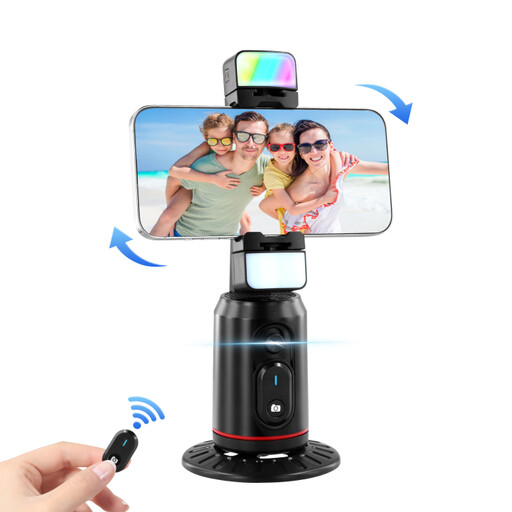
Auto face-tracking tripod with 360° rotation and fill light
Phone holder with remote control, described in the product name as suitable for livestreams, vlogs and videos.
The product name also mentions gesture control and an integrated fill light.
View at Joybuy
 No image available
KINSI selfie stick with tripod, 170 cm, Bluetooth remote
For taking smartphone photos from a little distance: the product description says you can trigger your phone’s camera using the Bluetooth remote.
According to the product details, the holder is designed for smartphones with a screen size of 4.7 to 6.0 inches. It also has a telescopic stainless steel stick and a rotating holder.
View at Joybuy
Frequently asked questions
Do I need a remote shutter release if my camera is already on a tripod?
Not necessarily. A remote shutter release stops you pressing the camera when taking a shot. If your camera model supports a suitable app, you can try that first. However, a tripod and remote shutter release are no substitute for precise focusing or a stable setup.
Will a remote help with banding under artificial light?
Not automatically. Sony points out that certain combinations of lighting and electronic shutter can cause visible artefacts. If you see banding, check the guidance for your camera model on shutter type and camera settings.
What should I check before connecting a cable release?
Check the exact camera model and required connection against the manufacturer’s list. Fujifilm requires an additional adapter for some models when using the RR-100; Panasonic states that the DMW-RS2E has a firmware requirement.
What can I do if a remote shutter release bought from a business seller in the EU is faulty?
According to EU consumer information, when you buy from a business seller, you have at least two years of legal protection from the seller from the date you receive the goods. This is separate from any additional manufacturer’s warranty; according to this information, the stated rule does not apply to purchases from private individuals.
How should I dispose of a used battery?
According to the German Environment Agency, used batteries must be collected separately from unsorted municipal waste and recycled.


