Sketchers with limited desk space
If you draw on a computer you already own and want to put the input surface away when you’ve finished, compare the device dimensions, active drawing area and driver requirements.


If you already draw on a suitable computer and want to clear your desk afterwards, a pen tablet without a display is a natural place to start. A connected pen display is a better fit if you want to see your lines directly beneath the pen tip; to sketch without a computer, you’ll need a standalone tablet with a compatible pen and suitable app. Whichever type of device you choose, check how much space it needs, along with its connections, software and the full set-up involved.
If you draw on a computer you already own and want to put the input surface away when you’ve finished, compare the device dimensions, active drawing area and driver requirements.
If you want to edit outlines and details right where they appear on screen, you’ll need room for a connected display and the right connection to your computer.
If you want to capture ideas without relying on your desktop computer, consider a standalone device with a compatible pen and an app that suits the way you work.
A good fit if: You already have a suitable computer with a screen and want a drawing surface you can put away afterwards.
The trade-off: You draw on a different surface from the one where you see the line appear. For the One by Wacom Medium, Wacom specifies a USB connection and a required driver for Mac or PC.
A good fit if: You want to draw directly on the visible sketch and have enough space and the right connections for both the computer and display.
The trade-off: A pen display isn’t automatically a standalone computer. Huion lists the Kamvas 13 (Gen 3) as 13.3 inches with a resolution of 1,920 × 1,080 pixels; XPPen lists the Artist 12 3rd as having an 11.9-inch display. Check the video signal, power supply and cables for the specific model.
A good fit if: You want to sketch ideas without a computer connected.
The trade-off: Check that the apps and files you need are compatible with your design workflow. XPPen describes the Magic Drawing Pad as a standalone Android device; Samsung lists the S Pen as included with the Galaxy Tab S10 FE. That doesn’t mean a particular drawing app will suit the way you work.
| What matters | What to check before buying | Who is this especially important for? |
|---|---|---|
| Space needed | Compare the overall dimensions and usable drawing area separately, and allow room for cables and somewhere to rest your hand. | If you work at a small desk and want to put the device away afterwards, you’ll also need room to move your hand as you draw. Around 29% of consumers are likely to put space requirements first. |
| Drawing directly on the image | Decide whether a separate pen tablet will do; if you choose a display, check its size and connections for the exact model. | If you want to make changes to shapes directly on the visible design, seeing the image beneath your pen is key. Around 22% of consumers are likely to make direct drawing their top priority. |
| Sketching without a computer | Check the standalone operating system, compatible pen, drawing app and export options. | If you want to capture ideas independently of a connected computer, you’ll need a device that works on its own and an app workflow that suits you. Around 14% of consumers are likely to prioritise independence from a computer. |
| Device and required extras | Check what’s included, any connection accessories you’ll need and the terms for any software supplied with the specific version. | If you want to work out the full cost in advance, consider not only the device but also any extras and software terms. Around 21% of consumers are likely to put the total cost first. |
| Set-up and compatibility | Check the operating system, driver installation, video output and power supply for the specific connection. | If you want to use the device with the computer you already have for your studies, it’s important to check that the connection and software will work. Around 14% of consumers are likely to prioritise an easy set-up above all else. |
A drawing display showing your work doesn’t, by itself, tell you whether the device can work without a computer connected.
If you want to sketch independently of a computer, check specifically whether the model works on its own and supports the app you want to use. For a pen display, check the complete connection set-up.
If desk space is limited, you need room for both the device and the hand movements you want to make while drawing.
Measure the space available on your desk and check the dimensions of the specific model, its active drawing area or display, and the room needed for cables.
A limited-time software offer isn’t necessarily available to use indefinitely.
Check the duration and terms of the app you want before building it into your design workflow.
Pens and nibs may be designed for specific tablet models.
Check the tablet and pen model numbers against the accessory compatibility list. Wacom lists compatible nibs for the One by Wacom CTL-472 and CTL-672 ranges.
You may need to replace any incompatible accessories.
The One by Wacom range includes pen tablets designed to work with a computer you already own, rather than drawing displays.
The Kamvas 13 (Gen 3) is a connected pen display for drawing directly on the sketch shown on screen.
The Artist 12 3rd is a connected display, while the Magic Drawing Pad is a separate standalone Android option.
The Galaxy Tab S10 FE is a standalone tablet option for sketching without a computer connected.
An LCD drawing tablet with a pen for simple sketches and early ideas.
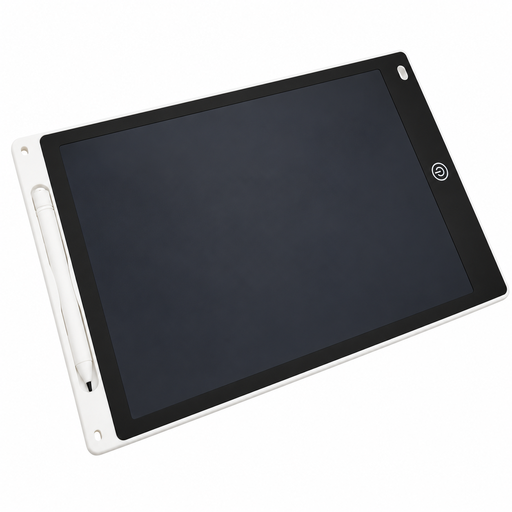 No image available
Could be suitable for simple jewellery sketches and early ideas; check whether the drawing area is large enough for the level of detail you want.
Pen and erase function, as stated in the product name.
Powered by a button cell. Due to the risk of choking, only adults should open the battery compartment.
No. You move the pen across the tablet surface and see the sketch on the connected screen. If you want the line to appear directly beneath the pen tip, compare a connected pen display with a standalone tablet.
Check the exact operating system, available ports and, if necessary, whether you can install a driver. Wacom requires a driver for the One by Wacom Medium on Mac or PC; with a pen display, the video signal and power supply must also be suitable for the connection.
Choose replacement nibs based on the exact pen model, not just the brand name. For the One by Wacom CTL-472 and CTL-672, Wacom lists the LP190K pen and compatible nibs.
For consumer purchases in the EU, Your Europe explains that goods are covered by a legal guarantee of at least two years from the date you receive them. For distance sales, you generally have a 14-day right to cancel from delivery; exceptions and any return costs should be taken into account. A voluntary manufacturer’s warranty does not replace your legal rights against the seller.
No. The German Environment Agency explains that waste electrical and electronic equipment must be collected separately from household rubbish, for example at local collection points or through suitable take-back schemes at retailers.