Jewellery presenters focused on detail
If you want to show settings, surfaces or engravings filling the frame, set up your camera, macro lens and lighting in a fixed position. Sony and Nikon specify a 1:1 reproduction ratio for certain macro lenses.


To fill the frame with settings or engravings, start by choosing a suitable macro lens, then find a compatible mirrorless camera. For demonstrations on the move without changing lenses, a compact gimbal camera may be more practical; check that the framing and close-focus distance work for your smallest pieces of jewellery. Test your lights with your video settings, and plan your lens, lighting and mounting as one complete setup.
If you want to show settings, surfaces or engravings filling the frame, set up your camera, macro lens and lighting in a fixed position. Sony and Nikon specify a 1:1 reproduction ratio for certain macro lenses.
If you switch between your face, hands and jewellery, consider how the focus shifts and whether you can control the lighting. Nikon says the Z50II has a Product Review mode that shifts focus from a face to an item being presented.
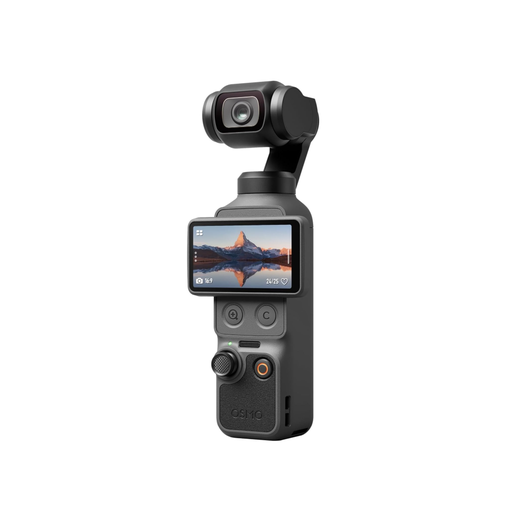
If you prefer a small recording device that doesn’t require lens changes, test its close-focus capability with your jewellery. DJI specifies a Product Showcase focus mode and a focus range starting at 0.2 m for the Osmo Pocket 3.
Best if: you want very small jewellery details to fill a large part of the frame. Sony and Nikon specify a 1:1 reproduction ratio for certain lenses.
Consider: the camera body and lens need to be compatible. With Sony’s SEL30M35, Sony says there is just 2.4 cm of space in front of the lens for lighting and your hands when shooting at the closest distance.
Best if: you switch between shots of your face, hands and product. Nikon says the Z50II has a Product Review mode, while Sony describes the ZV-E10 II as a video-focused mirrorless camera.
Consider: a presentation mode is no substitute for a macro lens. According to Nikon, 4K/60p on the Z50II is cropped.
Best if: you move around while presenting and don’t want to change lenses. DJI specifies a built-in three-axis gimbal and a Product Showcase focus mode for the Osmo Pocket 3.
Consider: a stated focus range starting at 0.2 m doesn’t confirm macro magnification. Check the framing with your smallest piece of jewellery.
| Buying priority | What to check | Who it matters to |
|---|---|---|
| Visibility of the smallest details | Reproduction ratio of the specific lens; framing and working distance with your smallest piece of jewellery. | If I want to show settings or engravings at a large size, I also make sure there’s enough room in front of the lens for lighting. For around 31% of consumers, magnifying fine details is the top priority. |
| Flicker under artificial light | Manually adjustable video shutter speed; test footage using your lights. Sony suggests 1/50 or 1/100 of a second as possible starting points for 50 Hz lighting. | I want to spot banding or changes in brightness before recording a longer demonstration. Around 25% of consumers particularly value being able to control footage under artificial light. |
| Colour and reflections | Compare white balance and exposure under the lighting you plan to use; check the position of adjustable light sources with a reference piece. Nikon describes how to control and position light deliberately indoors. | If the colour and finish of the metal need to look true to life, I want to be able to assess the lighting and reflections carefully. Consistent material representation is a priority for around 19% of consumers. |
| Changing perspectives | Test focus transitions and mounting in your actual workflow; with fixed-lens cameras, check the close-focus limit. | I switch between hands, face and jewellery, or change where I’m filming, and want to carry on recording without hassle. Around 13% of consumers prioritise a straightforward, portable setup for demonstrations. |
| What’s included in the setup | Check what comes with the exact kit version; consider the lens and suitable storage media for your planned recordings. Sony points out that not every memory card is suitable for video recording. | Before choosing a kit, I want to know which extra items I’ll need for filming. For around 12% of consumers, keeping the overall setup manageable is the main consideration. |
The 16–50 mm zoom lens listed for the Sony ZV-E10 II kit is different from the separately described SEL30M35, which has a 1:1 reproduction ratio.
Before buying, check the exact kit version and the reproduction ratio of the lens actually included.
You may need to add a suitable separate lens, as well as mounting equipment and lighting.
Sony specifies a minimum focusing distance of 0.095 m for the SEL30M35 and says there is just 2.4 cm of space in front of the lens when shooting at the closest distance. These figures refer to different distances.
Plan your lighting and hand movements around the usable space in front of the lens, rather than relying on the minimum focusing distance alone.
Depending on your setup, you may need to choose a different lens or position the lighting more carefully.
DJI specifies a focus range starting at 0.2 m for the Osmo Pocket 3; this doesn’t confirm 1:1 macro magnification.
Check the framing with your smallest piece of jewellery from the camera position you plan to use.
Flickering light sources can cause banding. Sony explains that adjusting the shutter speed may help reduce flicker.
Test your lights and video settings together before recording a longer demonstration.
If flicker is visible, you may need to repeat some shots.
The ZV-E10 II is a video-focused E-mount mirrorless camera; the SEL30M35 is a separate macro option to consider.
According to Nikon, the Z50II has a Product Review mode; the NIKKOR Z MC 50 mm f/2.8 is a separate macro option.
The EOS R50 V is a video-focused EOS R camera body; RF macro lenses are a separate consideration.
The Osmo Pocket 3 is a compact camera with a built-in gimbal, designed for demonstrations on the move without changing lenses.
The products below are compact pocket cameras for filming jewellery demonstrations on the move. With your smallest piece of jewellery, check that the close-focus capability and framing are suitable for your detail shots.
 No product image available
The pocket-sized design is a compact option for demonstrations on the move; before buying, check the framing with your smallest piece of jewellery.
 No product image available
This pocket-sized model may suit demonstrations on the move; check the close-focus capability with your smallest piece of jewellery.
1″ CMOS sensor; 4K/240fps in slow-motion mode only; 2× lossless zoom; 107GB built-in storage; 2″ rotating screen.
 No product image available
This pocket-sized model is a compact option for demonstrations on the move; check the framing with your smallest piece of jewellery.
4K/120fps; 1-inch sensor.
 No product image available
If you want to move the camera while presenting, the pocket-sized design is a compact option; test the close-focus capability with your jewellery.
4K/120fps; 1-inch CMOS; 3-axis stabilisation; 2-inch rotating touchscreen.
Not simply because it’s included in a kit. Check the reproduction ratio of the included lens to see if it can achieve the framing you want. Sony lists a 16–50 mm zoom for the ZV-E10 II kit; the 1:1 reproduction ratio applies to the separate SEL30M35.
Record a short test using the lights you’ll actually be filming with. If you see flicker, adjust the video shutter speed if your camera allows it. Sony suggests 1/50 or 1/100 of a second as possible starting points for 50 Hz lighting; the right setting depends on the light source.
Check your mounting equipment, lighting, the lens actually included and storage media that’s suitable for your planned video format. Sony points out that not every memory card is suitable for video recording.
For statutory consumer rights relating to faulty goods, the seller is generally your point of contact; a voluntary guarantee is separate. The Verbraucherzentrale explains that the statutory warranty period is two years, and that certain purchase contracts made from 31 July 2026 can receive a one-off extension if you choose a repair. If you’re buying purely for business, check whether this consumer information applies to you.
Under § 22 KunstUrhG, permission from the person shown is generally required to publish images of them; any possible exceptions need to be assessed on a case-by-case basis. If personal data is processed, the Federal Commissioner for Data Protection and Freedom of Information states that a legal basis under the GDPR is required. This applies to footage of identifiable people, not every jewellery demonstration.