What should you look for when choosing one?
First, decide whether it’s appropriate to use a speaker that plays the conversation out loud where you’ll be taking the call. Then consider how clearly your voice comes across, whether the connection is right for your device and whether the conversation flows naturally.
Conference speakerphone in a quiet spot
A good choice if: you want to speak hands-free and no one else can overhear the other person’s answers. Jabra and Yealink list features such as noise or echo cancellation and full-duplex audio for certain models.
The trade-off: the speaker plays the conversation out loud. Manufacturers’ claims about noise processing don’t prove that every nearby voice will be reliably screened out.
Headset or quiet room
A good choice if: you’re in a shared office, or a test call from your chosen spot shows that the conversation won’t be clear enough.
The trade-off: a headset won’t give you the hands-free speakerphone setup you want. You should still test the microphone and call location in advance.
| What matters |
What to check before buying |
Who is this especially important to? |
| Clear speech |
Test how clearly your voice comes across from the seat you’ll use, with typical office noise in the background. Jabra and Yealink list noise processing for certain models, but these manufacturer claims don’t prove that speech will be clear in every office environment. |
When I’m answering questions over office noise, I want the other person to hear me clearly. Around 36% of consumers say that being understood is their top priority. |
| Privacy |
Check whether a quiet room is available or a headset would be a better fit. Muting the microphone doesn’t automatically mute the speaker. |
If I’m sitting with other people, I don’t want them to overhear the other person’s answers. Privacy is the top priority for around 29% of consumers. |
| The right connection |
Check that the connection and what’s included with the specific model variant are suitable for your laptop or smartphone. Then select the microphone and speaker in your call app. |
If I use a different device for each appointment, I want to set up the connection reliably in advance. Around 21% of consumers prioritise a reliable connection. |
| Natural conversation |
Check that the specific model offers full-duplex audio and echo cancellation, and test it with a few quick questions. Jabra describes full-duplex as being able to speak and listen at the same time. |
When I have a follow-up question, I don’t want to wait until the other person has finished speaking. A natural flow of conversation is the top priority for around 14% of consumers. |
Related products at Joybuy
The products below include speakerphones for hands-free calls and an earbud alternative if you’d rather not use a speaker that plays the conversation out loud in a shared office.
 No image available
Insta360 Wave AI Conference Speakerphone (White)
For hands-free calls at a quiet desk; in a shared office, other people may be able to hear the conversation through the open speaker.
Bluetooth connection. Check that it works with the device you’ll use for your call before your appointment.
View at Joybuy
 No image available
EMEET Lunaplus 8-Mic Bluetooth Conference Speaker
For hands-free calls if you can test the listed microphone features in your office environment before your interview.
Features listed include eight microphones, 360° voice pickup, AI noise reduction, Dual Connection and a 5-W speaker. These claims don’t prove that speech will be clear in every office environment.
View at Joybuy
 No image available
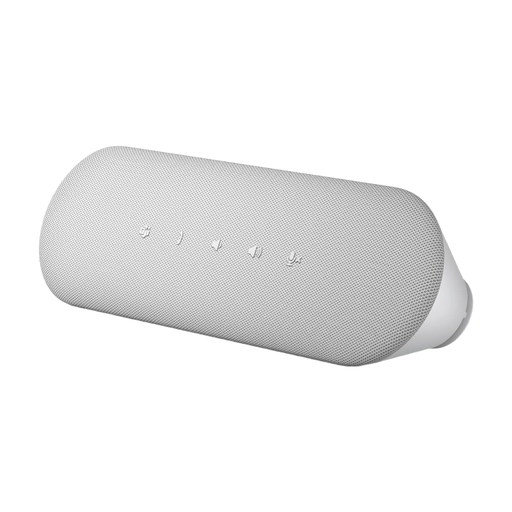
Dell Pro Desktop Speakerphone SP3022
For a permanent spot on your desk when you want to make hands-free calls using a desktop speakerphone. In a shared office, bear in mind that the other person’s voice will play out loud.
View at Joybuy
 No image available
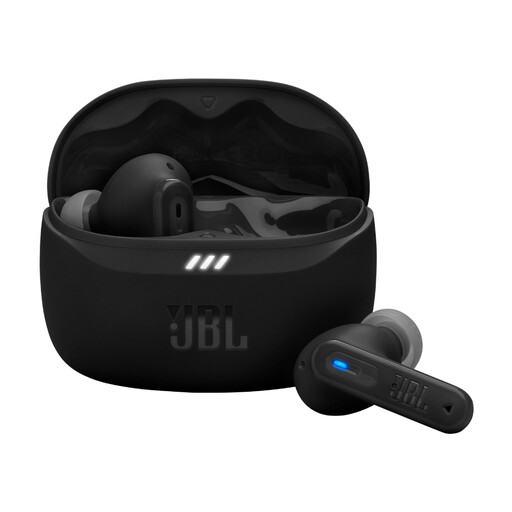
JBL Tune Beam 2 (Black)
An alternative to a conference speakerphone that plays audio out loud, if you’d rather use earbuds. Check that they work with your call app before your appointment.
View at Joybuy
Frequently asked questions
Can a conference speakerphone stop people overhearing a job interview in an open-plan office?
No. Noise reduction on the microphone doesn’t make audio played through the speaker private. If other people are within earshot, it’s better to choose a quiet room or headset, and check how clearly your microphone picks up your voice too.
What should I set up before the interview?
Select your preferred microphone and speaker in the call app, then make a test call from the place where you’ll be taking the interview. If you’re using a wireless connection, check the pairing; for USB, check which port or adapter you’ll need. HP Deutschland describes the Poly Sync 20 as using USB with a PC and Bluetooth with a smartphone.
How do I maintain or update a speakerphone?
Check the support information for your specific model and follow the manufacturer’s instructions. AnkerWork recommends keeping the PowerConf S330’s firmware up to date; this doesn’t mean every speakerphone needs to be updated.
What are my rights when shopping online in Germany?
As the German consumer advice centre explains, your statutory rights against the seller are separate from any voluntary guarantee. For most online purchases of goods, you generally have 14 days from delivery to cancel your order; Your Europe notes that statutory exceptions apply. Check the information about any return postage costs too.
Can I simply record the job interview?
Don’t record the interview without telling anyone. Section 201 of the German Criminal Code makes it a criminal offence to record another person’s non-public spoken words without authorisation. If you intend to record, get agreement from everyone involved beforehand.


