First, choose a controller that’s supported by your platform and the specific kart-racing game you play. Then consider how it feels in your hands, how it connects and which extra features you need. For PC, look for a gamepad explicitly listed as compatible with Windows. On Nintendo Switch or Switch 2, you can also use Joy-Con you already own. For motion steering, you’ll need a compatible controller and, if required, a steering wheel attachment for the right generation. According to Nintendo, the Switch 2 Pro Controller only works with Switch 2.
Who is this guide for?
PC kart-racing players at their desk
If you want to race on your Windows PC after work, check whether the specific game supports controller input. Valve explains how to configure input devices with Steam Input, but this alone doesn’t confirm that every feature is available in every game.
Mario Kart players with a Switch
On Switch or Switch 2, you can decide whether the Joy-Con you already have are suitable for the way you play, or whether you’d prefer a full-size controller. Nintendo confirms that the original Switch Pro Controller can be used wirelessly with Switch 2; the Switch 2 Pro Controller, by contrast, is only compatible with Switch 2.
Fans of motion steering
If you want to steer by tilting your controller in a compatible Mario Kart game, the controller generation, accessories and game settings all need to match. Nintendo describes motion steering in Mario Kart 8 Deluxe using Joy-Con, and specifies a compatible motion-controlled controller for Mario Kart World.
What should you look for when buying?
First, check that your platform and game are compatible. Then decide which grip, connection type and control options will work best at your home office desk.
| What matters when buying |
What to look for |
Who is this important to? |
| Platform and game |
Check the console generation or operating system, as well as the specific game’s model, input mode and controller support. |
If I play on PC or console, I want the controller to work with my platform and kart-racing game; around 31% of consumers put this compatibility first. |
| Grip and inputs |
Compare the size and button layout, and check which buttons the game uses for steering, drifting and items. |
If I’m steering and using buttons frequently during a race, I want the controls to be easy to reach; around 25% of consumers prioritise a comfortable fit in their hands. |
| Connection and power |
Check the supported connection type, available USB ports, what’s included in the box and how the controller is powered. |
At my desk, I want to connect the controller in a way that suits where I sit, while factoring in charging breaks or an awkward cable route; around 25% of consumers put connection and power first. |
| Motion steering |
Check that the Joy-Con generation and accessories match, and that motion controls can be enabled in the specific game. |
If I want to steer by tilting, I need a compatible controller and, if required, a steering wheel attachment; around 19% of consumers prioritise this type of control and the accessories it requires. |
Avoid common buying mistakes
-
Assuming Switch and Switch 2 controllers are interchangeable
Controllers with similar names aren’t automatically interchangeable between console generations. Nintendo lists the Switch 2 Pro Controller as compatible only with Switch 2, while the original Switch Pro Controller can be used wirelessly with Switch 2.
Check the console generation against the full model name before you decide.
A second controller that isn’t compatible could mean another purchase or a return.
-
Assuming a steering wheel attachment is a complete controller
The Nintendo Switch Joy-Con steering wheel attachment doesn’t include a Joy-Con. Nintendo also describes a separate Joy-Con 2 steering wheel attachment for Mario Kart World; the accessory generations aren’t interchangeable.
Check whether you already own the right Joy-Con and whether motion steering can be enabled in the specific game.
If you don’t have a compatible Joy-Con, you’ll need to buy a suitable controller as well.
-
Assuming similarly named models and wireless connections are interchangeable
For the 8BitDo Ultimate Bluetooth Controller, the manufacturer specifies USB or a 2.4 GHz receiver with XInput for PC, and Bluetooth for Switch. These connection options and specifications don’t automatically apply to similarly named versions.
Check the exact model, its connection type for your platform and what’s included in the box.
Depending on the connection type, you may need a free USB port, a compatible receiver or a suitable way to charge the controller.
Key brands at a glance
Nintendo
Joy-Con and Pro Controllers are options for the corresponding Switch generation.
- Nintendo confirms that the original Switch Pro Controller can be used wirelessly with Switch 2.
- According to Nintendo, the Switch 2 Pro Controller is only compatible with Switch 2. The Nintendo Switch Joy-Con steering wheel is sold without a Joy-Con.
Microsoft Xbox
The Xbox Wireless Controller is a gamepad option for Windows PC.
- Microsoft specifies Bluetooth and customisable button mapping for the model in question.
- Check the power requirements and support in the specific game; Windows compatibility doesn’t confirm compatibility with Switch.
8BitDo
Connection options vary between controller models.
- For the Ultimate Bluetooth Controller, 8BitDo specifies USB or a 2.4 GHz receiver with XInput for PC, and Bluetooth for Switch.
- These specifications apply to this model and not automatically to similarly named 8BitDo versions.
PowerA
Nintendo-licensed Switch controllers are an alternative to a full-size Nintendo controller.
- For the Enhanced Wireless Controller Rechargeable, PowerA specifies motion controls, a USB-C charging cable and an estimated battery life of up to 30 hours.
- According to the manufacturer, this model doesn’t have HD Rumble, IR or amiibo NFC. The battery life is the manufacturer’s estimate, not an independent measurement.
Sony PlayStation
DualSense models are an option for a compatible PlayStation or a PC game confirmed to support them.
- The DualSense range offers another gamepad option when the platform and game support the relevant version.
- Before buying, check compatibility and which features are available in the specific game you play.
Gamepads for PC kart-racing games at Joybuy
The gamepads below are intended for kart-racing games on PC. For each model, check whether the specific game supports controller input and whether the connection type listed will work with your desk setup.
 No image available
BIGBIG WON Rainbow 3 Wireless Controller
An option for PC kart-racing games if the specific game supports this controller; PC is listed as a platform in the product title.
Features listed in the product title: 2000 Hz polling rate, capacitive joystick, 16 mechanical buttons, 6-axis gyroscope and switchable Hall/microswitch triggers.
The title also lists support for Switch 2, iOS and Android; check compatibility with your specific game and the connection type you need.
View at Joybuy
 No image available
BIGBIG WON Rainbow 2 Pro Wired Controller
The product title describes a wired PC controller; check that your kart-racing game supports its inputs.
Features listed in the title: 6-axis gyroscope, macro and turbo functions, Dual Shock, customisable buttons and RGB lighting.
The product title lists PC, Switch Lite and PS4 as platforms; check the specific version and whether it’s supported by the game you play.
View at Joybuy
 No image available
Microsoft Xbox Series X/S Wireless Controller – Pulse Red
An option for PC kart-racing games if the specific game supports this controller; PC is listed as a platform in the product title.
The product title describes the model as a wireless controller and lists Xbox One, Xbox Series X/S and PC.
View at Joybuy
 No image available
PlayStation DualSense Wireless Controller – Midnight Black
This model is an option for PC kart-racing games if your specific game supports DualSense input.
The product title describes a wireless controller in Midnight Black and says a USB cable is included.
View at Joybuy
 No image available
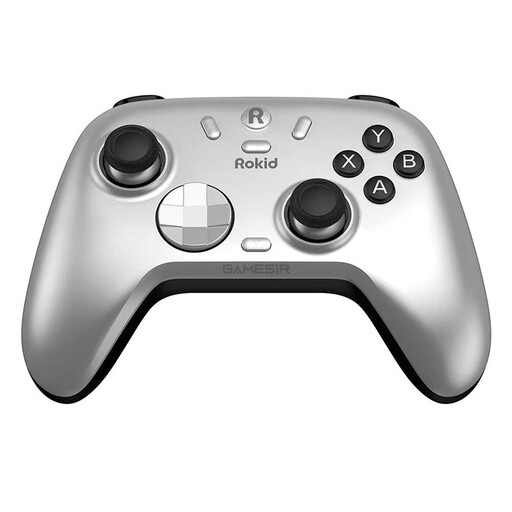
Rokid × GameSir Co-Branded Controller
The product description lists PC and Switch as platforms; for PC kart-racing games, check support for the specific title you play.
The product description lists Bluetooth, a wireless receiver and a wired connection.
View at Joybuy
Frequently asked questions
Do I need to buy a steering wheel attachment for Mario Kart 8 Deluxe?
No. Nintendo describes steering with the Control Stick, or by using motion steering as an alternative. If you want to use a steering wheel attachment, check that you have the right Joy-Con; the Switch attachment sold by Nintendo doesn’t include one.
How do I switch on motion steering in Mario Kart?
In Mario Kart 8 Deluxe, Nintendo says you can press Plus or Minus while choosing your vehicle to view its stats, then switch the feature on or off using the motion steering icon. For Mario Kart World, you’ll need a controller with motion controls.
Will a Switch 2 Pro Controller work with the original Switch?
No. Nintendo says the Switch 2 Pro Controller is only compatible with Switch 2. According to Nintendo, the original Switch Pro Controller can be used wirelessly with Switch 2.
Can I put a faulty controller with its battery in household rubbish?
No. The German Environment Agency explains that old electrical equipment must be collected separately from unsorted household waste. If batteries can be removed easily, they should be taken out and returned separately to an appropriate collection point.


