Start by choosing a controller for your console or PC and the specific kart racing game you want to play. A controller for Xbox or Windows won’t automatically work with Mario Kart. For multiplayer races, consider how many controllers and player slots are available; individual Joy-Con may be suitable for supported Switch games, while a full-size gamepad offers a different shape and button layout. Motion controls work only when both the controller and the game support them.
Who needs to think carefully about their choice?
Players with a specific console
You already own a Switch, Switch 2, Xbox, PlayStation or PC and want a controller that works with your kart racing game. Nintendo and SEGA list their games for specific platforms; sharing a genre doesn’t automatically mean that the same controllers are compatible.
Multiplayer races on the sofa
If several people are playing in front of the same screen, count the controllers you have available and the player slots in the specific game. Nintendo says Mario Kart World supports up to four players on the same Switch 2.
Motion-control fans
Would you rather steer by tilting the controller than using the stick? Nintendo notes that you’ll need a controller with motion controls and the right setting enabled in the game.
What should you look for when buying?
| What to consider |
What to check before buying |
Who needs to consider this? |
| Compatibility |
Check the console and its generation, the specific game, the full model name and any firmware update that may be required. |
If you want to make sure the controller and game work with your current platform, prioritise this check; around 40% of consumers put compatibility first. |
| Controllers for other players |
Count the number of players supported by the game and the controllers you actually have available. A steering wheel attachment is not an extra controller. |
If you’re planning to play together on the same screen, you’ll need enough compatible controllers for everyone; around 30% of consumers prioritise the number of controllers needed for local multiplayer races. Nintendo says Mario Kart World supports up to four players on one Switch 2. |
| Steering style |
Check that the controller has motion controls and that the corresponding setting is available in the game. |
If tilting the controller rather than using the stick is important to you, both the controller and the game must support that input; around 20% of consumers put steering style first. Nintendo lists these requirements for tilt controls in Mario Kart World and Mario Kart 8 Deluxe. |
| Connection from your seat |
Consider the cable length and how to route it safely, or check the power supply for a wireless model. |
If you play from the sofa, you’ll want a connection that reaches your seat and is easy to use there; around 10% of consumers prioritise seating distance and power supply. GameSir describes the G7 HE as a wired controller for Xbox and Windows. |
Common buying mistakes
-
Assuming “Switch compatible” means it works with every console generation
Joy-Con 2 and the Switch 2 Pro Controller are designed for Switch 2, not the original Switch. Nintendo says older Joy-Con can be used wirelessly with Switch 2, but can’t be charged directly on the console.
Check the exact console generation and full controller model. If you’re using older Joy-Con, also consider how you’ll charge them.
-
Counting a steering wheel attachment as an extra controller
A Joy-Con 2 steering wheel is an accessory that holds a Joy-Con 2; it doesn’t provide an additional controller.
Before buying, count the actual controllers you have for the number of players you’re planning for.
-
Assuming extra features work on other platforms
According to Sony, haptic feedback from a DualSense on PC requires a supported game and a USB connection. Xbox Support says that audio through the Xbox Wireless Controller isn’t supported over Bluetooth on Windows.
Check that the feature you want works with your platform and connection type, rather than relying only on a general compatibility claim.
-
Choosing a wired gamepad without checking where you’ll be sitting
According to the manufacturer, the GameSir G7 HE requires a USB connection. When playing on a TV, the cable’s reach to your seat can determine whether the controller is practical to set up.
Before choosing, check how you’ll need to route the cable and make sure it won’t create a trip hazard.
A guide to the key brands
Nintendo
There are different Joy-Con and Pro Controller models for Switch and Switch 2. Check which console generation each model is designed for.
- Nintendo lists motion controls for Joy-Con 2 and additional assignable buttons for the Switch 2 Pro Controller.
- Joy-Con 2 aren’t designed for the original Switch. Older Joy-Con can be used wirelessly with Switch 2, but can’t be charged directly on the console.
8BitDo
The manufacturer lists the Ultimate 2 Bluetooth as an option for Switch, Switch 2 and Windows.
- According to 8BitDo, it comes with a charging dock and TMR sticks.
- A firmware update is required for the Switch 2 support listed by the manufacturer. These features alone don’t prove it performs better in any particular game.
PowerA
PowerA lists the Enhanced Wireless Controller Rechargeable for Nintendo Switch and, according to the manufacturer, Switch 2 too.
- For the 1522795-01 version, the manufacturer lists a rechargeable battery, motion controls and two assignable buttons.
- This version doesn’t have a C Button, HD Rumble, IR or amiibo NFC. These specifications don’t automatically apply to other PowerA models.
Microsoft Xbox
The Xbox Wireless Controller is listed for Xbox consoles and Windows PCs; support for the specific game and connection type still matters.
- Microsoft lists Bluetooth and customisable button mapping.
- According to Xbox Support, audio through the controller isn’t supported over Bluetooth on Windows.
Sony PlayStation
The DualSense is designed for PS5 and can also connect to a PC, subject to compatible games and devices.
- Sony lists USB and Bluetooth connections for Windows.
- According to Sony, haptic feedback on PC requires a supported game and a USB connection.
GameSir
GameSir lists the G7 HE as a wired option for Xbox Series X|S, Xbox One and Windows 10/11.
- For this model, the manufacturer lists Hall Effect sticks and triggers, along with assignable rear buttons.
- These claims aren’t independent proof of durability. The USB cable needs to reach your seat.
Joybuy products for Switch 2
The Joybuy products featured here are designed for kart racing on Nintendo Switch 2, from a Joy-Con 2 set for multiplayer sessions to full-size wireless gamepads.
 No image available
Nintendo Switch 2 Joy-Con 2 (2-piece set, Blue/Light Yellow)
A suitable option if you want to use two separate controllers for multiplayer races on Switch 2.
Set of left and right Joy-Con 2; the product details list wrist straps and motion controls. Designed for Nintendo Switch 2 only.
View at Joybuy
 No image available
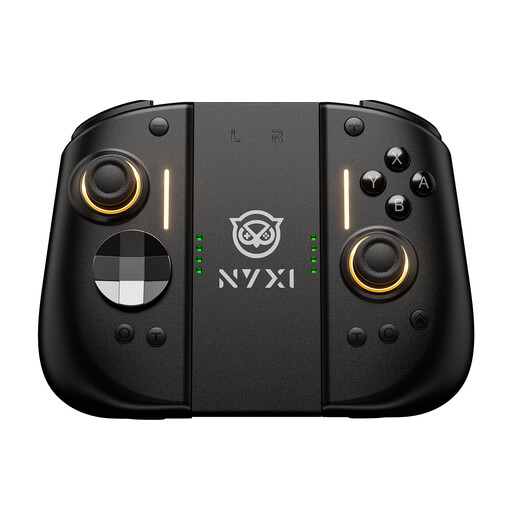
NYXI Hyperion 3 Wireless Controller for Switch 2, Black
An option if you’re looking for a wireless gamepad with motion controls for Switch 2.
The product name lists a 9-axis gyroscope, Hall Effect sticks, mechanical buttons and two rear buttons.
View at Joybuy
 No image available
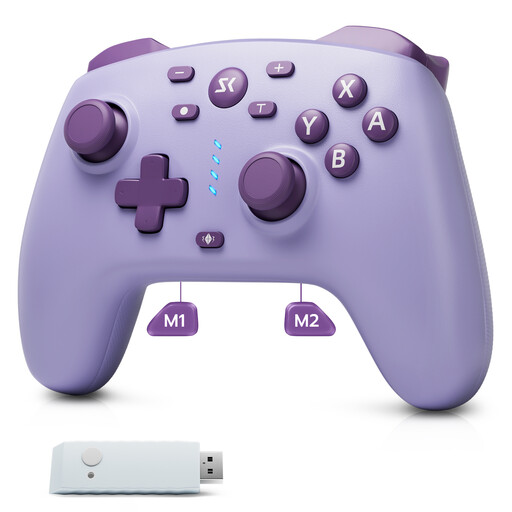
CHENGDAO Wireless Controller for Switch, Switch 2 and Windows, Purple
A potential fit if you’re looking for a wireless gamepad for the platforms listed in the product name.
The product name lists a 2.4 GHz receiver, two rear buttons, and Hall Effect sticks and triggers.
View at Joybuy
 No image available
BEITONG KP70 Elite Wireless Gaming Controller
A possible choice if you’re looking for a gamepad for the platforms listed in the product name.
The product name lists PC, Nintendo Switch and Switch 2, as well as haptic triggers, adjustable stick tension and six programmable buttons.
View at Joybuy
 No image available
Nintendo Switch 2 Pro Controller
An option if you prefer to play on Switch 2 with a full-size gamepad.
Nintendo lists freely assignable GL and GR buttons. This model is compatible with Nintendo Switch 2 only.
View at Joybuy
Frequently asked questions
Can I play Mario Kart World with four people on one TV?
Yes. Nintendo says up to four players can play on the same Switch 2 console. Check which controllers are actually available for all four players; a steering wheel attachment doesn’t count as an extra controller.
How do I turn on tilt controls?
In Mario Kart World, you can change the controls in the game settings; you’ll need a controller with motion controls. In Mario Kart 8 Deluxe, Nintendo says you can turn tilt controls on or off using the relevant icon when choosing your vehicle.
Do I need any special accessories to use Switch 2 in TV mode?
Yes. Nintendo requires the Switch 2 dock for TV mode; the dock and power adapter from the original Switch aren’t interchangeable. Joy-Con 2 must be detached from the console for TV mode.
What are my rights when buying a controller online in Germany?
When you buy from a trader, EU law provides a minimum two-year legal guarantee against faulty goods, starting from the date you receive them, as Your Europe explains. For most online purchases of goods, you generally have 14 days from delivery to cancel; exceptions and any return costs notified in advance should be taken into account. A voluntary manufacturer’s guarantee doesn’t replace your statutory rights.


