First, check that your controller, platform and kart racing game are compatible. A compatible gamepad is all you need for button and stick controls. If you want to steer by tilting in Mario Kart World, Nintendo says you’ll need a controller with motion controls. RGB only matters if the part you want to light up actually does, while a steering wheel with pedals needs space and a suitable way to secure it.
Which controllers suit which players
Players with a specific console
If you already know which Switch generation you play on, check the platform details and the controls supported by your particular racing game against the controller. Nintendo distinguishes between Switch and Switch 2 accessories.
Fans of eye-catching lighting
Lighting on the controller can look great in a dark room. But check whether the specific model lights up the casing, individual RGB zones or the buttons themselves.
Players with a preferred way to steer
If you want to steer by tilting or use a steering wheel, check which controls the game and controller support. A steering wheel with pedals also needs space to set it up.
What to look for when buying
First check the game and platform, then decide how you want to steer. After that, you can work out what sort of lighting you want and whether a cable or charging will suit your gaming setup.
| Buying priority |
What to check |
Who it matters to |
| Platform and game |
Check the console generation and the controls supported by the specific game. |
I want to avoid choosing a controller for the wrong console or control method. Compatibility comes first for around 36% of consumers. |
| Type of lighting |
Check whether the casing, RGB zones or buttons light up, and whether you can adjust the effects. |
If I want visible lighting in a dark room, it matters which parts actually light up. Around 29% of consumers prioritise lighting. |
| Steering feel |
Check the control options in the game, as well as motion controls or steering wheel compatibility. |
I want to choose between buttons and stick, tilt controls or a steering wheel without overlooking a feature the game requires. Steering style is the main priority for around 21% of consumers. |
| Cable and power |
Consider whether the cable will reach your seat or whether a wireless model needs charging. |
If I don’t want a cable restricting where I sit, or need to plan for charging breaks, the connection type is key. Around 14% of consumers check cable length and power first. |
Avoid common buying mistakes
-
Assuming RGB casing lights mean illuminated buttons
RGB zones or lighting effects on the casing don’t mean the button labels light up too.
Check the full model description to see which parts are illuminated and whether you can adjust the effects.
-
Choosing a backlit design when you need tilt controls
You need a controller with motion controls to steer by tilting in Mario Kart World. According to the manufacturer, the wired PowerA Advantage with Lumectra for Switch 2 doesn’t support this feature.
Choose your preferred control method in the game first, then check that the specific controller supports it.
-
Thinking of a steering wheel as a simple replacement for a handheld gamepad
HORI describes the Racing Wheel Pro Deluxe as a wired steering wheel with pedals and a mounting system, not as a handy gamepad alternative.
Before you choose one, check your seating position, mounting surface, space for the pedals and cable route.
A guide to relevant brands
Nintendo
A useful option if you want to check motion controls and the features available for your specific Switch generation.
- Nintendo lists motion controls for the Switch 2 Pro Controller. According to Nintendo, the older Switch Pro Controller can be used wirelessly with Switch 2.
- Nintendo says the Switch 2 Pro Controller is designed exclusively for Switch 2. Check the full model name when you buy.
PowerA
Lumectra models vary by console generation, connection type and control features.
- PowerA lists lighting and motion controls for its wireless Enhanced Wireless with Lumectra for the original Switch.
- According to PowerA, the wired Advantage with Lumectra for Switch 2 doesn’t support motion controls and can only be used when the console is docked. PowerA specifies a 3 m USB-C cable.
Turtle Beach / Afterglow
Afterglow Wave models have different connection types and feature specifications, so check the exact version.
- Turtle Beach lists eight RGB zones and motion controls for the wireless Afterglow Wave for Switch 2.
- Turtle Beach specifies a 3 m cable for the wired Switch 2 version. You can’t assume that the wireless model’s features also apply to the wired version.
8BitDo
The Ultimate 2 Bluetooth combines customisation options with the ability to use lighting effects.
- 8BitDo lists RGB effects, profiles and a charging dock.
- According to the manufacturer, a firmware update is needed to use it with Switch 2. The manual warns that the lighting effects may flash and recommends that people sensitive to light turn them off.
HORI
An alternative to a handheld gamepad if you’d prefer a steering wheel with pedals that stays set up in one place.
- HORI describes the Mario Kart Racing Wheel Pro Deluxe for Switch 2 as a wired steering wheel with pedals, secured with a clamp or suction cups.
- The holding function HORI describes for Mario Kart 8 Deluxe isn’t compatible with Mario Kart World. You’ll need space for the steering wheel, pedals, mounting system and cable.
Related products at Joybuy
The Joybuy products below include controllers for Switch and Switch 2, as well as models that list additional platform compatibility. Check that the controller works with your specific game and console.
 No product image available
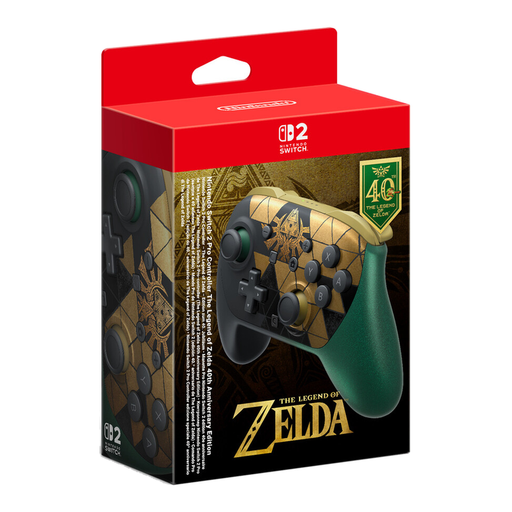
Nintendo Switch 2 Pro Controller The Legend of Zelda 40th Anniversary Edition
For wireless gaming on Switch 2, provided the controller and game are compatible with your platform.
The product title lists HD Rumble 2, mouse controls, amiibo and GameChat.
View at Joybuy
 No product image available
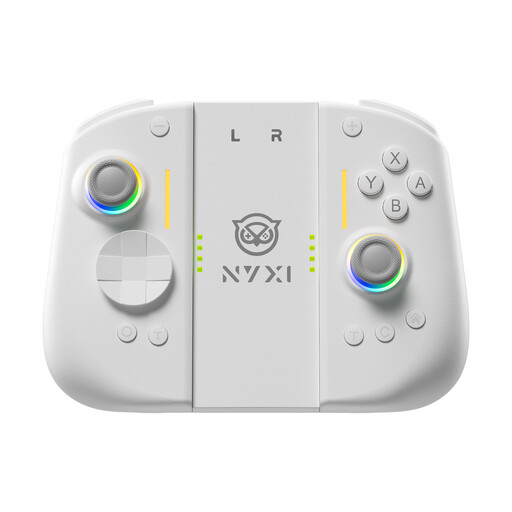
NYXI Hyperion 3 Wireless Controller for Switch 2, White
For wireless gaming on Switch 2 if you want to use motion controls and the specific game supports them.
The product title lists a 9-axis gyroscope, Hall effect joysticks, mechanical buttons, two rear buttons and adjustable vibration.
View at Joybuy
 No product image available
BIGBIG WON Rainbow 2 Pro Wired Controller
For wired gaming if the platforms listed in the product title are compatible with your game and you want RGB lighting.
The title lists a 6-axis gyroscope and names PC, Nintendo Switch Lite and PS4 as compatible platforms.
View at Joybuy
 No product image available
Nintendo Switch Joy-Con pair, Neon Blue/Neon Yellow
For Switch games where you want to use Joy-Con and your preferred control method; check the requirements of the specific game.
The pair is listed in Neon Blue and Neon Yellow. The Joy-Con grip mentioned in the description is sold separately.
View at Joybuy
 No product image available
BEITONG KP70 Elite Wireless Gaming Controller
For wireless gaming if the platforms listed in the product title are compatible with your game.
The title lists PC, Nintendo Switch, Switch 2, Steam and Android, as well as haptic triggers, adjustable joystick resistance and six programmable buttons.
View at Joybuy
Frequently asked questions
Do I need a specific controller for tilt controls in Mario Kart World?
Yes. According to Nintendo, you need a controller with motion controls for this control method. Nintendo recommends using a Joy-Con 2 in a Joy-Con 2 steering wheel; this extra requirement doesn’t apply to button controls.
Can I keep using an older Switch Pro Controller with Switch 2?
According to Nintendo, the older Switch Pro Controller can be used wirelessly with Switch 2. It’s not the same model as the Switch 2 Pro Controller, which Nintendo says is designed exclusively for Switch 2.
Do the buttons light up automatically on an RGB controller?
No. RGB zones or lighting on the casing don’t mean the buttons light up too. Check the description for the exact model to see which areas are actually illuminated.
What should I bear in mind with a wired controller?
Check that the cable reaches your seat, and keep it out of walkways. PowerA specifies a 3 m USB-C cable for the wired Advantage with Lumectra for Switch 2; according to the manufacturer, this model only works when the console is docked.
What are my rights in Germany if a controller is faulty?
Your statutory rights against the seller are separate from any voluntary manufacturer’s guarantee. If a product is faulty, the first step may be to ask for it to be repaired or replaced. The Verbraucherzentrale last explained the current position on 28 September 2026.


